
Creative gallery WordPress Theme


Edit Template Offline
2. Create new page and search for id 13011
Edit Template Online
Create Awesome Websites


Free Nicepage Builder
Keywords
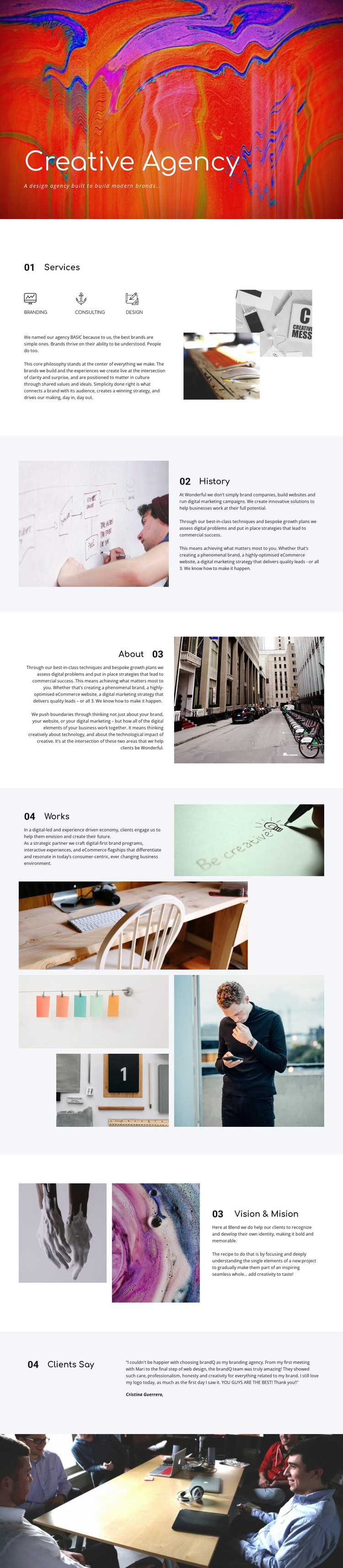
Service Pages and Portfolio Content Within One Visual System
The Services section divides the agency offer into Branding, consulting, and design, giving a WordPress project clear page-oriented content areas to develop further. History and About then provide complementary background and approach information, with alternating image-and-text layouts that can distinguish explanatory content from service material while keeping the same visual direction. These areas are more useful as a content foundation than as isolated decorative blocks.
The Works section offers a different type of content relationship. Its six-image asymmetrical collage presents selected creative output visually, making it a natural center for portfolio or project-focused material. The Vision & Mision section adds a statement of direction through two images and a text panel, while Clients Say contributes a compact quotation and attribution that can sit alongside the more permanent agency information. The hero and final full-width photograph act as shared visual framing for these content areas.
The template analysis does not verify WordPress Posts, blog categories, or other existing CMS structures, so those should not be treated as components already present in the design. Instead, the page can be interpreted as a theme-ready arrangement for permanent agency content, with room for additional publishable material if the project requires it. The Nicepage WordPress Plugin is an optional bridge for continuing to edit supported page content in WordPress, while the template’s actual value comes from its service, portfolio, background, and testimonial relationships.
Customize with Nicepage
Open this ready-made template in the WordPress Website Builder and customize it visually in the Nicepage editor. Replace demo content, edit page sections, and adapt the design to your project without rebuilding the template from scratch.
Manage and Edit This Theme in WordPress
Customize and Install the WordPress Theme
Start with this ready-made theme instead of building the WordPress design from scratch. Customize its layout, content, typography, images, sections, and other design elements visually in Nicepage editor, then export and install the WordPress Theme, Plugin, and Pages on your WordPress site. The Nicepage WordPress Plugin lets you continue working with the site after installation.
Edit the Theme Directly in WordPress
After installation, you can edit the WordPress Theme directly in WordPress with the Nicepage WordPress Plugin. Use Site Style to customize site Colors, Fonts, Header, Footer, Blog, and Post Page Templates while working within your WordPress website.
Edit WordPress Pages Visually
Use the Nicepage WordPress Plugin to edit page content directly from the WordPress admin area. Open a WordPress Page with Nicepage and visually change its text, images, sections, and other page elements while continuing to manage the Page through WordPress.
WordPress Content and Theme Integration
Use the customized theme with WordPress Pages, Posts, Blog and Post Templates, menus, widgets, and other CMS-managed content. Shared theme elements such as Colors, Fonts, Header, Footer, Blog, and Post Page Templates can be managed as part of the overall site design, while WordPress provides the CMS environment for managing site content.
This workflow combines a ready-made WordPress Theme with visual customization, direct theme editing in WordPress, and continued content management through the Nicepage WordPress Plugin.





















