About modeling agency WordPress Theme


The Portrait and Paragraph Create Stable WordPress Page Content
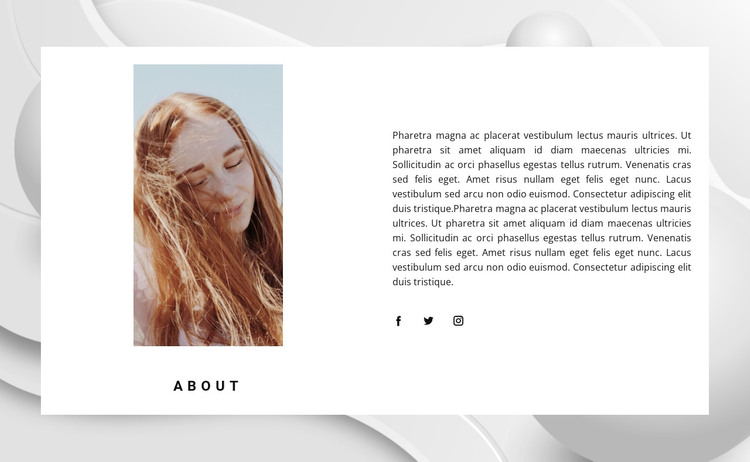
The left-hand portrait gives the section an immediate personal reference, while the ABOUT label identifies the role of the content without adding a second competing heading. Across the split layout, the right column carries the longer supporting paragraph and keeps Facebook, Twitter, and Instagram icons close to the profile information. This relationship makes the block suitable for stable page content: an introduction that explains who or what is being presented and offers related social destinations.
The white content panel provides a controlled reading area over the pale abstract background image. Dark text, compact uppercase typography, and generous white space balance the portrait-oriented image with the denser paragraph column. Because the interaction is static, the section communicates through its image, text hierarchy, and social-link placement rather than through a carousel, expandable panel, or other changing component.
Within a WordPress-managed page, this block can function as a reusable about or profile region while other content remains responsible for navigation, articles, services, or contact information. The placeholder paragraph can be replaced with approved page copy, and the portrait and social destinations can be updated without changing the two-column relationship. Its role is therefore focused and publishable: one visually defined content area that supports the wider page rather than a complete theme or site structure.
Customize with Nicepage
Open this ready-made template in the WordPress Website Builder and customize it visually in the Nicepage editor. Replace demo content, edit page sections, and adapt the design to your project without rebuilding the template from scratch.
Edit Template Offline
2. Create a new page or select existing
3. Click Add new block, search for id 518382 and click enter
Edit Template Online
Create Awesome Websites


Free Nicepage Builder
Keywords
Manage and Edit This Theme in WordPress
Customize and Install the WordPress Theme
Start with this ready-made theme instead of building the WordPress design from scratch. Customize its layout, content, typography, images, sections, and other design elements visually in Nicepage editor, then export and install the WordPress Theme, Plugin, and Pages on your WordPress site. The Nicepage WordPress Plugin lets you continue working with the site after installation.
Edit the Theme Directly in WordPress
After installation, you can edit the WordPress Theme directly in WordPress with the Nicepage WordPress Plugin. Use Site Style to customize site Colors, Fonts, Header, Footer, Blog, and Post Page Templates while working within your WordPress website.
Edit WordPress Pages Visually
Use the Nicepage WordPress Plugin to edit page content directly from the WordPress admin area. Open a WordPress Page with Nicepage and visually change its text, images, sections, and other page elements while continuing to manage the Page through WordPress.
WordPress Content and Theme Integration
Use the customized theme with WordPress Pages, Posts, Blog and Post Templates, menus, widgets, and other CMS-managed content. Shared theme elements such as Colors, Fonts, Header, Footer, Blog, and Post Page Templates can be managed as part of the overall site design, while WordPress provides the CMS environment for managing site content.
This workflow combines a ready-made WordPress Theme with visual customization, direct theme editing in WordPress, and continued content management through the Nicepage WordPress Plugin.