
Web design studio of art WordPress Theme


Edit Template Offline
2. Create new page and search for id 72065
Edit Template Online
Create Awesome Websites


Free Nicepage Builder
Keywords
About and Branding Content Give WordPress Pages a Clear Role
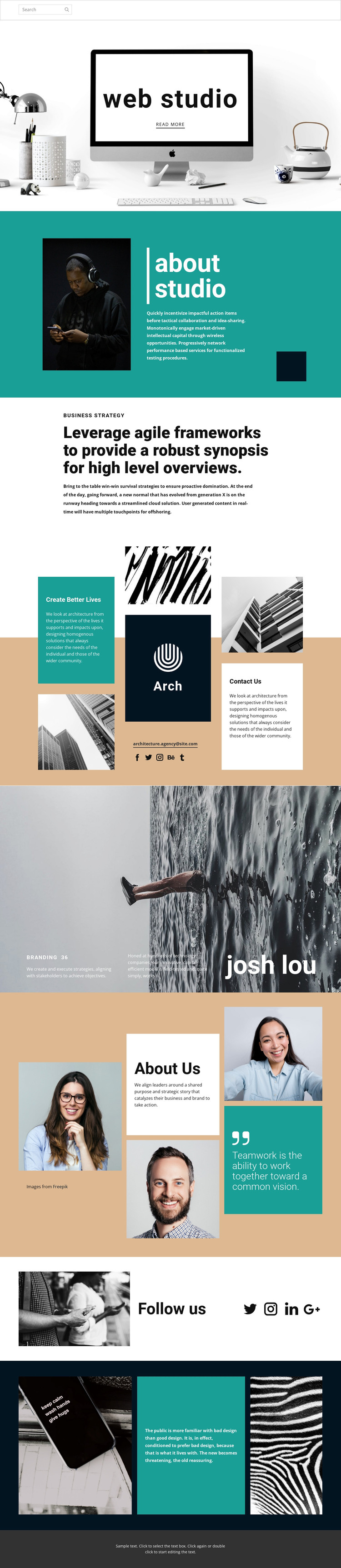
The page separates several kinds of permanent studio information that can work naturally as page-oriented content. The web studio hero introduces the organization, while the about studio block gives visitors background through an image and descriptive copy. The business strategy section offers a focused place for positioning, and the Branding panel adds a second service or capability perspective. These areas are different in purpose even though they share the same editorial visual language.
The About Us composition extends the page with portraits, studio explanation, and a teamwork statement, making people and working principles part of the content structure rather than decorative imagery alone. The architecture mosaic connects visual material with Contact Us information, an email address, and social links, while the Follow us section concentrates the broader social presence. In a WordPress-oriented project, these permanent page areas could coexist with additional regularly updated content if the site later requires it, but no blog or post structure is claimed here. The central benefit is a theme-ready visual system for organizing studio pages without losing the established image and typography relationships.
Customize with Nicepage
Open this ready-made template in the WordPress Website Builder and customize it visually in the Nicepage editor. Replace demo content, edit page sections, and adapt the design to your project without rebuilding the template from scratch.
Manage and Edit This Theme in WordPress
Customize and Install the WordPress Theme
Start with this ready-made theme instead of building the WordPress design from scratch. Customize its layout, content, typography, images, sections, and other design elements visually in Nicepage editor, then export and install the WordPress Theme, Plugin, and Pages on your WordPress site. The Nicepage WordPress Plugin lets you continue working with the site after installation.
Edit the Theme Directly in WordPress
After installation, you can edit the WordPress Theme directly in WordPress with the Nicepage WordPress Plugin. Use Site Style to customize site Colors, Fonts, Header, Footer, Blog, and Post Page Templates while working within your WordPress website.
Edit WordPress Pages Visually
Use the Nicepage WordPress Plugin to edit page content directly from the WordPress admin area. Open a WordPress Page with Nicepage and visually change its text, images, sections, and other page elements while continuing to manage the Page through WordPress.
WordPress Content and Theme Integration
Use the customized theme with WordPress Pages, Posts, Blog and Post Templates, menus, widgets, and other CMS-managed content. Shared theme elements such as Colors, Fonts, Header, Footer, Blog, and Post Page Templates can be managed as part of the overall site design, while WordPress provides the CMS environment for managing site content.
This workflow combines a ready-made WordPress Theme with visual customization, direct theme editing in WordPress, and continued content management through the Nicepage WordPress Plugin.





















