
Black and white colors of art WordPress Theme
Edit Template Offline
2. Create new page and search for id 79786
Edit Template Online
Create Awesome Websites


Free Nicepage Builder
Keywords
Project galleries and page content share one visual system
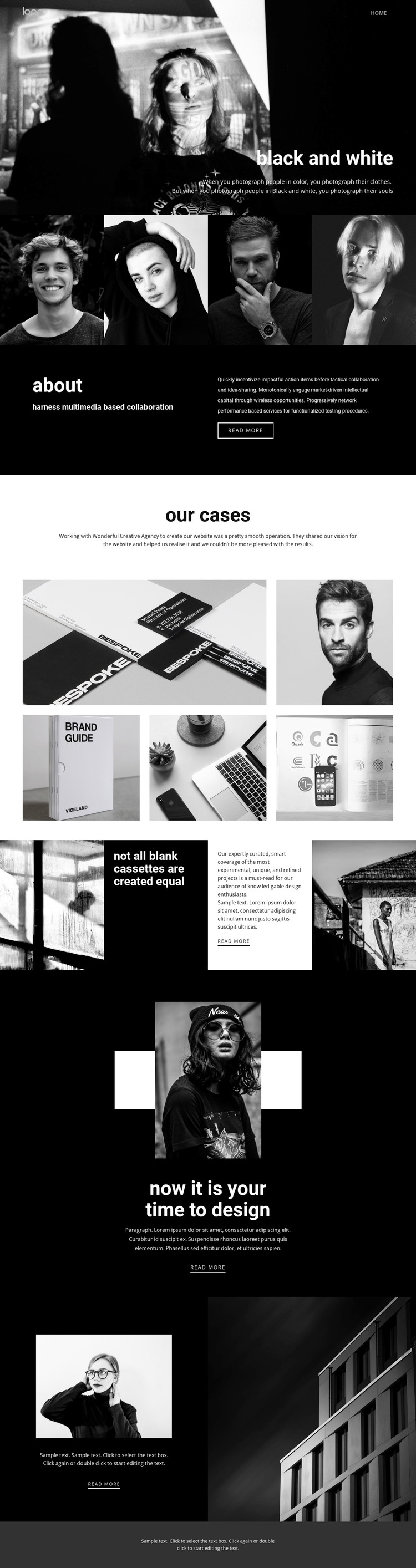
The four-image gallery and the five-image “our cases” display create two different kinds of page-oriented content. The first works as a concise overview of photographic work, while the second presents project imagery after a dedicated introduction, giving it a stronger case-study role. Together with the “about” section, these areas provide clear permanent content categories that can remain visually coordinated in a WordPress-managed site.
The page also contains repeated relationships that are useful when interpreting a theme: navigation frames the experience, dark and light sections separate content groups, and split layouts place explanatory text beside photography. The “read more” actions can point toward deeper project or information content, but the analysis does not verify WordPress Posts, blog structures, or categories as existing template elements. Those should therefore remain possible future content interpretations rather than factual claims about the current page. A WordPress-oriented project could preserve the hero, gallery, about, cases, editorial statement, and closing image language while expanding the content around it. The result is a theme direction centered on publishable page content and recurring visual sections, not merely a CMS name attached to a static design.
Customize with Nicepage
Open this ready-made template in the WordPress Website Builder and customize it visually in the Nicepage editor. Replace demo content, edit page sections, and adapt the design to your project without rebuilding the template from scratch.
Manage and Edit This Theme in WordPress
Customize and Install the WordPress Theme
Start with this ready-made theme instead of building the WordPress design from scratch. Customize its layout, content, typography, images, sections, and other design elements visually in Nicepage editor, then export and install the WordPress Theme, Plugin, and Pages on your WordPress site. The Nicepage WordPress Plugin lets you continue working with the site after installation.
Edit the Theme Directly in WordPress
After installation, you can edit the WordPress Theme directly in WordPress with the Nicepage WordPress Plugin. Use Site Style to customize site Colors, Fonts, Header, Footer, Blog, and Post Page Templates while working within your WordPress website.
Edit WordPress Pages Visually
Use the Nicepage WordPress Plugin to edit page content directly from the WordPress admin area. Open a WordPress Page with Nicepage and visually change its text, images, sections, and other page elements while continuing to manage the Page through WordPress.
WordPress Content and Theme Integration
Use the customized theme with WordPress Pages, Posts, Blog and Post Templates, menus, widgets, and other CMS-managed content. Shared theme elements such as Colors, Fonts, Header, Footer, Blog, and Post Page Templates can be managed as part of the overall site design, while WordPress provides the CMS environment for managing site content.
This workflow combines a ready-made WordPress Theme with visual customization, direct theme editing in WordPress, and continued content management through the Nicepage WordPress Plugin.





















