Predictive Analytics WordPress Theme
Edit Template Offline
2. Create new page and search for id 6381644
Edit Template Online
Create Awesome Websites


Free Nicepage Builder
Keywords
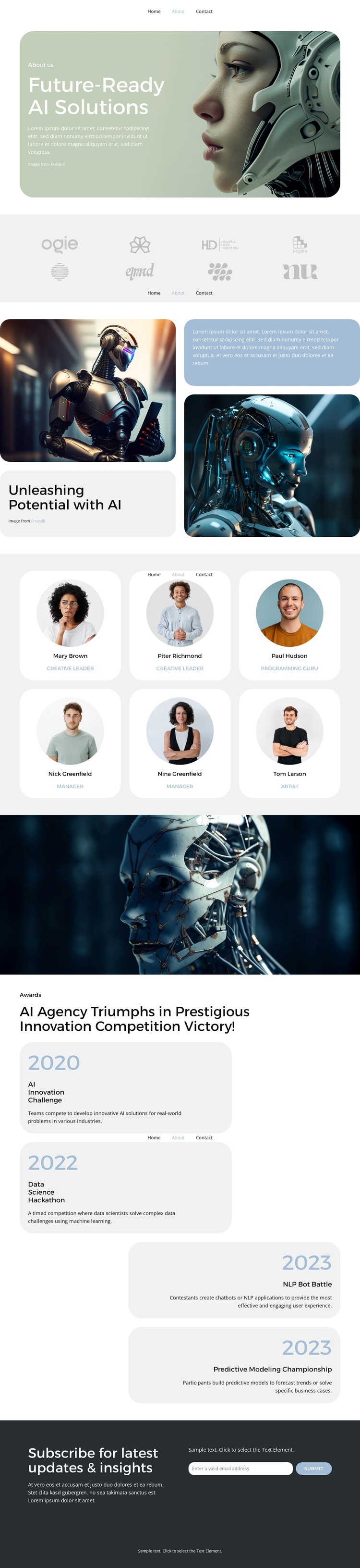
Six profile cards connect AI company content with a clear WordPress page structure
The six repeated profile cards give the About page a defined people-focused content area rather than treating the organization as an abstract technology brand. Each card combines a portrait with a name and role, creating a consistent pattern for presenting team information on a WordPress-managed page. The surrounding sections add different kinds of permanent content: the rounded hero introduces “Future-Ready AI Solutions,” the split capability area pairs two AI images with explanatory panels, and the subdued logo row provides a compact partner or client display.
The four award entries create a separate recognition area with year labels, names, and descriptions. Keeping these entries in rounded cards makes achievement-related information easier to distinguish from team content while preserving the same visual direction. In a WordPress project, this arrangement can serve as the main About page while the navigation provides a visible route to related Home, FAQ, and Contact content. The design does not require those destinations to be treated as existing WordPress structures; it simply gives them a clear place within the site’s presentation.
The email subscription form closes the information sequence with an update-oriented interaction, following the introduction, organizational context, people, and recognition. That relationship suits a WordPress theme interpretation because fixed company information can remain visually coordinated with content that may be revised over time. The dark footer then supplies a shared-looking endpoint for the page and reinforces the compact, organized character of the design.
Customize with Nicepage
Open this ready-made template in the WordPress Website Builder and customize it visually in the Nicepage editor. Replace demo content, edit page sections, and adapt the design to your project without rebuilding the template from scratch.
Manage and Edit This Theme in WordPress
Customize and Install the WordPress Theme
Start with this ready-made theme instead of building the WordPress design from scratch. Customize its layout, content, typography, images, sections, and other design elements visually in Nicepage editor, then export and install the WordPress Theme, Plugin, and Pages on your WordPress site. The Nicepage WordPress Plugin lets you continue working with the site after installation.
Edit the Theme Directly in WordPress
After installation, you can edit the WordPress Theme directly in WordPress with the Nicepage WordPress Plugin. Use Site Style to customize site Colors, Fonts, Header, Footer, Blog, and Post Page Templates while working within your WordPress website.
Edit WordPress Pages Visually
Use the Nicepage WordPress Plugin to edit page content directly from the WordPress admin area. Open a WordPress Page with Nicepage and visually change its text, images, sections, and other page elements while continuing to manage the Page through WordPress.
WordPress Content and Theme Integration
Use the customized theme with WordPress Pages, Posts, Blog and Post Templates, menus, widgets, and other CMS-managed content. Shared theme elements such as Colors, Fonts, Header, Footer, Blog, and Post Page Templates can be managed as part of the overall site design, while WordPress provides the CMS environment for managing site content.
This workflow combines a ready-made WordPress Theme with visual customization, direct theme editing in WordPress, and continued content management through the Nicepage WordPress Plugin.