
Exceptional web art WordPress Theme


Edit Template Offline
2. Create new page and search for id 14344
Edit Template Online
Create Awesome Websites


Free Nicepage Builder
Keywords
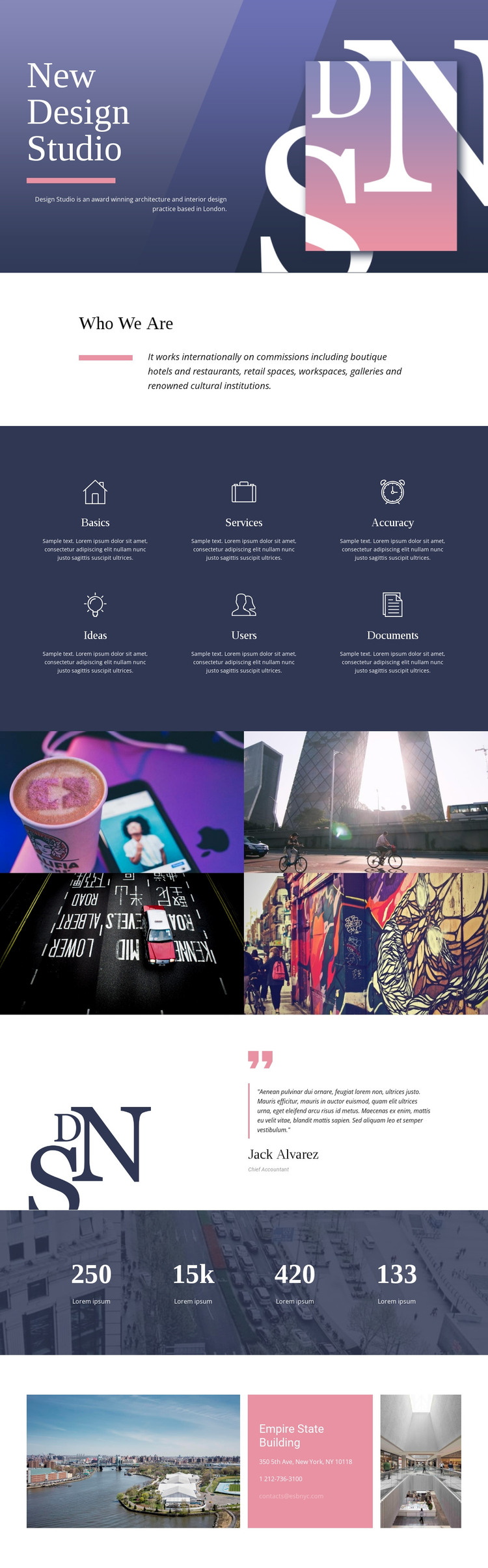
Capability Cards and Portfolio Content Give the Theme Clear Page Areas
The six labeled capability items create the clearest content structure for a WordPress-oriented version of this design. Basics, Services, Accuracy, Ideas, Users, and Documents are presented as repeated feature units, so they can be treated as a coordinated group of studio information rather than as unrelated decorative labels. The “Who We Are” section adds a separate page-oriented explanation of the practice before visitors reach the visual work.
The four-image portfolio gallery provides a second major content area. Its equal panels make project imagery easy to replace or reorganize while preserving the visual relationship established by the design. The testimonial section adds a different type of content: a quotation connected to an attributed role and decorative image. This can sit alongside the studio profile and portfolio material as a human reference point, without treating the supplied sample person or wording as a verified business statement.
Four counters form a dedicated metrics region, but the displayed demo values should remain structural examples until the studio supplies confirmed information. The final contact section gives the design a practical page endpoint through phone and email channels, with a central card framed by architectural images. Together, these areas provide a useful WordPress theme content model: permanent studio information, repeated capability content, visual portfolio material, supporting testimony, structural metrics, and direct contact details. The visual system can remain coordinated while the underlying page content is replaced and maintained for the actual practice.
Customize with Nicepage
Open this ready-made template in the WordPress Website Builder and customize it visually in the Nicepage editor. Replace demo content, edit page sections, and adapt the design to your project without rebuilding the template from scratch.
Manage and Edit This Theme in WordPress
Customize and Install the WordPress Theme
Start with this ready-made theme instead of building the WordPress design from scratch. Customize its layout, content, typography, images, sections, and other design elements visually in Nicepage editor, then export and install the WordPress Theme, Plugin, and Pages on your WordPress site. The Nicepage WordPress Plugin lets you continue working with the site after installation.
Edit the Theme Directly in WordPress
After installation, you can edit the WordPress Theme directly in WordPress with the Nicepage WordPress Plugin. Use Site Style to customize site Colors, Fonts, Header, Footer, Blog, and Post Page Templates while working within your WordPress website.
Edit WordPress Pages Visually
Use the Nicepage WordPress Plugin to edit page content directly from the WordPress admin area. Open a WordPress Page with Nicepage and visually change its text, images, sections, and other page elements while continuing to manage the Page through WordPress.
WordPress Content and Theme Integration
Use the customized theme with WordPress Pages, Posts, Blog and Post Templates, menus, widgets, and other CMS-managed content. Shared theme elements such as Colors, Fonts, Header, Footer, Blog, and Post Page Templates can be managed as part of the overall site design, while WordPress provides the CMS environment for managing site content.
This workflow combines a ready-made WordPress Theme with visual customization, direct theme editing in WordPress, and continued content management through the Nicepage WordPress Plugin.





















