All about collaboration WordPress Theme


Edit Template Offline
2. Create new page and search for id 4794291
Edit Template Online
Create Awesome Websites


Free Nicepage Builder
Keywords
Company Pages, Repeated Plan Content, and Contact Details
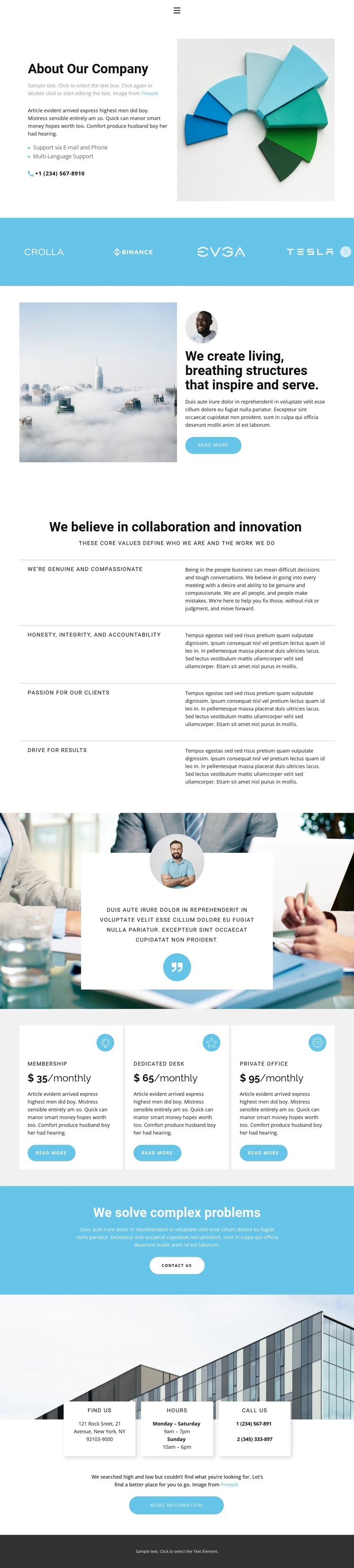
The page-oriented content is well suited to a company profile environment because its sections have distinct editorial roles. The opening two-column block can serve as permanent About content, combining company introduction text, an image, email and phone support, and multi-language support. The navigation links to Home, About, Team, and Contact also provide a clear site context, although the analysis verifies the links rather than a complete set of separate page designs.
The middle sections offer several kinds of content that can remain connected through one visual direction. The four value statements give the company profile durable principles to maintain, while the repeated brand-logo band and the testimonial-style quote provide places for associated identity and supporting evidence. The three workspace plan cards introduce a separate, repeatable content group: Membership, Dedicated Desk, and Private Office can be interpreted as organized offering information rather than as generic decorative cards. Sample prices and quotations should be replaced with confirmed project content.
The final CTA band and contact cards complete the page-oriented structure with an explicit Contact us action followed by address, opening hours, and phone information. In a WordPress theme context, these areas can support permanent company pages and recurring content as the site develops, without claiming that blog posts, categories, or other WordPress-specific elements already exist. The design’s value lies in its clear division between profile content, values, options, and practical contact information.
Customize with Nicepage
Open this ready-made template in the WordPress Website Builder and customize it visually in the Nicepage editor. Replace demo content, edit page sections, and adapt the design to your project without rebuilding the template from scratch.
Manage and Edit This Theme in WordPress
Customize and Install the WordPress Theme
Start with this ready-made theme instead of building the WordPress design from scratch. Customize its layout, content, typography, images, sections, and other design elements visually in Nicepage editor, then export and install the WordPress Theme, Plugin, and Pages on your WordPress site. The Nicepage WordPress Plugin lets you continue working with the site after installation.
Edit the Theme Directly in WordPress
After installation, you can edit the WordPress Theme directly in WordPress with the Nicepage WordPress Plugin. Use Site Style to customize site Colors, Fonts, Header, Footer, Blog, and Post Page Templates while working within your WordPress website.
Edit WordPress Pages Visually
Use the Nicepage WordPress Plugin to edit page content directly from the WordPress admin area. Open a WordPress Page with Nicepage and visually change its text, images, sections, and other page elements while continuing to manage the Page through WordPress.
WordPress Content and Theme Integration
Use the customized theme with WordPress Pages, Posts, Blog and Post Templates, menus, widgets, and other CMS-managed content. Shared theme elements such as Colors, Fonts, Header, Footer, Blog, and Post Page Templates can be managed as part of the overall site design, while WordPress provides the CMS environment for managing site content.
This workflow combines a ready-made WordPress Theme with visual customization, direct theme editing in WordPress, and continued content management through the Nicepage WordPress Plugin.