
Business Coaching WordPress Theme


Edit Template Offline
2. Create new page and search for id 19679
Edit Template Online
Create Awesome Websites


Free Nicepage Builder
Keywords
Service Cards and Coach Profiles Create Clear WordPress Page Content
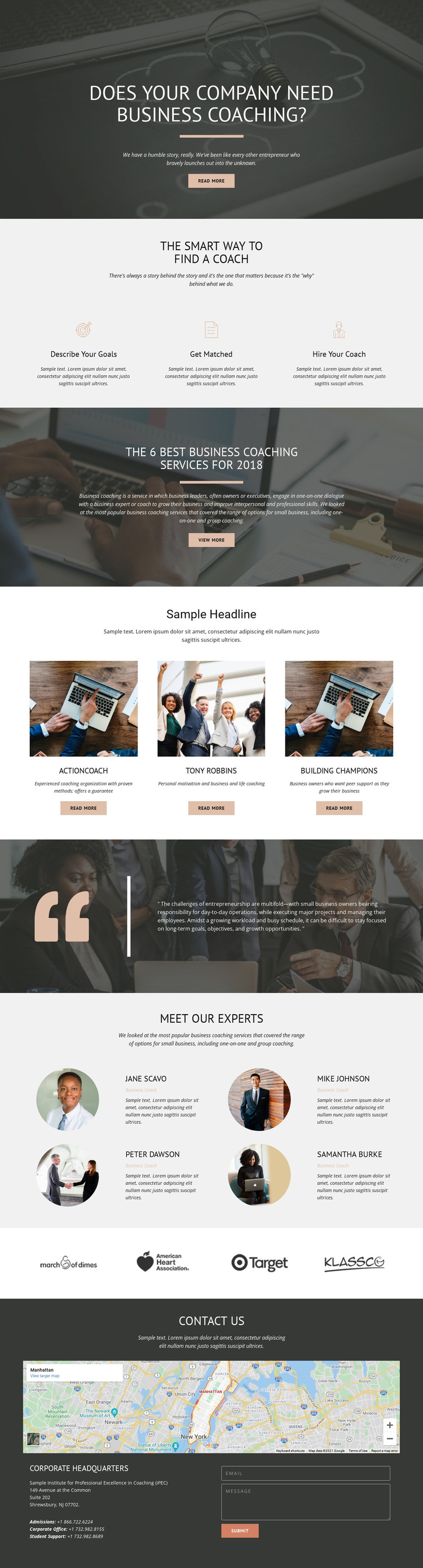
The three process items give the design a clear page-oriented introduction to business coaching: visitors first consider their goals, then the matching process, and finally the act of hiring a coach. That sequence can anchor permanent WordPress page content before the service overview and its three image-led cards present named coaching organizations as examples within the design. The cards provide repeated content units that can be revised while preserving the same visual relationship between image, description, and action button.
The four coach profiles add a separate people-focused content area, with portraits, names, and business-coach labels arranged as a recurring set. This makes the design suitable for a WordPress-managed page where expert information can remain distinct from the service comparison section. The four organization logos provide another compact supporting region, while the quotation creates an editorial pause between service material and profiles. At the end, the map, headquarters information, phone details, and inquiry form group practical contact content into one clear destination. The supplied names, address, phone numbers, organization references, and dated wording are demo or structural content and should be replaced with verified project information. A WordPress Theme adaptation can therefore preserve the page's content relationships while allowing the coaching information, profiles, and contact details to be maintained as the project develops.
Customize with Nicepage
Open this ready-made template in the WordPress Website Builder and customize it visually in the Nicepage editor. Replace demo content, edit page sections, and adapt the design to your project without rebuilding the template from scratch.
Manage and Edit This Theme in WordPress
Customize and Install the WordPress Theme
Start with this ready-made theme instead of building the WordPress design from scratch. Customize its layout, content, typography, images, sections, and other design elements visually in Nicepage editor, then export and install the WordPress Theme, Plugin, and Pages on your WordPress site. The Nicepage WordPress Plugin lets you continue working with the site after installation.
Edit the Theme Directly in WordPress
After installation, you can edit the WordPress Theme directly in WordPress with the Nicepage WordPress Plugin. Use Site Style to customize site Colors, Fonts, Header, Footer, Blog, and Post Page Templates while working within your WordPress website.
Edit WordPress Pages Visually
Use the Nicepage WordPress Plugin to edit page content directly from the WordPress admin area. Open a WordPress Page with Nicepage and visually change its text, images, sections, and other page elements while continuing to manage the Page through WordPress.
WordPress Content and Theme Integration
Use the customized theme with WordPress Pages, Posts, Blog and Post Templates, menus, widgets, and other CMS-managed content. Shared theme elements such as Colors, Fonts, Header, Footer, Blog, and Post Page Templates can be managed as part of the overall site design, while WordPress provides the CMS environment for managing site content.
This workflow combines a ready-made WordPress Theme with visual customization, direct theme editing in WordPress, and continued content management through the Nicepage WordPress Plugin.





















