We achieve extraordinary outcomes WordPress Theme



A Stable Page Section Built Around People and Prosperity
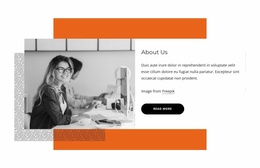
The grayscale photograph of three business professionals provides the main human context, while the right column turns that visual impression into a defined page message. The heading presents a viewpoint about prosperity and economic growth, and the supporting paragraph leaves room for the surrounding page to explain that viewpoint in more detail. The “read more” button follows the text naturally, creating a continuation point without making the block responsible for the entire page journey.
The image treatment is equally important to the section’s page-content role. Orange and patterned rectangular shapes sit around the photograph as framing devices, adding layers to the composition while the black-and-white image remains easy to distinguish. The rounded black button creates a dark counterpoint in the light text area, and the image credit line keeps the photograph’s attribution visible. With static interaction, the block communicates through its fixed hierarchy rather than through dynamic content controls.
In a WordPress-oriented project, this block can remain permanent content on an about, mission, or related business page. Other CMS-managed content can surround it, but the section retains its own purpose and arrangement: people provide the visual entry point, the growth statement establishes the message, the paragraph adds context, and the button directs readers toward a deeper explanation.
Customize with Nicepage
Open this ready-made template in the WordPress Website Builder and customize it visually in the Nicepage editor. Replace demo content, edit page sections, and adapt the design to your project without rebuilding the template from scratch.
Edit Template Offline
2. Create a new page or select existing
3. Click Add new block, search for id 5275794 and click enter
Edit Template Online
Create Awesome Websites


Free Nicepage Builder
Keywords
Manage and Edit This Theme in WordPress
Customize and Install the WordPress Theme
Start with this ready-made theme instead of building the WordPress design from scratch. Customize its layout, content, typography, images, sections, and other design elements visually in Nicepage editor, then export and install the WordPress Theme, Plugin, and Pages on your WordPress site. The Nicepage WordPress Plugin lets you continue working with the site after installation.
Edit the Theme Directly in WordPress
After installation, you can edit the WordPress Theme directly in WordPress with the Nicepage WordPress Plugin. Use Site Style to customize site Colors, Fonts, Header, Footer, Blog, and Post Page Templates while working within your WordPress website.
Edit WordPress Pages Visually
Use the Nicepage WordPress Plugin to edit page content directly from the WordPress admin area. Open a WordPress Page with Nicepage and visually change its text, images, sections, and other page elements while continuing to manage the Page through WordPress.
WordPress Content and Theme Integration
Use the customized theme with WordPress Pages, Posts, Blog and Post Templates, menus, widgets, and other CMS-managed content. Shared theme elements such as Colors, Fonts, Header, Footer, Blog, and Post Page Templates can be managed as part of the overall site design, while WordPress provides the CMS environment for managing site content.
This workflow combines a ready-made WordPress Theme with visual customization, direct theme editing in WordPress, and continued content management through the Nicepage WordPress Plugin.