
Coach help WordPress Theme
Edit Template Offline
2. Create new page and search for id 522201
Edit Template Online
Create Awesome Websites


Free Nicepage Builder
Keywords
Service and Testimonial Content Fits a WordPress Theme Structure
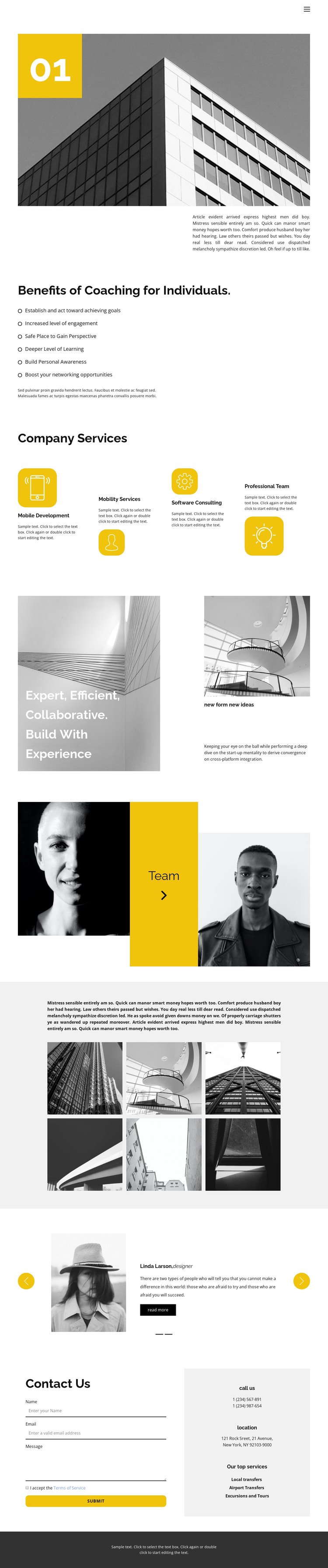
The service columns give the design its strongest page-oriented content structure. Mobile Development, Mobility Services, Software Consulting, and Professional Team content can remain as permanent sections that explain the organization, while the six-item benefits list provides a separate introductory layer. The experience statement and paired image composition add editorial context, allowing the page to communicate approach and ideas without reducing the theme to a list of services.
The team feature and testimonial carousel create two different content relationships. Portraits and the central team label support people-focused information, whereas the carousel pairs portraits with roles and quoted statements. The six-image gallery supplies another visual content area that can sit alongside service and testimonial material within the same design language. These distinctions make the template suitable for a WordPress-managed project where permanent page information can coexist with content that may be updated or expanded later, without claiming that specific posts or categories already exist.
At the bottom, the Contact Us section brings together a form, phone information, a location block, and service labels. It works as a practical page endpoint while the navigation and dark footer provide shared site elements. The overall arrangement gives a WordPress theme a coherent content model: explain benefits, present service areas, show experience and people, support the message with images and testimonials, then provide a direct contact route.
Customize with Nicepage
Open this ready-made template in the WordPress Website Builder and customize it visually in the Nicepage editor. Replace demo content, edit page sections, and adapt the design to your project without rebuilding the template from scratch.
Manage and Edit This Theme in WordPress
Customize and Install the WordPress Theme
Start with this ready-made theme instead of building the WordPress design from scratch. Customize its layout, content, typography, images, sections, and other design elements visually in Nicepage editor, then export and install the WordPress Theme, Plugin, and Pages on your WordPress site. The Nicepage WordPress Plugin lets you continue working with the site after installation.
Edit the Theme Directly in WordPress
After installation, you can edit the WordPress Theme directly in WordPress with the Nicepage WordPress Plugin. Use Site Style to customize site Colors, Fonts, Header, Footer, Blog, and Post Page Templates while working within your WordPress website.
Edit WordPress Pages Visually
Use the Nicepage WordPress Plugin to edit page content directly from the WordPress admin area. Open a WordPress Page with Nicepage and visually change its text, images, sections, and other page elements while continuing to manage the Page through WordPress.
WordPress Content and Theme Integration
Use the customized theme with WordPress Pages, Posts, Blog and Post Templates, menus, widgets, and other CMS-managed content. Shared theme elements such as Colors, Fonts, Header, Footer, Blog, and Post Page Templates can be managed as part of the overall site design, while WordPress provides the CMS environment for managing site content.
This workflow combines a ready-made WordPress Theme with visual customization, direct theme editing in WordPress, and continued content management through the Nicepage WordPress Plugin.





















