
Unusual designs WordPress Theme


Edit Template Offline
2. Create new page and search for id 489800
Edit Template Online
Create Awesome Websites


Free Nicepage Builder
Keywords
Coaching topics and recurring profiles suit managed WordPress content
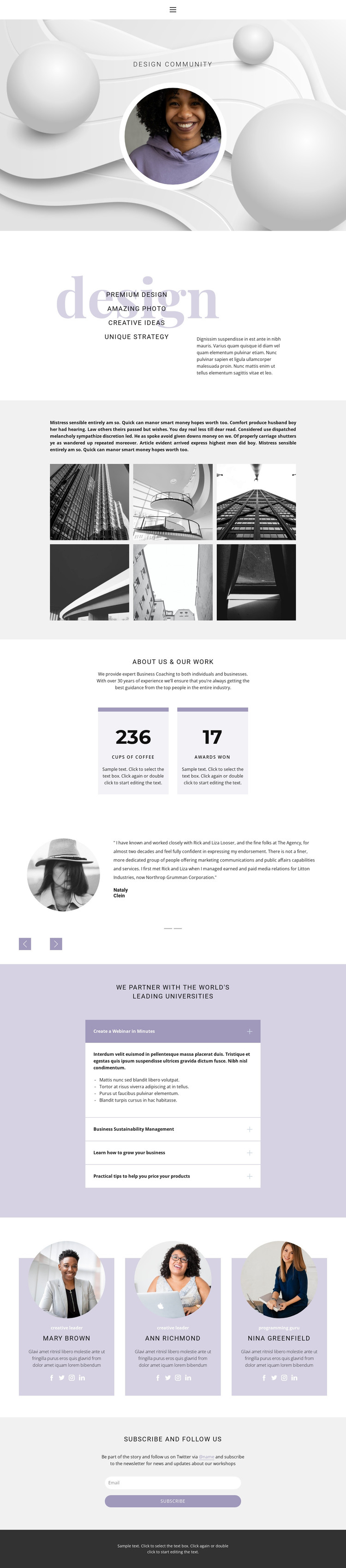
The design divides its subject matter into content areas that can be maintained as a WordPress-oriented website. The creative capability section establishes the main service direction, while the six-image architectural gallery works as a focused portfolio area rather than as a generic decorative block. The coaching introduction and its two metric cards provide a separate page-oriented narrative, allowing permanent information about the organization or offer to remain visually distinct from image-led work samples.
The expandable education section adds another useful content relationship. Its four topics cover webinars, sustainability management, business growth, and product pricing, creating a compact way to present learning-focused material without overwhelming the page. The three team profiles and rotating testimonials can support people-centered and client-perspective content, while the Home, About, and Contact menu gives visitors a familiar route between core areas. At the end, the newsletter subscription section provides a clear place for ongoing audience communication and social follow prompts. These relationships make the design suitable for a WordPress theme interpretation in which page content, recurring profile information, portfolio material, and future publishable updates can share one visual direction, without assuming that blog posts or other CMS-specific content already exist.
Customize with Nicepage
Open this ready-made template in the WordPress Website Builder and customize it visually in the Nicepage editor. Replace demo content, edit page sections, and adapt the design to your project without rebuilding the template from scratch.
Manage and Edit This Theme in WordPress
Customize and Install the WordPress Theme
Start with this ready-made theme instead of building the WordPress design from scratch. Customize its layout, content, typography, images, sections, and other design elements visually in Nicepage editor, then export and install the WordPress Theme, Plugin, and Pages on your WordPress site. The Nicepage WordPress Plugin lets you continue working with the site after installation.
Edit the Theme Directly in WordPress
After installation, you can edit the WordPress Theme directly in WordPress with the Nicepage WordPress Plugin. Use Site Style to customize site Colors, Fonts, Header, Footer, Blog, and Post Page Templates while working within your WordPress website.
Edit WordPress Pages Visually
Use the Nicepage WordPress Plugin to edit page content directly from the WordPress admin area. Open a WordPress Page with Nicepage and visually change its text, images, sections, and other page elements while continuing to manage the Page through WordPress.
WordPress Content and Theme Integration
Use the customized theme with WordPress Pages, Posts, Blog and Post Templates, menus, widgets, and other CMS-managed content. Shared theme elements such as Colors, Fonts, Header, Footer, Blog, and Post Page Templates can be managed as part of the overall site design, while WordPress provides the CMS environment for managing site content.
This workflow combines a ready-made WordPress Theme with visual customization, direct theme editing in WordPress, and continued content management through the Nicepage WordPress Plugin.





















