From luxury hospitality to lifestyle brands WordPress Theme


A Stable Portfolio Section for WordPress-Managed Page Content
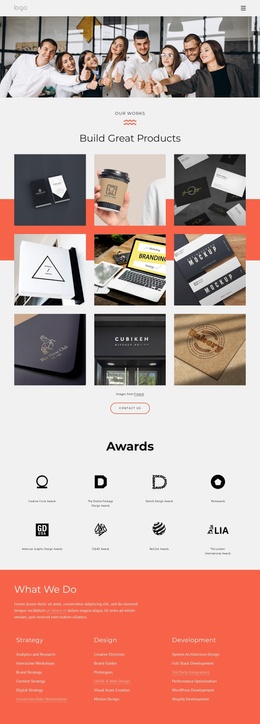
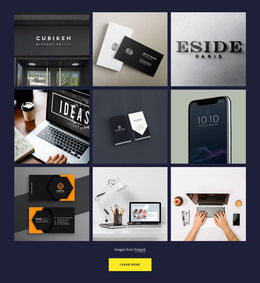
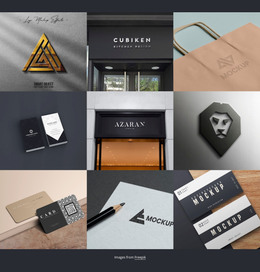
The “our works” label and “Build Great Products” heading make the block suitable for a stable portfolio or selected-works area within a WordPress-managed page. Nine square images form a three-column gallery covering branding, packaging, business cards, signage, and product-presentation mockups. This repeated visual content reads as a permanent showcase section rather than a time-sensitive article, while the lightbox interaction lets visitors inspect individual examples without leaving the gallery context.
The block’s content is organized around one visual collection: the coral horizontal band behind the middle rows, consistent image spacing, and square crops keep the nine examples connected as one presentation. The “Images from Freepik” note provides supporting attribution below the gallery, and the rounded outlined “Contact Us” button gives the section a clear inquiry direction. Together, these elements can remain a visually consistent page area while the surrounding WordPress project manages other content around it.
The CMS context changes how the section participates in a larger site, not what the block contains. Here, the useful role is publishable portfolio content with a defined visual pattern and a related contact action. Other WordPress-managed pages or content areas can handle broader site information, while this block retains its gallery-specific purpose.
Customize with Nicepage
Open this ready-made template in the WordPress Website Builder and customize it visually in the Nicepage editor. Replace demo content, edit page sections, and adapt the design to your project without rebuilding the template from scratch.
Edit Template Offline
2. Create a new page or select existing
3. Click Add new block, search for id 4271331 and click enter
Edit Template Online
Create Awesome Websites


Free Nicepage Builder
Keywords
Manage and Edit This Theme in WordPress
Customize and Install the WordPress Theme
Start with this ready-made theme instead of building the WordPress design from scratch. Customize its layout, content, typography, images, sections, and other design elements visually in Nicepage editor, then export and install the WordPress Theme, Plugin, and Pages on your WordPress site. The Nicepage WordPress Plugin lets you continue working with the site after installation.
Edit the Theme Directly in WordPress
After installation, you can edit the WordPress Theme directly in WordPress with the Nicepage WordPress Plugin. Use Site Style to customize site Colors, Fonts, Header, Footer, Blog, and Post Page Templates while working within your WordPress website.
Edit WordPress Pages Visually
Use the Nicepage WordPress Plugin to edit page content directly from the WordPress admin area. Open a WordPress Page with Nicepage and visually change its text, images, sections, and other page elements while continuing to manage the Page through WordPress.
WordPress Content and Theme Integration
Use the customized theme with WordPress Pages, Posts, Blog and Post Templates, menus, widgets, and other CMS-managed content. Shared theme elements such as Colors, Fonts, Header, Footer, Blog, and Post Page Templates can be managed as part of the overall site design, while WordPress provides the CMS environment for managing site content.
This workflow combines a ready-made WordPress Theme with visual customization, direct theme editing in WordPress, and continued content management through the Nicepage WordPress Plugin.