Design studio team WordPress Theme


Edit Template Offline
2. Create new page and search for id 4302354
Edit Template Online
Create Awesome Websites


Free Nicepage Builder
Keywords
Six Role-Based Profiles Give the Theme a Clear Content Framework
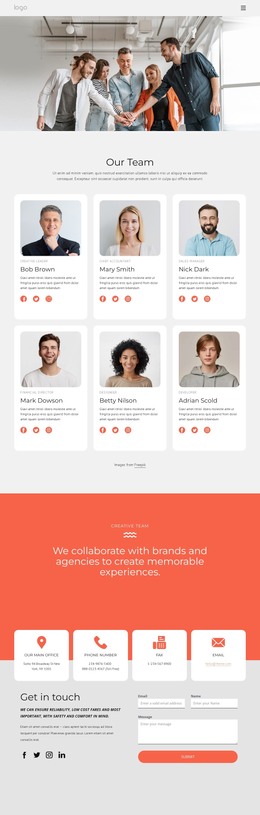
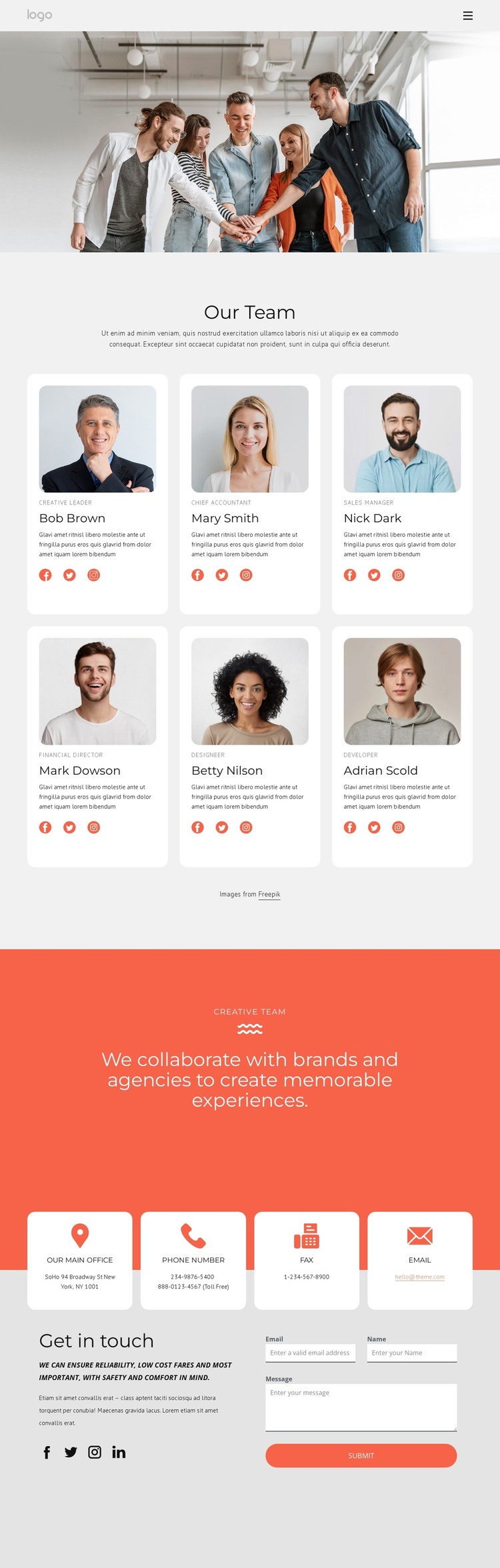
The six portrait cards create a strong set of permanent page content for a creative team site. Each card connects a person’s image with a role label and social profile links, so the design can present individual contributors without losing the identity of the group. The wide team photograph reinforces that relationship at the top by showing the team as a collective before visitors examine separate profiles.
The Creative Team band serves a different content purpose. Its centered statement about collaboration with brands and agencies can sit alongside page-oriented information about the people, giving the site a concise shared message rather than another repeated profile. This distinction is useful when the design is adapted around managed content: individual profile information and the group’s positioning remain separate but visually connected. The navigation and mobile-navigation elements provide the page-level framework for reaching related content as the project develops.
Contact content forms the theme’s practical closing structure. Four distinct channels organize an office address, phone details, fax, and email, while the adjacent inquiry form requests a name, email, and message. That combination supports a WordPress-managed presentation in which stable team information can coexist with updated page content and visitor communication. The sample names and contact values are structural placeholders, but the relationships between profiles, shared messaging, and inquiry content define a usable theme direction without claiming that blog posts, services, or additional WordPress sections already exist.
Customize with Nicepage
Open this ready-made template in the WordPress Website Builder and customize it visually in the Nicepage editor. Replace demo content, edit page sections, and adapt the design to your project without rebuilding the template from scratch.
Manage and Edit This Theme in WordPress
Customize and Install the WordPress Theme
Start with this ready-made theme instead of building the WordPress design from scratch. Customize its layout, content, typography, images, sections, and other design elements visually in Nicepage editor, then export and install the WordPress Theme, Plugin, and Pages on your WordPress site. The Nicepage WordPress Plugin lets you continue working with the site after installation.
Edit the Theme Directly in WordPress
After installation, you can edit the WordPress Theme directly in WordPress with the Nicepage WordPress Plugin. Use Site Style to customize site Colors, Fonts, Header, Footer, Blog, and Post Page Templates while working within your WordPress website.
Edit WordPress Pages Visually
Use the Nicepage WordPress Plugin to edit page content directly from the WordPress admin area. Open a WordPress Page with Nicepage and visually change its text, images, sections, and other page elements while continuing to manage the Page through WordPress.
WordPress Content and Theme Integration
Use the customized theme with WordPress Pages, Posts, Blog and Post Templates, menus, widgets, and other CMS-managed content. Shared theme elements such as Colors, Fonts, Header, Footer, Blog, and Post Page Templates can be managed as part of the overall site design, while WordPress provides the CMS environment for managing site content.
This workflow combines a ready-made WordPress Theme with visual customization, direct theme editing in WordPress, and continued content management through the Nicepage WordPress Plugin.