
Start innovating WordPress Theme


Edit Template Offline
2. Create new page and search for id 364509
Edit Template Online
Create Awesome Websites


Free Nicepage Builder
Keywords
Team Profiles and Capability Cards Support WordPress Page Content
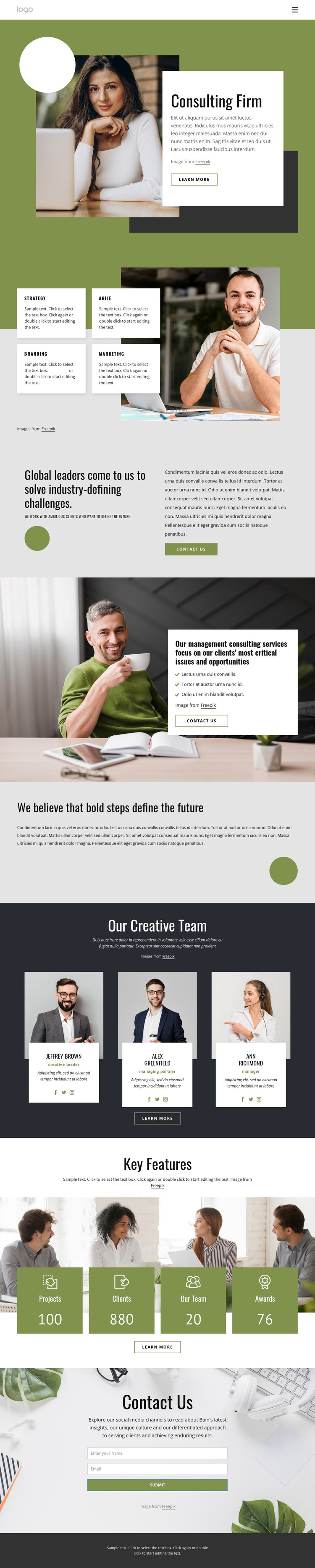
The capability area gives the design a clear set of permanent consulting content: Strategy, Agile, Branding, and Marketing appear as four repeated cards beside a business image. These categories can anchor page-oriented explanations, while the separate management consulting section adds a three-item service list and a Contact us button for more focused information. The hero's introductory copy and Learn more action then provide a natural entry point before visitors reach those deeper content areas.
The three-member creative team showcase offers another useful content relationship for a WordPress-managed site. Each portrait card carries a name, role label, biography, and social links, creating a repeatable profile pattern rather than a single isolated text block. The Key Features section uses a different repeated structure: four colored cards identify Projects, Clients, Our Team, and Awards beneath a group business image. The labels can remain part of the site's page content, while the sample values should be replaced with confirmed information before publication.
The closing contact section is especially suitable as a permanent page area, combining an introductory message with fields for a visitor's name and email address. Together, the service cards, team profiles, highlight cards, social links, and inquiry form give a WordPress theme a coherent set of content zones for pages and future editorial additions, without assuming that blog posts or other unverified CMS structures already exist.
Customize with Nicepage
Open this ready-made template in the WordPress Website Builder and customize it visually in the Nicepage editor. Replace demo content, edit page sections, and adapt the design to your project without rebuilding the template from scratch.
Manage and Edit This Theme in WordPress
Customize and Install the WordPress Theme
Start with this ready-made theme instead of building the WordPress design from scratch. Customize its layout, content, typography, images, sections, and other design elements visually in Nicepage editor, then export and install the WordPress Theme, Plugin, and Pages on your WordPress site. The Nicepage WordPress Plugin lets you continue working with the site after installation.
Edit the Theme Directly in WordPress
After installation, you can edit the WordPress Theme directly in WordPress with the Nicepage WordPress Plugin. Use Site Style to customize site Colors, Fonts, Header, Footer, Blog, and Post Page Templates while working within your WordPress website.
Edit WordPress Pages Visually
Use the Nicepage WordPress Plugin to edit page content directly from the WordPress admin area. Open a WordPress Page with Nicepage and visually change its text, images, sections, and other page elements while continuing to manage the Page through WordPress.
WordPress Content and Theme Integration
Use the customized theme with WordPress Pages, Posts, Blog and Post Templates, menus, widgets, and other CMS-managed content. Shared theme elements such as Colors, Fonts, Header, Footer, Blog, and Post Page Templates can be managed as part of the overall site design, while WordPress provides the CMS environment for managing site content.
This workflow combines a ready-made WordPress Theme with visual customization, direct theme editing in WordPress, and continued content management through the Nicepage WordPress Plugin.





















