We solve your problems WordPress Theme


Stable Capability Content in a WordPress Page Section
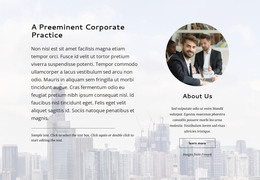
The two cards read as a durable page-content area because each presents a defined capability with a heading, supporting paragraph, and Learn more button. “Innovative Legal Counsel” and “Professional Team” can be maintained as separate but related content units in a WordPress-managed page, while the shared white styling keeps them visually connected. The section does not need to carry editorial chronology or a larger publishing structure to remain useful as permanent feature content.
The horizontal card row also gives the page a compact way to present two areas of emphasis before visitors continue to other content. The cityscape background provides a consistent visual setting, and the broad foreground leaves enough space for the cards to remain legible. Because both buttons use the same subdued treatment, the content can be updated without creating competing visual priorities. The Freepik credit belongs to the displayed image context and should remain accurate when the asset is retained.
In a WordPress Theme context, the block can participate as one reusable page section while the surrounding project manages its wider content and templates. The practical focus is the stable relationship between the two feature entries, not an assumption that posts, categories, widgets, or other CMS structures are present inside the block. The section can sit alongside those broader content areas while preserving its own card-based presentation.
Customize with Nicepage
Open this ready-made template in the WordPress Website Builder and customize it visually in the Nicepage editor. Replace demo content, edit page sections, and adapt the design to your project without rebuilding the template from scratch.
Edit Template Offline
2. Create a new page or select existing
3. Click Add new block, search for id 302675 and click enter
Edit Template Online
Create Awesome Websites


Free Nicepage Builder
Keywords
Manage and Edit This Theme in WordPress
Customize and Install the WordPress Theme
Start with this ready-made theme instead of building the WordPress design from scratch. Customize its layout, content, typography, images, sections, and other design elements visually in Nicepage editor, then export and install the WordPress Theme, Plugin, and Pages on your WordPress site. The Nicepage WordPress Plugin lets you continue working with the site after installation.
Edit the Theme Directly in WordPress
After installation, you can edit the WordPress Theme directly in WordPress with the Nicepage WordPress Plugin. Use Site Style to customize site Colors, Fonts, Header, Footer, Blog, and Post Page Templates while working within your WordPress website.
Edit WordPress Pages Visually
Use the Nicepage WordPress Plugin to edit page content directly from the WordPress admin area. Open a WordPress Page with Nicepage and visually change its text, images, sections, and other page elements while continuing to manage the Page through WordPress.
WordPress Content and Theme Integration
Use the customized theme with WordPress Pages, Posts, Blog and Post Templates, menus, widgets, and other CMS-managed content. Shared theme elements such as Colors, Fonts, Header, Footer, Blog, and Post Page Templates can be managed as part of the overall site design, while WordPress provides the CMS environment for managing site content.
This workflow combines a ready-made WordPress Theme with visual customization, direct theme editing in WordPress, and continued content management through the Nicepage WordPress Plugin.