
Discovering levels of art WordPress Theme


Edit Template Offline
2. Create new page and search for id 24552
Edit Template Online
Create Awesome Websites


Free Nicepage Builder
Keywords
Collage-Led Sections Give WordPress Content a Shared Visual System
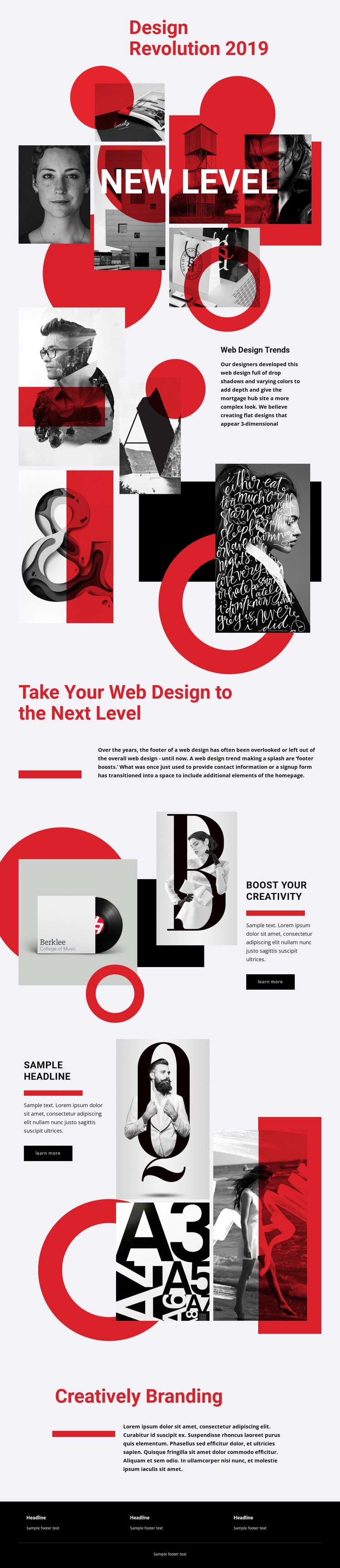
The page’s strongest content areas are organized around distinct editorial subjects. New Level uses a large collage of photographs, typography, and red geometric shapes to introduce the visual idea, while Web Design Trends places trend-oriented copy beside another layered image arrangement. In a WordPress project, these areas can be interpreted as permanent page content that presents the design direction clearly before visitors reach the more detailed feature sections.
The two split features provide a different relationship between content and imagery. The first places a supporting paragraph and Learn more link beside an editorial image, creating a compact area for a focused topic. The second repeats the pattern with a small text feature and a taller four-image collage, giving the page a separate visual proof area without making the composition uniform. This distinction leaves room for related page or regularly updated content to follow the same visual character, without claiming that posts or blog structures already exist in the source design.
The Creatively Branding section offers a natural permanent content area for the brand-focused message, and the dark footer supplies shared site content through three text columns and a closing line. Together, these regions make the design suitable for a WordPress-oriented theme interpretation: page content, recurring visual motifs, and common site elements can remain coordinated while the project’s actual editorial material is added.
Customize with Nicepage
Open this ready-made template in the WordPress Website Builder and customize it visually in the Nicepage editor. Replace demo content, edit page sections, and adapt the design to your project without rebuilding the template from scratch.
Manage and Edit This Theme in WordPress
Customize and Install the WordPress Theme
Start with this ready-made theme instead of building the WordPress design from scratch. Customize its layout, content, typography, images, sections, and other design elements visually in Nicepage editor, then export and install the WordPress Theme, Plugin, and Pages on your WordPress site. The Nicepage WordPress Plugin lets you continue working with the site after installation.
Edit the Theme Directly in WordPress
After installation, you can edit the WordPress Theme directly in WordPress with the Nicepage WordPress Plugin. Use Site Style to customize site Colors, Fonts, Header, Footer, Blog, and Post Page Templates while working within your WordPress website.
Edit WordPress Pages Visually
Use the Nicepage WordPress Plugin to edit page content directly from the WordPress admin area. Open a WordPress Page with Nicepage and visually change its text, images, sections, and other page elements while continuing to manage the Page through WordPress.
WordPress Content and Theme Integration
Use the customized theme with WordPress Pages, Posts, Blog and Post Templates, menus, widgets, and other CMS-managed content. Shared theme elements such as Colors, Fonts, Header, Footer, Blog, and Post Page Templates can be managed as part of the overall site design, while WordPress provides the CMS environment for managing site content.
This workflow combines a ready-made WordPress Theme with visual customization, direct theme editing in WordPress, and continued content management through the Nicepage WordPress Plugin.





















