
We build brands WordPress Theme


Edit Template Offline
2. Create new page and search for id 20465
Edit Template Online
Create Awesome Websites


Free Nicepage Builder
Keywords
Project and Service Areas Give WordPress Content a Visual Structure
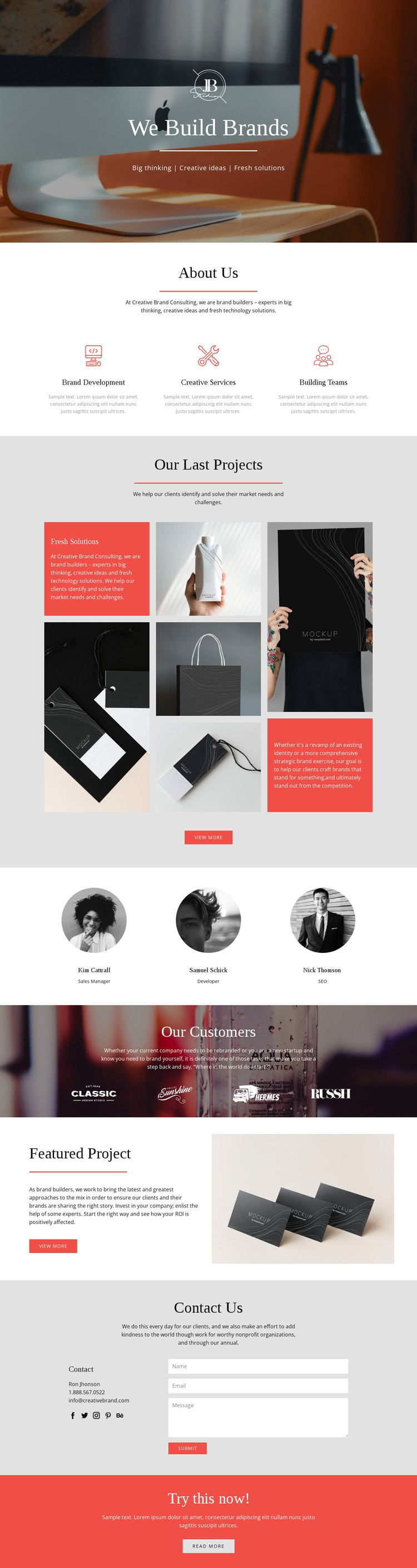
The opening hero and About Us section establish permanent page content for a branding or rebranding project. The hero carries the We Build Brands message through a photograph, logo, and centered text, while the three capability items distinguish Brand Development, Creative Services, and Building Teams. These areas can remain stable page content while their wording and imagery are adapted for a specific consultancy.
The project sections provide a different content relationship. Our Last Projects uses a multi-image showcase with supporting text and a View More action, making it a natural visual area for selected work or case-study summaries. Featured Project then isolates one project through copy beside an image. The team profiles and four customer brand marks add recurring presentation areas that can support people and client-context content within the same visual system, without claiming that WordPress Posts or categories already exist in the template.
Contact Us supplies the clearest communication area through direct details, social links, and an inquiry form. The coral-red Try this now! band adds a separate promotional prompt at the end. In a WordPress-managed implementation, these page-oriented sections can keep their distinct roles while content is maintained through the CMS. The result is a theme interpretation grounded in the actual design: service explanation, visual proof, people, customer context, featured work, and inquiry content remain connected by one agency-oriented presentation.
Customize with Nicepage
Open this ready-made template in the WordPress Website Builder and customize it visually in the Nicepage editor. Replace demo content, edit page sections, and adapt the design to your project without rebuilding the template from scratch.
Manage and Edit This Theme in WordPress
Customize and Install the WordPress Theme
Start with this ready-made theme instead of building the WordPress design from scratch. Customize its layout, content, typography, images, sections, and other design elements visually in Nicepage editor, then export and install the WordPress Theme, Plugin, and Pages on your WordPress site. The Nicepage WordPress Plugin lets you continue working with the site after installation.
Edit the Theme Directly in WordPress
After installation, you can edit the WordPress Theme directly in WordPress with the Nicepage WordPress Plugin. Use Site Style to customize site Colors, Fonts, Header, Footer, Blog, and Post Page Templates while working within your WordPress website.
Edit WordPress Pages Visually
Use the Nicepage WordPress Plugin to edit page content directly from the WordPress admin area. Open a WordPress Page with Nicepage and visually change its text, images, sections, and other page elements while continuing to manage the Page through WordPress.
WordPress Content and Theme Integration
Use the customized theme with WordPress Pages, Posts, Blog and Post Templates, menus, widgets, and other CMS-managed content. Shared theme elements such as Colors, Fonts, Header, Footer, Blog, and Post Page Templates can be managed as part of the overall site design, while WordPress provides the CMS environment for managing site content.
This workflow combines a ready-made WordPress Theme with visual customization, direct theme editing in WordPress, and continued content management through the Nicepage WordPress Plugin.





















