International language school WordPress Theme


Edit Template Offline
2. Create new page and search for id 18696
Edit Template Online
Create Awesome Websites


Free Nicepage Builder
Keywords
Course Content and Learner Support Share One Theme Direction
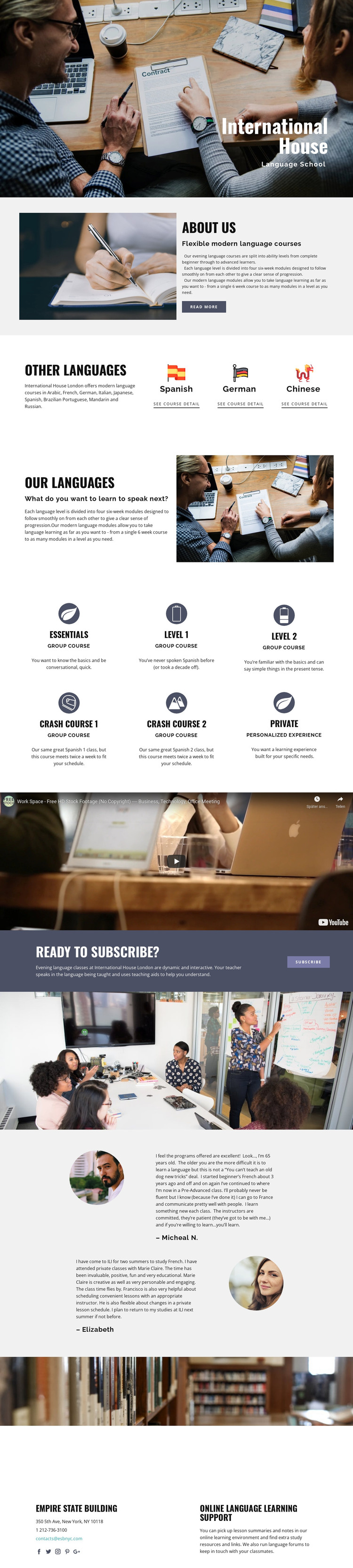
The page’s permanent education content is divided into recognizable areas that can guide a WordPress-managed language school site. The about section explains flexible evening courses and progression through levels, while the language-selection block introduces specific choices such as Spanish, German, and Chinese. The wider verified language list adds further editorial breadth, including Arabic, French, Italian, Japanese, Brazilian Portuguese, Mandarin, and Russian, without requiring unsupported claims about existing post or category structures.
The course area gives the design a second content relationship. Essentials, Crash Course 1, Crash Course 2, level-based study, group courses, and private learning can be treated as related information while retaining a common visual presentation. The video and testimonials then provide supporting content around the core program: one demonstrates learning media, while the other presents learner-oriented evidence through text and portraits. Demo names and sample statements should remain structural examples until replaced with verified project content.
The enrollment callout and online support section complete the page-oriented interpretation. A school could keep the subscribe message alongside course information, then use the final contact region for support resources, communication, and social links. This combination allows permanent course explanations and potentially updated educational content to share one visual system. The design therefore works as a theme foundation through its relationships between program information, learner context, enrollment, and continuing online study.
Customize with Nicepage
Open this ready-made template in the WordPress Website Builder and customize it visually in the Nicepage editor. Replace demo content, edit page sections, and adapt the design to your project without rebuilding the template from scratch.
Manage and Edit This Theme in WordPress
Customize and Install the WordPress Theme
Start with this ready-made theme instead of building the WordPress design from scratch. Customize its layout, content, typography, images, sections, and other design elements visually in Nicepage editor, then export and install the WordPress Theme, Plugin, and Pages on your WordPress site. The Nicepage WordPress Plugin lets you continue working with the site after installation.
Edit the Theme Directly in WordPress
After installation, you can edit the WordPress Theme directly in WordPress with the Nicepage WordPress Plugin. Use Site Style to customize site Colors, Fonts, Header, Footer, Blog, and Post Page Templates while working within your WordPress website.
Edit WordPress Pages Visually
Use the Nicepage WordPress Plugin to edit page content directly from the WordPress admin area. Open a WordPress Page with Nicepage and visually change its text, images, sections, and other page elements while continuing to manage the Page through WordPress.
WordPress Content and Theme Integration
Use the customized theme with WordPress Pages, Posts, Blog and Post Templates, menus, widgets, and other CMS-managed content. Shared theme elements such as Colors, Fonts, Header, Footer, Blog, and Post Page Templates can be managed as part of the overall site design, while WordPress provides the CMS environment for managing site content.
This workflow combines a ready-made WordPress Theme with visual customization, direct theme editing in WordPress, and continued content management through the Nicepage WordPress Plugin.