Leader in technology WordPress Theme


Edit Template Offline
2. Create new page and search for id 17226
Edit Template Online
Create Awesome Websites


Free Nicepage Builder
Keywords
Reusable Product Content Fits the Page-Oriented Visual System
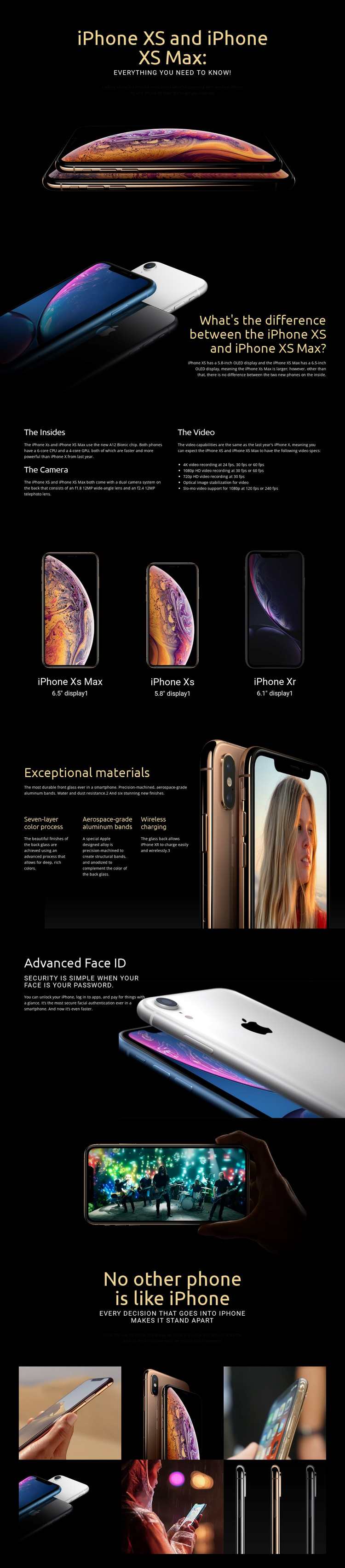
The page contains several permanent information areas that can be interpreted naturally within a WordPress-managed site. The opening hero establishes the product subject with iPhone XS and iPhone XS Max, and the next section gives page content a specific comparison purpose by explaining their display-size difference. The three-model presentation then adds iPhone XS Max, iPhone XS, and iPhone XR with 6.5-inch, 5.8-inch, and 6.1-inch display labels, creating a repeatable pattern for product or comparison information.
Other sections offer different content relationships. “The Insides” brings technical explanation together through the A12 Bionic chip, dual camera system, and video capabilities, including 4K, 1080p HD, and 720p recording. The materials block shifts toward construction and charging, covering the seven-layer color process, aerospace-grade aluminum bands, and wireless charging. Advanced Face ID isolates security and authentication content, while the later statement adds privacy, security, and recycling context. These areas could remain visually coordinated as permanent page content even if a project later introduces regularly updated technology material.
The six-image gallery gives the visual system a separate collection area, and the repeated dark backgrounds, large headings, and bright phone photographs can help maintain continuity around related WordPress-managed pages. This interpretation does not assume that blog posts, categories, or other CMS structures already exist in the template. Instead, it identifies how the verified product, feature, comparison, and gallery areas could fit a WordPress theme whose content grows while preserving the original design character.
Customize with Nicepage
Open this ready-made template in the WordPress Website Builder and customize it visually in the Nicepage editor. Replace demo content, edit page sections, and adapt the design to your project without rebuilding the template from scratch.
Manage and Edit This Theme in WordPress
Customize and Install the WordPress Theme
Start with this ready-made theme instead of building the WordPress design from scratch. Customize its layout, content, typography, images, sections, and other design elements visually in Nicepage editor, then export and install the WordPress Theme, Plugin, and Pages on your WordPress site. The Nicepage WordPress Plugin lets you continue working with the site after installation.
Edit the Theme Directly in WordPress
After installation, you can edit the WordPress Theme directly in WordPress with the Nicepage WordPress Plugin. Use Site Style to customize site Colors, Fonts, Header, Footer, Blog, and Post Page Templates while working within your WordPress website.
Edit WordPress Pages Visually
Use the Nicepage WordPress Plugin to edit page content directly from the WordPress admin area. Open a WordPress Page with Nicepage and visually change its text, images, sections, and other page elements while continuing to manage the Page through WordPress.
WordPress Content and Theme Integration
Use the customized theme with WordPress Pages, Posts, Blog and Post Templates, menus, widgets, and other CMS-managed content. Shared theme elements such as Colors, Fonts, Header, Footer, Blog, and Post Page Templates can be managed as part of the overall site design, while WordPress provides the CMS environment for managing site content.
This workflow combines a ready-made WordPress Theme with visual customization, direct theme editing in WordPress, and continued content management through the Nicepage WordPress Plugin.