Future technology WordPress Theme


Edit Template Offline
2. Create new page and search for id 18337
Edit Template Online
Create Awesome Websites


Free Nicepage Builder
Keywords
Editorial Topics and Repeated Cards Suit Managed Technology Content
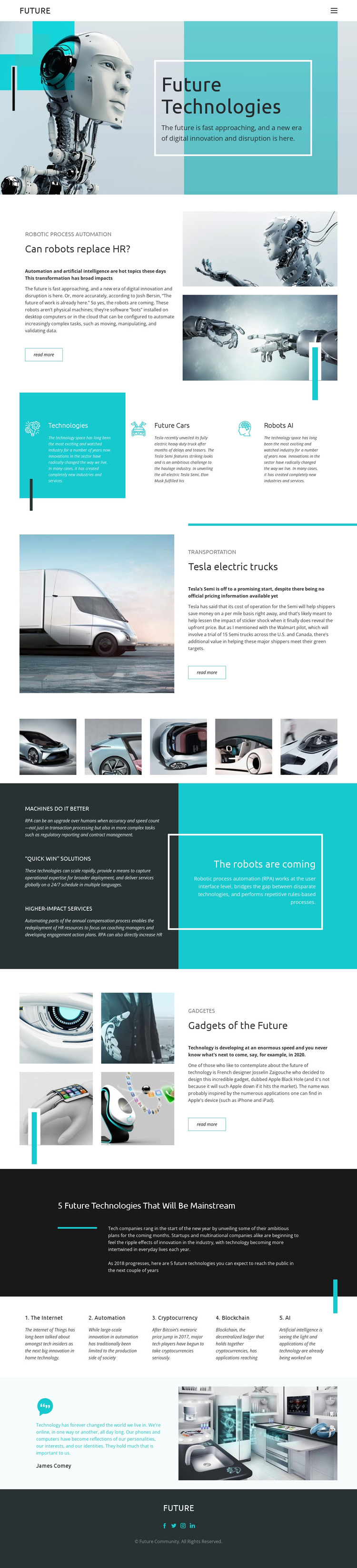
The page contains clear permanent content areas that can translate into a WordPress-oriented editorial structure. The robotic hero introduces the main subject, while the split features provide separate presentation zones for robotic process automation, Tesla electric trucks, and future gadgets. Their repeated image-and-text relationship can support page-oriented technology stories without claiming that WordPress Posts, categories, or blog templates already exist in the source design.
The three category panels and five numbered topic columns offer a different kind of content relationship. Technologies, Future Cars, and Robots AI work as concise topic groupings, while the later list covers the Internet, automation, cryptocurrency, blockchain, and AI in a more explanatory format. The vehicle gallery adds a visual content area that can sit alongside those editorial subjects, and the automation benefits provide a compact repeated-panel pattern suitable for recurring information.
The FUTURE header, social links, and Future Community footer supply shared site elements around these page regions. In a WordPress project, the design could therefore keep permanent technology pages and regularly updated editorial material within one visual direction. The important distinction is the mapping of this particular content structure to a managed publishing environment, not a claim that any unverified WordPress content type is already present.
Customize with Nicepage
Open this ready-made template in the WordPress Website Builder and customize it visually in the Nicepage editor. Replace demo content, edit page sections, and adapt the design to your project without rebuilding the template from scratch.
Manage and Edit This Theme in WordPress
Customize and Install the WordPress Theme
Start with this ready-made theme instead of building the WordPress design from scratch. Customize its layout, content, typography, images, sections, and other design elements visually in Nicepage editor, then export and install the WordPress Theme, Plugin, and Pages on your WordPress site. The Nicepage WordPress Plugin lets you continue working with the site after installation.
Edit the Theme Directly in WordPress
After installation, you can edit the WordPress Theme directly in WordPress with the Nicepage WordPress Plugin. Use Site Style to customize site Colors, Fonts, Header, Footer, Blog, and Post Page Templates while working within your WordPress website.
Edit WordPress Pages Visually
Use the Nicepage WordPress Plugin to edit page content directly from the WordPress admin area. Open a WordPress Page with Nicepage and visually change its text, images, sections, and other page elements while continuing to manage the Page through WordPress.
WordPress Content and Theme Integration
Use the customized theme with WordPress Pages, Posts, Blog and Post Templates, menus, widgets, and other CMS-managed content. Shared theme elements such as Colors, Fonts, Header, Footer, Blog, and Post Page Templates can be managed as part of the overall site design, while WordPress provides the CMS environment for managing site content.
This workflow combines a ready-made WordPress Theme with visual customization, direct theme editing in WordPress, and continued content management through the Nicepage WordPress Plugin.