
Business page WordPress Theme


Edit Template Offline
2. Create new page and search for id 1081851
Edit Template Online
Create Awesome Websites


Free Nicepage Builder
Keywords
Capability cards separate permanent service content from inquiry content
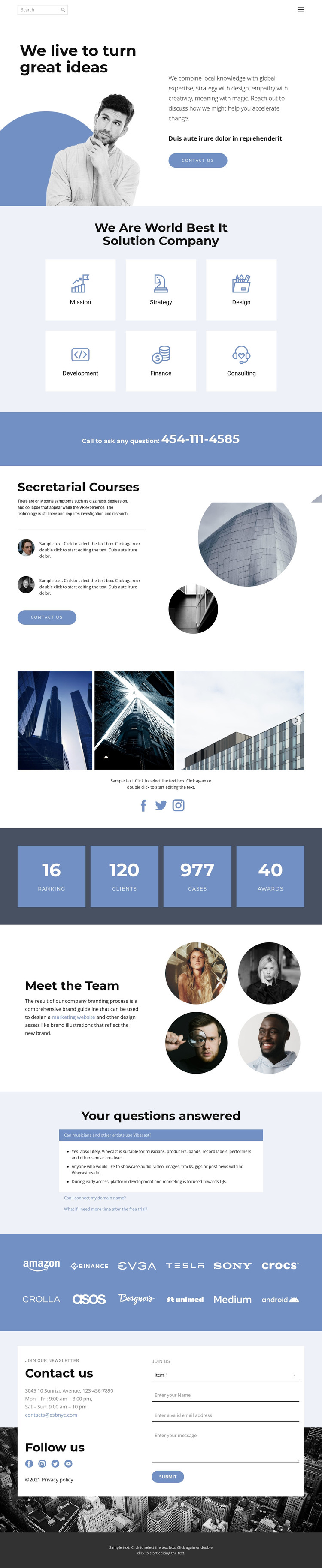
The six service cards provide a strong set of permanent page-oriented content areas: Mission, Strategy, Design, Development, Finance, and Consulting each has a visible place in the main presentation. The split hero can introduce the organization before those areas, while the separate course or service section gives another offering its own text, supporting items, imagery, and contact action. Together, these regions are more useful for a managed content environment than a single undifferentiated block of promotional copy.
The design also contains recurring content relationships that can remain visually coordinated as information changes. The gallery can present project or portfolio material, the team section can introduce people through four circular portraits, and the three-item question-and-answer accordion can hold common explanations. The partner-logo strip and social links create additional shared presentation areas. The metric row is a structural proof section, but its sample values should not be treated as verified company achievements. Phone, email, contact details, and the inquiry form complete the page-oriented contact content.
For a WordPress project, this arrangement can keep permanent service and company information alongside content that may be updated over time, while the existing palette, typography, cards, and imagery preserve the design character. Nicepage documentation confirms that the WordPress Plugin supports direct theme editing, but this page-specific interpretation focuses on how its verified content areas can work together inside a managed site.
Customize with Nicepage
Open this ready-made template in the WordPress Website Builder and customize it visually in the Nicepage editor. Replace demo content, edit page sections, and adapt the design to your project without rebuilding the template from scratch.
Manage and Edit This Theme in WordPress
Customize and Install the WordPress Theme
Start with this ready-made theme instead of building the WordPress design from scratch. Customize its layout, content, typography, images, sections, and other design elements visually in Nicepage editor, then export and install the WordPress Theme, Plugin, and Pages on your WordPress site. The Nicepage WordPress Plugin lets you continue working with the site after installation.
Edit the Theme Directly in WordPress
After installation, you can edit the WordPress Theme directly in WordPress with the Nicepage WordPress Plugin. Use Site Style to customize site Colors, Fonts, Header, Footer, Blog, and Post Page Templates while working within your WordPress website.
Edit WordPress Pages Visually
Use the Nicepage WordPress Plugin to edit page content directly from the WordPress admin area. Open a WordPress Page with Nicepage and visually change its text, images, sections, and other page elements while continuing to manage the Page through WordPress.
WordPress Content and Theme Integration
Use the customized theme with WordPress Pages, Posts, Blog and Post Templates, menus, widgets, and other CMS-managed content. Shared theme elements such as Colors, Fonts, Header, Footer, Blog, and Post Page Templates can be managed as part of the overall site design, while WordPress provides the CMS environment for managing site content.
This workflow combines a ready-made WordPress Theme with visual customization, direct theme editing in WordPress, and continued content management through the Nicepage WordPress Plugin.





















