Digital agency anniversary Template


Edit Template Offline
2. Create new page and search for id 6633719
Edit Template Online
Create Awesome Websites


Free Nicepage Builder
Keywords
A Celebration Layout That Also Explains What the Agency Does
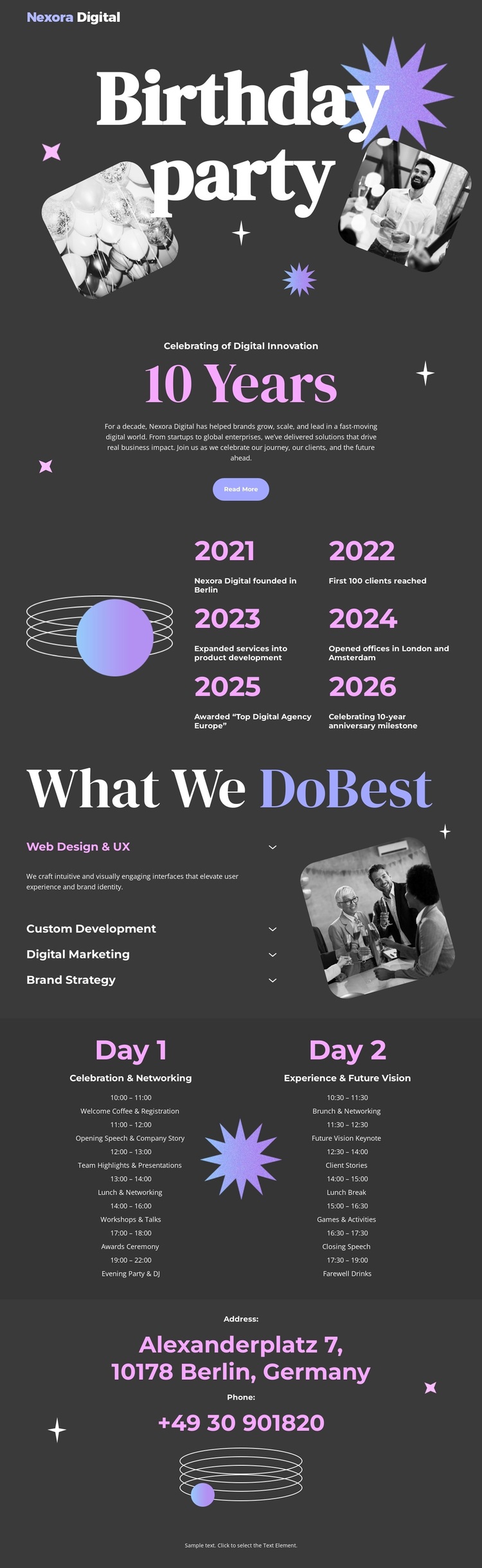
The Birthday party opening gives this design a distinctive starting point: it treats the agency anniversary as the main story rather than beginning with a conventional service grid. The large serif headline, overlapping photographs, starburst graphics, and dark charcoal background create an editorial celebration setting, while the Read More button indicates that more information follows. That visual emphasis makes the design a useful option for projects where an occasion needs to lead the page.
The template also covers the practical content needed to keep the celebration connected to the agency. The 10 Years area displays six year milestones, and the What We Do Best section identifies web design and UX, custom development, digital marketing, and brand strategy. These sections prevent the page from becoming only decorative event material. They explain the organization’s capabilities while preserving the high-contrast, playful visual tone established at the beginning.
The two-day schedule adds a concrete event framework, with Day 1 and Day 2 presented as adjacent columns. The Berlin Address section then supplies a recognizable closing contact area. Together, the anniversary message, milestone history, service coverage, schedule, and contact details distinguish this design from a generic corporate homepage. It is particularly suited to a project that needs visual celebration, concise agency positioning, and event information to coexist without a dense or conventional presentation.
Customize with Nicepage
Open this ready-made template in the Template Builder and customize it visually in the Nicepage editor. Replace demo content, edit page sections, and adapt the design to your project without rebuilding the template from scratch.
Start With a Ready-Made Template
Choose a Design for a New Page
Use a ready-made template as a starting point instead of creating every page from a blank canvas. When adding a new page in Nicepage, browse available designs, compare different layouts, and choose an option that already fits the general purpose and visual direction of your project.
Browse Different Page Designs
Explore Page Designs using search, thematic categories, Design Sets, and full-page previews. The collection includes layouts for different subjects and page purposes, making it easier to compare alternatives before selecting a design to customize.
Customize the Selected Template
After choosing a design, create the page and continue editing it visually in Nicepage. Replace the demo content, adjust images, typography, colors, sections, and other elements, and adapt the ready-made layout to your own content instead of rebuilding the design from the beginning.
Explore More Design Directions
If the first option does not match your project closely enough, return to the design collection and compare other templates before committing to a layout. This makes the template library useful not only for faster page creation, but also for exploring different visual approaches and finding a suitable starting point for a new project.
This workflow gives you access to a broad collection of ready-made designs that can be selected, compared, and customized according to the needs of each new page or project.