World Cup 2018 Template


Edit Template Offline
2. Create new page and search for id 25118
Edit Template Online
Create Awesome Websites


Free Nicepage Builder
Keywords
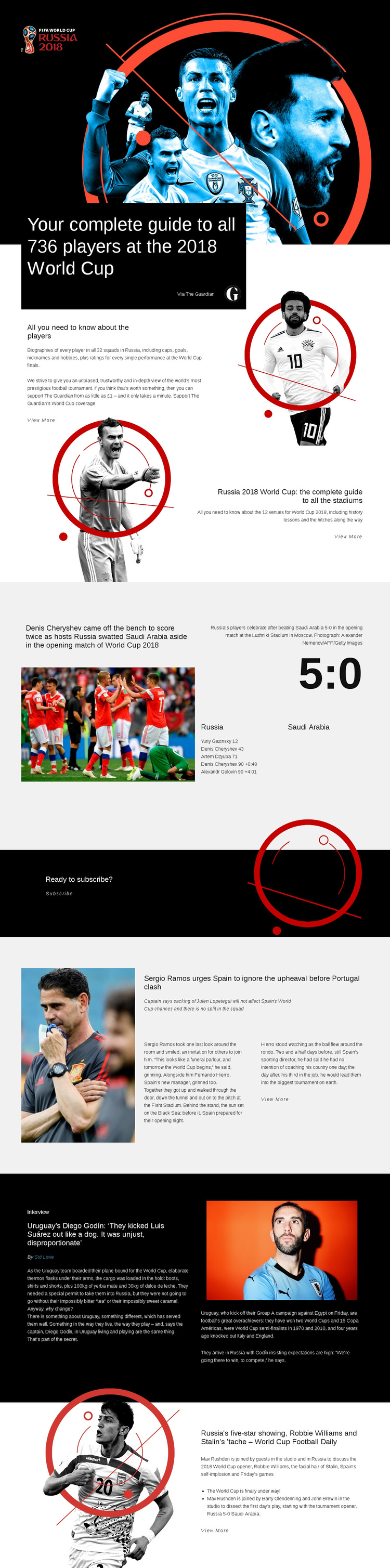
The 736-player guide gives this design a distinctive editorial focus
The design is shaped by the breadth of its World Cup coverage. Rather than centering on a single promotional offer or one match, it combines a complete guide to 736 players across 32 squads with a separate guide to 12 stadiums. That pairing gives the page both people-focused and place-focused reference content, making the layout suitable for a sports publication that wants to help readers explore the tournament from several angles.
The editorial range continues through the 5:0 Russia–Saudi Arabia opening-match report, which adds a specific result, goal details, action photography, and a Luzhniki Stadium caption. Spain team news introduces another current-affairs angle, while the Diego Godín interview brings in a bylined conversation, supporting facts, and a pull quote. The World Cup Football Daily section then changes the format again through podcast-style discussion and named contributors.
These relationships make the design worth considering when the project needs more than a generic sports homepage. Guides provide evergreen reference value, the match block supplies event-driven evidence, and the interview and daily discussion sections create room for personality and commentary. The black subscription band completes the publishing concept by connecting the editorial material to an ongoing coverage relationship. Its combination of structured information, visual storytelling, and varied article formats distinguishes it from layouts built around only scores, teams, or promotional cards.
Customize with Nicepage
Open this ready-made template in the Template Builder and customize it visually in the Nicepage editor. Replace demo content, edit page sections, and adapt the design to your project without rebuilding the template from scratch.
Start With a Ready-Made Template
Choose a Design for a New Page
Use a ready-made template as a starting point instead of creating every page from a blank canvas. When adding a new page in Nicepage, browse available designs, compare different layouts, and choose an option that already fits the general purpose and visual direction of your project.
Browse Different Page Designs
Explore Page Designs using search, thematic categories, Design Sets, and full-page previews. The collection includes layouts for different subjects and page purposes, making it easier to compare alternatives before selecting a design to customize.
Customize the Selected Template
After choosing a design, create the page and continue editing it visually in Nicepage. Replace the demo content, adjust images, typography, colors, sections, and other elements, and adapt the ready-made layout to your own content instead of rebuilding the design from the beginning.
Explore More Design Directions
If the first option does not match your project closely enough, return to the design collection and compare other templates before committing to a layout. This makes the template library useful not only for faster page creation, but also for exploring different visual approaches and finding a suitable starting point for a new project.
This workflow gives you access to a broad collection of ready-made designs that can be selected, compared, and customized according to the needs of each new page or project.