
Perfecting styles of art WordPress Theme


Edit Template Offline
2. Create new page and search for id 91273
Edit Template Online
Create Awesome Websites


Free Nicepage Builder
Keywords
Editorial Cards and Team Profiles Support Managed Studio Content
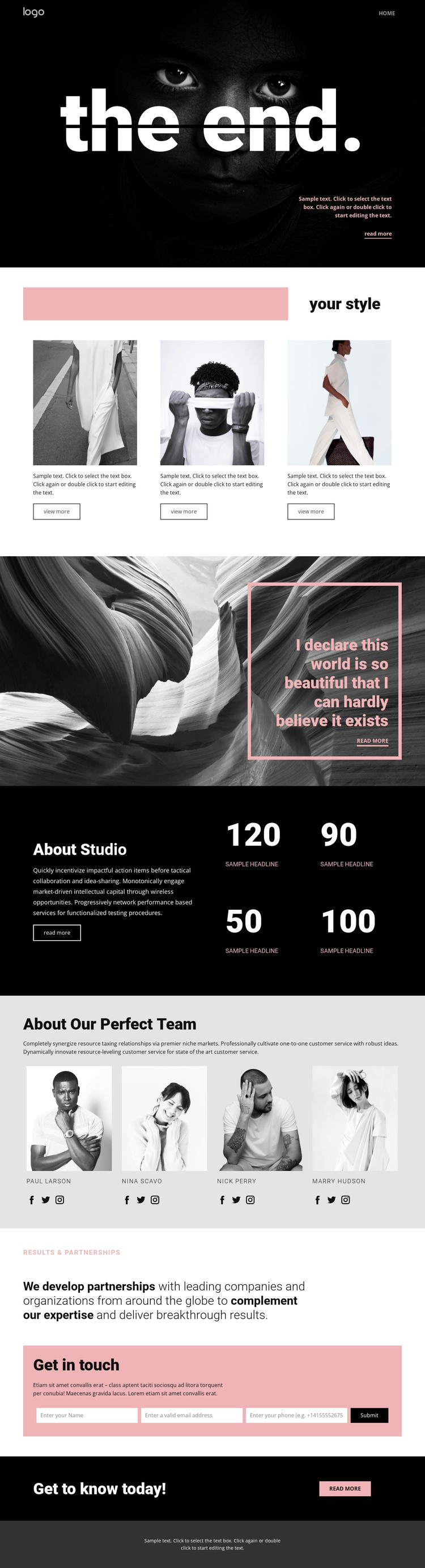
The “your style” area gives the design a useful page-oriented content group: three repeated image cards can present separate fashion projects, styling directions, or studio categories while retaining a consistent visual arrangement. This works alongside the opening portrait hero, which provides a strong introductory surface for the studio’s message. The split section that follows adds room for a longer statement by placing monochrome imagery beside a pale pink outlined text panel.
The About Studio section changes the rhythm from image-led presentation to informational content. Its introductory copy sits beside four displayed result figures, which are visibly part of the layout but are marked as sample content and should not be treated as confirmed achievements. The four-person team area offers another clear content grouping, combining portraits, names, and social links in a peer-based presentation that can be maintained as studio information changes.
At the end of the main content, partnership messaging creates a bridge toward the pink Get in touch panel. The contact form’s explanatory text, input areas, and Send button define a direct inquiry area, while the final callout and footer provide shared closing content. In a WordPress-oriented project, these page sections can remain visually coordinated as studio content develops. The design therefore supports both stable presentation areas and content that may need regular updating, without relying on an invented blog or post structure.
Customize with Nicepage
Open this ready-made template in the WordPress Website Builder and customize it visually in the Nicepage editor. Replace demo content, edit page sections, and adapt the design to your project without rebuilding the template from scratch.
Manage and Edit This Theme in WordPress
Customize and Install the WordPress Theme
Start with this ready-made theme instead of building the WordPress design from scratch. Customize its layout, content, typography, images, sections, and other design elements visually in Nicepage editor, then export and install the WordPress Theme, Plugin, and Pages on your WordPress site. The Nicepage WordPress Plugin lets you continue working with the site after installation.
Edit the Theme Directly in WordPress
After installation, you can edit the WordPress Theme directly in WordPress with the Nicepage WordPress Plugin. Use Site Style to customize site Colors, Fonts, Header, Footer, Blog, and Post Page Templates while working within your WordPress website.
Edit WordPress Pages Visually
Use the Nicepage WordPress Plugin to edit page content directly from the WordPress admin area. Open a WordPress Page with Nicepage and visually change its text, images, sections, and other page elements while continuing to manage the Page through WordPress.
WordPress Content and Theme Integration
Use the customized theme with WordPress Pages, Posts, Blog and Post Templates, menus, widgets, and other CMS-managed content. Shared theme elements such as Colors, Fonts, Header, Footer, Blog, and Post Page Templates can be managed as part of the overall site design, while WordPress provides the CMS environment for managing site content.
This workflow combines a ready-made WordPress Theme with visual customization, direct theme editing in WordPress, and continued content management through the Nicepage WordPress Plugin.





















