
Poetry Book and Author WordPress Theme


Edit Template Offline
2. Create new page and search for id 6660182
Edit Template Online
Create Awesome Websites


Free Nicepage Builder
Keywords
Permanent Author Content Connects With Expandable Literary Publishing
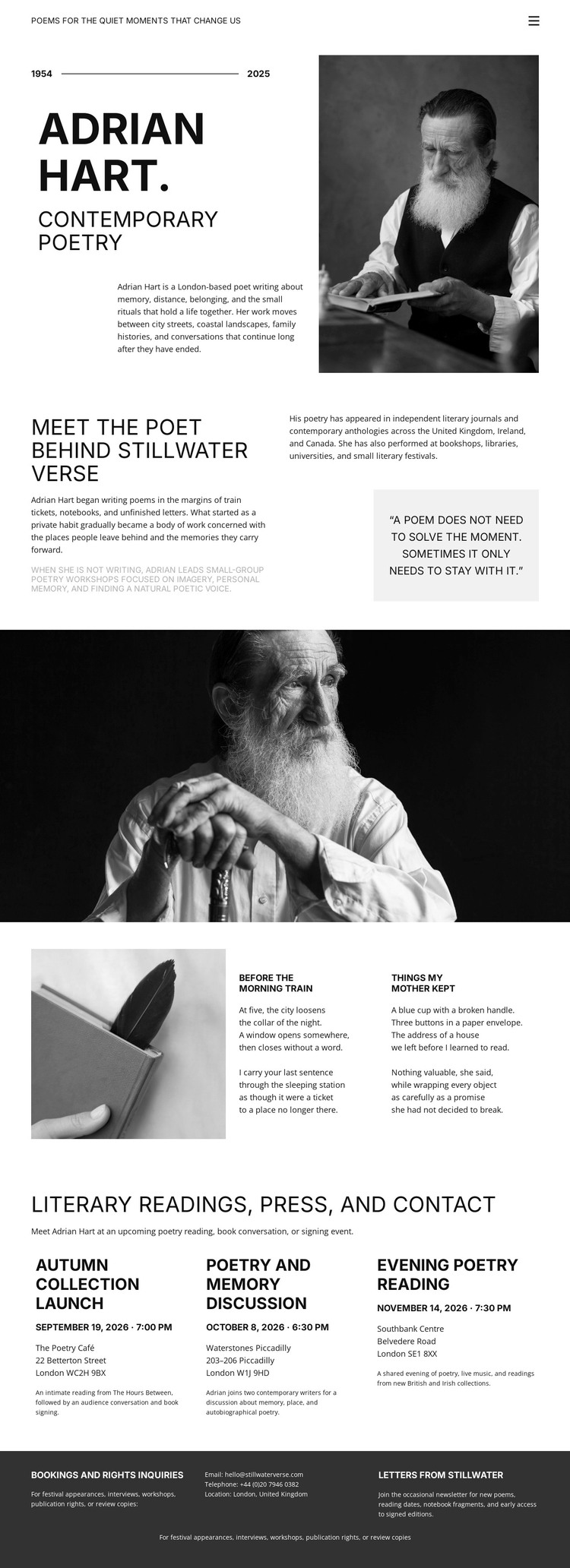
The page contains clear permanent content areas for a WordPress-oriented site. The opening profile can represent the author-facing identity of the project, combining the contemporary poetry heading, portrait, date line, and biography. The following Meet the Poet section adds supporting author context and a highlighted quotation, giving the page a stable profile narrative before visitors reach the work itself.
The two named excerpts, Before the Morning Train and Things My Mother Kept, create a distinct literary-content area beside a writing-themed image. In a WordPress project, that relationship can serve as the visual model for selected poems, collection highlights, or other publishable writing, without claiming that Posts or a blog already exist in this template. The later grid provides another content pattern: Autumn Collection, Poetry and Memory Discussions, and Evening Poetry Reading are repeated offerings that could be maintained as related author activities or editorial entries while preserving the same visual direction.
The dark footer gathers booking and notes information and Letters from Stillwater content into a compact shared area. This separation between enduring author information, selected work, repeated literary activity, and supporting contact content gives the design a useful theme interpretation. The page can remain recognizable as the project gains regularly updated material, while the existing portfolio structure continues to anchor the presentation.
Customize with Nicepage
Open this ready-made template in the WordPress Website Builder and customize it visually in the Nicepage editor. Replace demo content, edit page sections, and adapt the design to your project without rebuilding the template from scratch.
Manage and Edit This Theme in WordPress
Customize and Install the WordPress Theme
Start with this ready-made theme instead of building the WordPress design from scratch. Customize its layout, content, typography, images, sections, and other design elements visually in Nicepage editor, then export and install the WordPress Theme, Plugin, and Pages on your WordPress site. The Nicepage WordPress Plugin lets you continue working with the site after installation.
Edit the Theme Directly in WordPress
After installation, you can edit the WordPress Theme directly in WordPress with the Nicepage WordPress Plugin. Use Site Style to customize site Colors, Fonts, Header, Footer, Blog, and Post Page Templates while working within your WordPress website.
Edit WordPress Pages Visually
Use the Nicepage WordPress Plugin to edit page content directly from the WordPress admin area. Open a WordPress Page with Nicepage and visually change its text, images, sections, and other page elements while continuing to manage the Page through WordPress.
WordPress Content and Theme Integration
Use the customized theme with WordPress Pages, Posts, Blog and Post Templates, menus, widgets, and other CMS-managed content. Shared theme elements such as Colors, Fonts, Header, Footer, Blog, and Post Page Templates can be managed as part of the overall site design, while WordPress provides the CMS environment for managing site content.
This workflow combines a ready-made WordPress Theme with visual customization, direct theme editing in WordPress, and continued content management through the Nicepage WordPress Plugin.





















