
Event & Corporate Announcement WordPress Theme


Edit Template Offline
2. Create new page and search for id 6626244
Edit Template Online
Create Awesome Websites


Free Nicepage Builder
Keywords
Launch Content and Agenda Areas Suit a WordPress-Oriented Theme
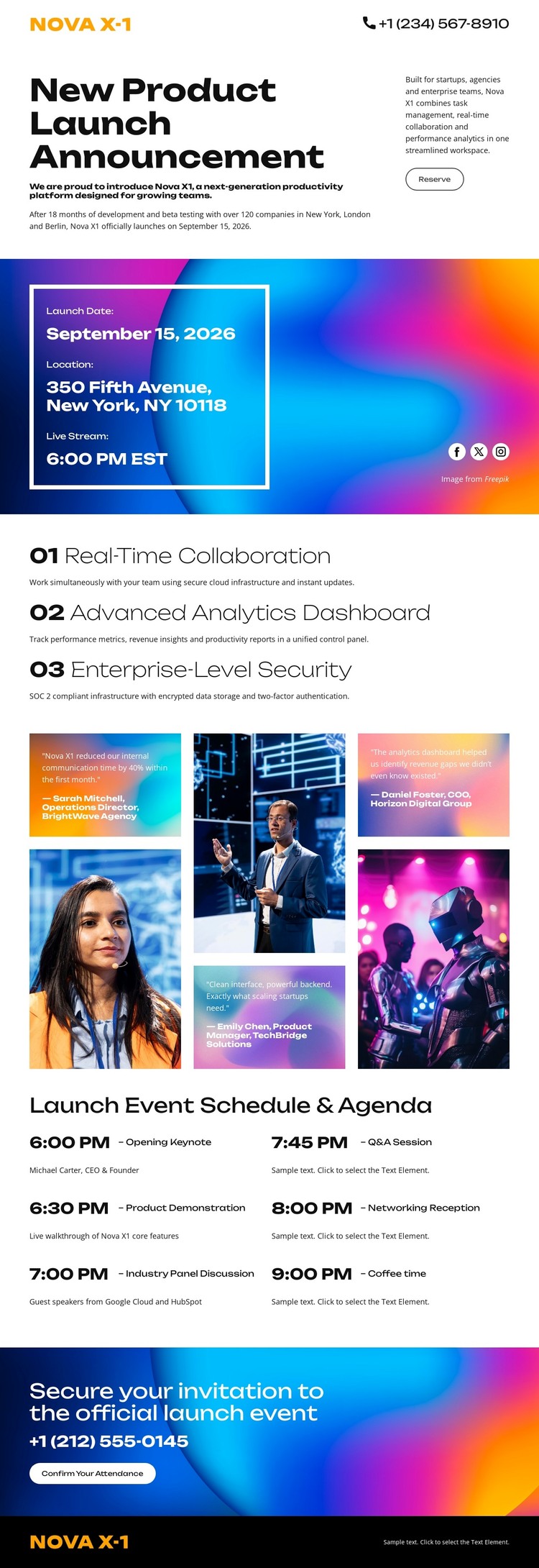
The opening announcement and event-information card create two distinct page-content roles. The first introduces Nova X-1 and the launch subject, while the second holds practical event details and livestream information. That division is useful for a content environment where permanent launch information needs to remain visually separate from the introductory message.
The three capability statements form a repeated product-content group. Real-time collaboration, an advanced analytics dashboard, and enterprise-level security can be presented as related information while retaining their numbered sequence. The five-image collage adds a visual content area that can support the same product-event story, and the eight-entry agenda provides a structured program section with keynote, demonstration, panel, and reception content. These relationships offer more useful WordPress interpretation than simply attaching a CMS label to the design.
The attendance invitation and dark footer then define the response and shared identity areas of the page. In a WordPress project, the design could surround permanent launch content with additional managed material if the project later requires it, but the template does not claim that Posts, categories, blog templates, or other WordPress structures already exist. Its theme value comes from the way page content, repeated capability information, image presentation, schedule entries, and a final action already belong to one coherent visual system.
Customize with Nicepage
Open this ready-made template in the WordPress Website Builder and customize it visually in the Nicepage editor. Replace demo content, edit page sections, and adapt the design to your project without rebuilding the template from scratch.
Manage and Edit This Theme in WordPress
Customize and Install the WordPress Theme
Start with this ready-made theme instead of building the WordPress design from scratch. Customize its layout, content, typography, images, sections, and other design elements visually in Nicepage editor, then export and install the WordPress Theme, Plugin, and Pages on your WordPress site. The Nicepage WordPress Plugin lets you continue working with the site after installation.
Edit the Theme Directly in WordPress
After installation, you can edit the WordPress Theme directly in WordPress with the Nicepage WordPress Plugin. Use Site Style to customize site Colors, Fonts, Header, Footer, Blog, and Post Page Templates while working within your WordPress website.
Edit WordPress Pages Visually
Use the Nicepage WordPress Plugin to edit page content directly from the WordPress admin area. Open a WordPress Page with Nicepage and visually change its text, images, sections, and other page elements while continuing to manage the Page through WordPress.
WordPress Content and Theme Integration
Use the customized theme with WordPress Pages, Posts, Blog and Post Templates, menus, widgets, and other CMS-managed content. Shared theme elements such as Colors, Fonts, Header, Footer, Blog, and Post Page Templates can be managed as part of the overall site design, while WordPress provides the CMS environment for managing site content.
This workflow combines a ready-made WordPress Theme with visual customization, direct theme editing in WordPress, and continued content management through the Nicepage WordPress Plugin.





















