
Privacy matters to our clients WordPress Theme


Edit Template Offline
2. Create new page and search for id 6543604
Edit Template Online
Create Awesome Websites


Free Nicepage Builder
Keywords
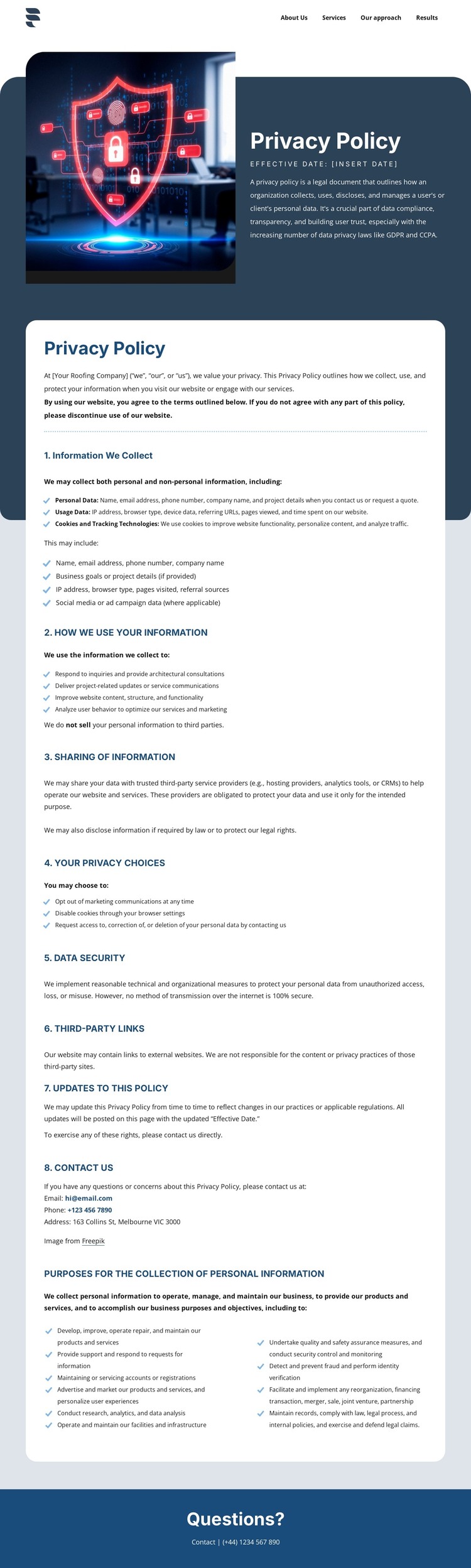
Permanent Policy Content Sits Beside a Clear Site Navigation Framework
The compact navigation and long-form policy card give this design a useful WordPress-oriented content interpretation. Navigation links to About Us, Services, Our approach, and Results establish the page as one part of a wider site, while the cybersecurity image and dark introduction identify a permanent privacy-policy destination. The central card can hold the stable informational content that visitors need to review without competing with regularly changing site material.
Its eight numbered sections create separate editorial subjects within that permanent page content. The document explains personal information, usage data, cookies, tracking technologies, information use and sharing, privacy choices, data security, third-party links, updates, and contact. It also states that personal information is not sold to third parties and references GDPR and CCPA. Rights involving access, correction, deletion, and marketing preferences add another clear content relationship, giving the policy page more substance than a generic legal notice.
The closing “Questions?” bar and contact line create a natural boundary between formal policy provisions and visitor communication. In a WordPress theme context, the design can therefore support page-oriented privacy content while retaining a recognizable visual system around the site’s navigation and shared-looking footer. The analysis confirms the page structure, not WordPress Posts, widgets, or other CMS elements as existing template components, so those should be introduced only if the final project requires them.
Customize with Nicepage
Open this ready-made template in the WordPress Website Builder and customize it visually in the Nicepage editor. Replace demo content, edit page sections, and adapt the design to your project without rebuilding the template from scratch.
Manage and Edit This Theme in WordPress
Customize and Install the WordPress Theme
Start with this ready-made theme instead of building the WordPress design from scratch. Customize its layout, content, typography, images, sections, and other design elements visually in Nicepage editor, then export and install the WordPress Theme, Plugin, and Pages on your WordPress site. The Nicepage WordPress Plugin lets you continue working with the site after installation.
Edit the Theme Directly in WordPress
After installation, you can edit the WordPress Theme directly in WordPress with the Nicepage WordPress Plugin. Use Site Style to customize site Colors, Fonts, Header, Footer, Blog, and Post Page Templates while working within your WordPress website.
Edit WordPress Pages Visually
Use the Nicepage WordPress Plugin to edit page content directly from the WordPress admin area. Open a WordPress Page with Nicepage and visually change its text, images, sections, and other page elements while continuing to manage the Page through WordPress.
WordPress Content and Theme Integration
Use the customized theme with WordPress Pages, Posts, Blog and Post Templates, menus, widgets, and other CMS-managed content. Shared theme elements such as Colors, Fonts, Header, Footer, Blog, and Post Page Templates can be managed as part of the overall site design, while WordPress provides the CMS environment for managing site content.
This workflow combines a ready-made WordPress Theme with visual customization, direct theme editing in WordPress, and continued content management through the Nicepage WordPress Plugin.





















