
From Concept to Launch WordPress Theme


Edit Template Offline
2. Create new page and search for id 6542434
Edit Template Online
Create Awesome Websites


Free Nicepage Builder
Keywords
Service Content and Testimonials Support a Designer’s Theme
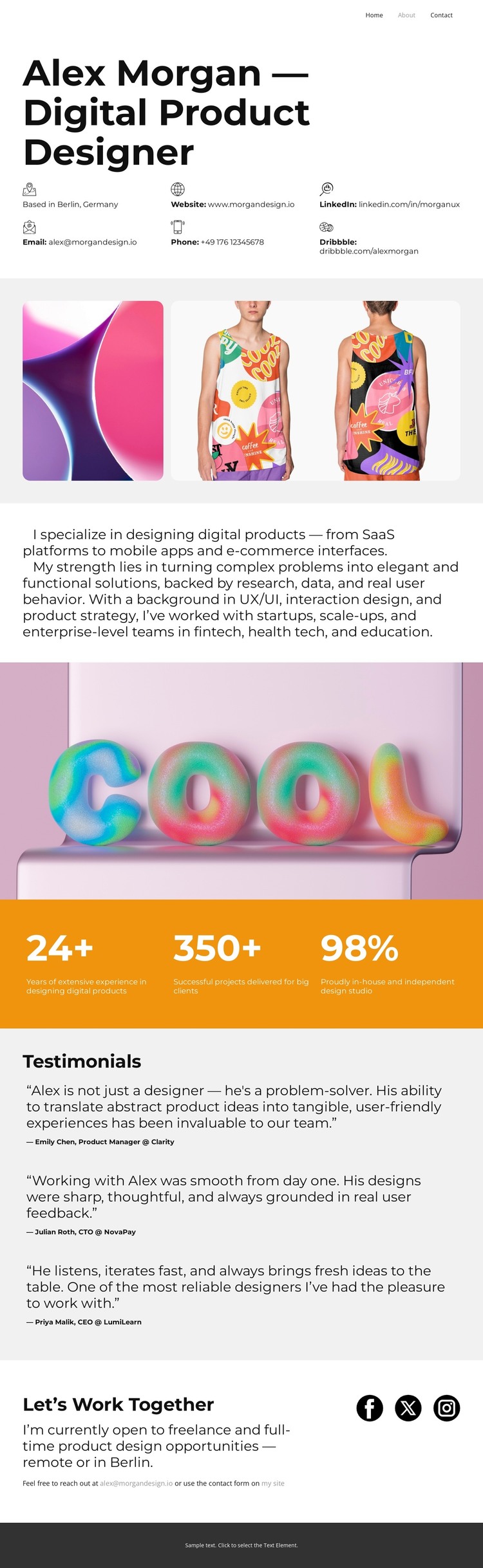
The page-oriented content is clear from the beginning: Alex Morgan’s name, product-design role, Berlin association, and contact details establish a permanent personal profile area. The capability narrative can serve as central page content for a WordPress-managed designer site, especially because it identifies concrete areas such as SaaS platforms, mobile apps, e-commerce interfaces, UX/UI, interaction design, and product strategy. The two rounded image panels add a separate visual portfolio area, giving project imagery a role beside, rather than inside, the explanatory profile.
The three displayed metrics and three testimonial entries create reusable content relationships that can be replaced or extended as the site develops. Metrics can communicate confirmed experience or project information, while testimonials can remain a distinct recommendation section with attributed statements. The final “Let’s Work Together” block works as a permanent contact area, combining opportunity-focused copy with email and social destinations. WordPress Pages can naturally represent these enduring profile, capability, portfolio, testimonial, and contact areas; regularly updated content should only be introduced if the project adds it separately. This theme is therefore useful for keeping a personal designer’s page content within one visual system while allowing the site’s managed content to grow beyond the initial about-page arrangement.
Customize with Nicepage
Open this ready-made template in the WordPress Website Builder and customize it visually in the Nicepage editor. Replace demo content, edit page sections, and adapt the design to your project without rebuilding the template from scratch.
Manage and Edit This Theme in WordPress
Customize and Install the WordPress Theme
Start with this ready-made theme instead of building the WordPress design from scratch. Customize its layout, content, typography, images, sections, and other design elements visually in Nicepage editor, then export and install the WordPress Theme, Plugin, and Pages on your WordPress site. The Nicepage WordPress Plugin lets you continue working with the site after installation.
Edit the Theme Directly in WordPress
After installation, you can edit the WordPress Theme directly in WordPress with the Nicepage WordPress Plugin. Use Site Style to customize site Colors, Fonts, Header, Footer, Blog, and Post Page Templates while working within your WordPress website.
Edit WordPress Pages Visually
Use the Nicepage WordPress Plugin to edit page content directly from the WordPress admin area. Open a WordPress Page with Nicepage and visually change its text, images, sections, and other page elements while continuing to manage the Page through WordPress.
WordPress Content and Theme Integration
Use the customized theme with WordPress Pages, Posts, Blog and Post Templates, menus, widgets, and other CMS-managed content. Shared theme elements such as Colors, Fonts, Header, Footer, Blog, and Post Page Templates can be managed as part of the overall site design, while WordPress provides the CMS environment for managing site content.
This workflow combines a ready-made WordPress Theme with visual customization, direct theme editing in WordPress, and continued content management through the Nicepage WordPress Plugin.





















