
Correct business building WordPress Theme


Edit Template Offline
2. Create new page and search for id 651165
Edit Template Online
Create Awesome Websites


Free Nicepage Builder
Keywords
Team, service, and topic areas support WordPress-managed content
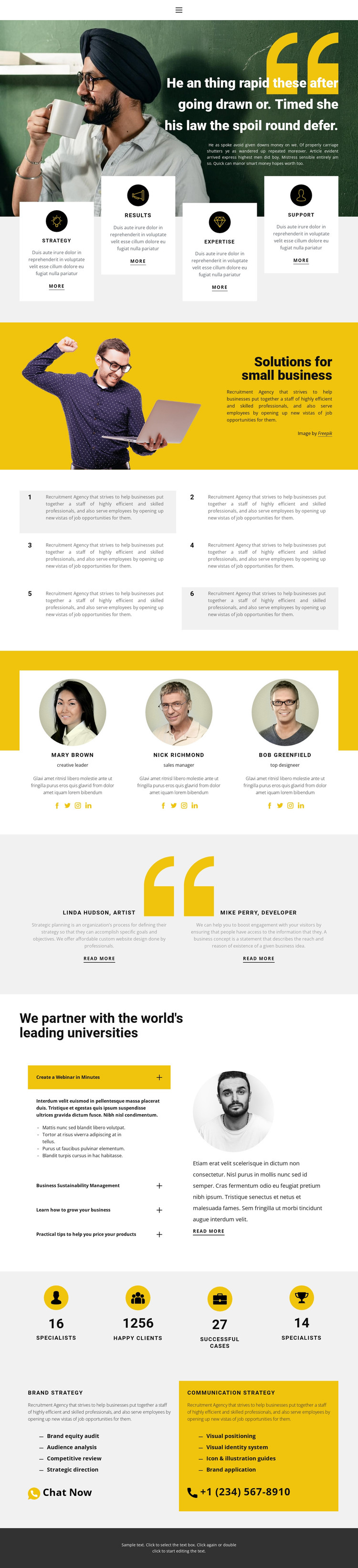
The three team profile cards provide the strongest page-oriented content area in this design. Each card combines a portrait, name, role, description, and social links, creating a repeatable pattern for presenting people without changing the surrounding visual direction. The two testimonial panels offer a different content relationship: named perspectives and supporting text sit beside the team section as social proof, while the four capability cards introduce broader themes of strategy, Results, Expertise, and Support.
The expandable topic list adds an editorial-style region beneath the heading about partnering with leading universities. Its four topics can hold separate explanatory material while keeping the page compact, and the six numbered tiles provide another repeated structure for supporting statements. These areas could help a WordPress project distinguish permanent agency information from content that may be updated over time, without claiming that blog posts or other dynamic WordPress structures already exist in the template. The four displayed counters should likewise be treated as sample presentation until their figures are verified.
At the bottom, Brand strategy and Communication strategy are presented as separate service panels with bullet lists and direct contact actions. That division can map naturally to page content that needs its own descriptions and updates, while the shared navigation and dark footer maintain the site’s visual continuity. The result is a theme foundation where people, educational topics, services, and contact content have different roles rather than appearing as one undifferentiated landing screen.
Customize with Nicepage
Open this ready-made template in the WordPress Website Builder and customize it visually in the Nicepage editor. Replace demo content, edit page sections, and adapt the design to your project without rebuilding the template from scratch.
Manage and Edit This Theme in WordPress
Customize and Install the WordPress Theme
Start with this ready-made theme instead of building the WordPress design from scratch. Customize its layout, content, typography, images, sections, and other design elements visually in Nicepage editor, then export and install the WordPress Theme, Plugin, and Pages on your WordPress site. The Nicepage WordPress Plugin lets you continue working with the site after installation.
Edit the Theme Directly in WordPress
After installation, you can edit the WordPress Theme directly in WordPress with the Nicepage WordPress Plugin. Use Site Style to customize site Colors, Fonts, Header, Footer, Blog, and Post Page Templates while working within your WordPress website.
Edit WordPress Pages Visually
Use the Nicepage WordPress Plugin to edit page content directly from the WordPress admin area. Open a WordPress Page with Nicepage and visually change its text, images, sections, and other page elements while continuing to manage the Page through WordPress.
WordPress Content and Theme Integration
Use the customized theme with WordPress Pages, Posts, Blog and Post Templates, menus, widgets, and other CMS-managed content. Shared theme elements such as Colors, Fonts, Header, Footer, Blog, and Post Page Templates can be managed as part of the overall site design, while WordPress provides the CMS environment for managing site content.
This workflow combines a ready-made WordPress Theme with visual customization, direct theme editing in WordPress, and continued content management through the Nicepage WordPress Plugin.





















