Social Media Design WordPress Theme


Edit Template Offline
2. Create new page and search for id 6284200
Edit Template Online
Create Awesome Websites


Free Nicepage Builder
Keywords
Service content and team areas give WordPress pages a clear editorial frame
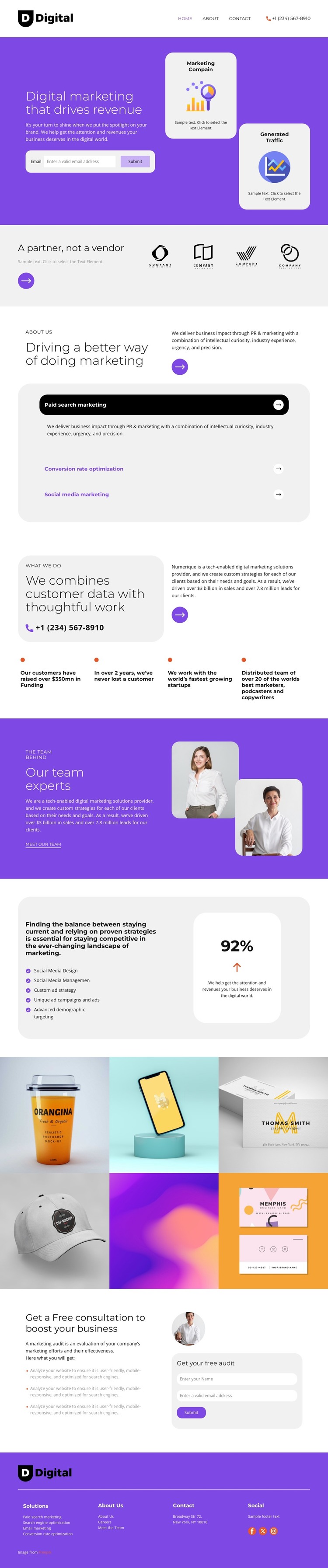
The service accordion is a natural starting point for a WordPress-managed content structure because it separates paid search marketing, conversion rate optimization, and social media marketing without disrupting the page’s visual direction. Each service area can remain part of the broader agency presentation while its wording and supporting material evolve with the project. The partner statement and four capability points provide additional page content for explaining positioning and expertise.
The team section introduces a different kind of content relationship. Its copy, Meet Our Team action, and two portrait images create a people-focused area that can support permanent agency information, while the six-image gallery provides a separate visual space for campaigns, marketing work, or other verified project material. These areas are not interchangeable: the team content establishes who delivers the work, whereas the gallery supplies image-led context.
The two lead-capture forms and consultation section complete the page-oriented structure. The upper email form can support the opening message, while the lower name-and-email form is paired with audit details and a free-audit prompt. Navigation, contact information, and Facebook, Twitter, and Instagram links in the footer give shared site elements a consistent closing role. Used as a WordPress theme, the design therefore offers coordinated areas for pages and changing content without claiming that posts, categories, or blog templates already exist.
Customize with Nicepage
Open this ready-made template in the WordPress Website Builder and customize it visually in the Nicepage editor. Replace demo content, edit page sections, and adapt the design to your project without rebuilding the template from scratch.
Manage and Edit This Theme in WordPress
Customize and Install the WordPress Theme
Start with this ready-made theme instead of building the WordPress design from scratch. Customize its layout, content, typography, images, sections, and other design elements visually in Nicepage editor, then export and install the WordPress Theme, Plugin, and Pages on your WordPress site. The Nicepage WordPress Plugin lets you continue working with the site after installation.
Edit the Theme Directly in WordPress
After installation, you can edit the WordPress Theme directly in WordPress with the Nicepage WordPress Plugin. Use Site Style to customize site Colors, Fonts, Header, Footer, Blog, and Post Page Templates while working within your WordPress website.
Edit WordPress Pages Visually
Use the Nicepage WordPress Plugin to edit page content directly from the WordPress admin area. Open a WordPress Page with Nicepage and visually change its text, images, sections, and other page elements while continuing to manage the Page through WordPress.
WordPress Content and Theme Integration
Use the customized theme with WordPress Pages, Posts, Blog and Post Templates, menus, widgets, and other CMS-managed content. Shared theme elements such as Colors, Fonts, Header, Footer, Blog, and Post Page Templates can be managed as part of the overall site design, while WordPress provides the CMS environment for managing site content.
This workflow combines a ready-made WordPress Theme with visual customization, direct theme editing in WordPress, and continued content management through the Nicepage WordPress Plugin.