Our partners put our clients first WordPress Theme


Edit Template Offline
2. Create new page and search for id 5725307
Edit Template Online
Create Awesome Websites


Free Nicepage Builder
Keywords
Eight Team Cards Give WordPress Pages a People-Centered Structure
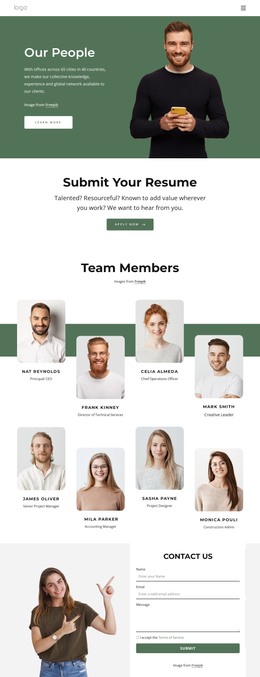
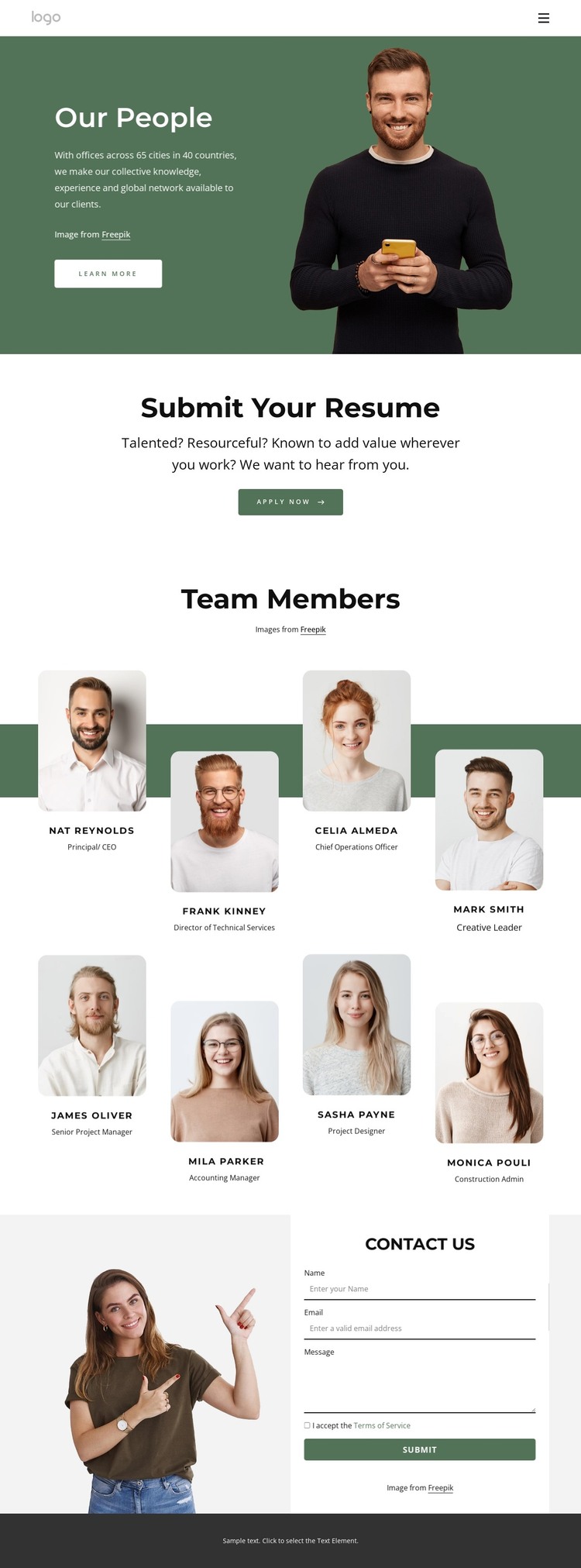
The repeated team profiles are the page’s clearest content unit. Eight portrait cards are arranged in two rows of four, with names and role labels beneath the images, creating a readable directory for a people-focused WordPress page. The sample identities should be replaced with verified project content, but the repeated relationship between portrait, name, and role is a useful structure for managed personnel information.
That directory is framed by two different page-oriented areas. Our People introduces the organization through a side-by-side text-and-portrait composition, green background, and Learn More button. Submit Your Resume then turns the visitor’s attention toward recruitment with a centered message and Apply Now action. This sequence gives permanent introductory content and applicant-focused content separate roles, rather than blending them into the same card grid.
The Contact Us section provides a practical page endpoint beside the team information. Its image and form work together to request a name, email, message, and terms acceptance, supporting direct inquiries without changing the visual character of the roster. The navigation menu includes About Us, Home Page, Landing, and Our Team links, giving the design clear relationships between page areas. A dark footer closes the composition and can remain a shared visual region as additional people-centered or company pages are added to the WordPress-managed site.
Customize with Nicepage
Open this ready-made template in the WordPress Website Builder and customize it visually in the Nicepage editor. Replace demo content, edit page sections, and adapt the design to your project without rebuilding the template from scratch.
Manage and Edit This Theme in WordPress
Customize and Install the WordPress Theme
Start with this ready-made theme instead of building the WordPress design from scratch. Customize its layout, content, typography, images, sections, and other design elements visually in Nicepage editor, then export and install the WordPress Theme, Plugin, and Pages on your WordPress site. The Nicepage WordPress Plugin lets you continue working with the site after installation.
Edit the Theme Directly in WordPress
After installation, you can edit the WordPress Theme directly in WordPress with the Nicepage WordPress Plugin. Use Site Style to customize site Colors, Fonts, Header, Footer, Blog, and Post Page Templates while working within your WordPress website.
Edit WordPress Pages Visually
Use the Nicepage WordPress Plugin to edit page content directly from the WordPress admin area. Open a WordPress Page with Nicepage and visually change its text, images, sections, and other page elements while continuing to manage the Page through WordPress.
WordPress Content and Theme Integration
Use the customized theme with WordPress Pages, Posts, Blog and Post Templates, menus, widgets, and other CMS-managed content. Shared theme elements such as Colors, Fonts, Header, Footer, Blog, and Post Page Templates can be managed as part of the overall site design, while WordPress provides the CMS environment for managing site content.
This workflow combines a ready-made WordPress Theme with visual customization, direct theme editing in WordPress, and continued content management through the Nicepage WordPress Plugin.