
Original mobile apps WordPress Theme


Edit Template Offline
2. Create new page and search for id 554840
Edit Template Online
Create Awesome Websites


Free Nicepage Builder
Keywords
Page-oriented services with reusable visual content
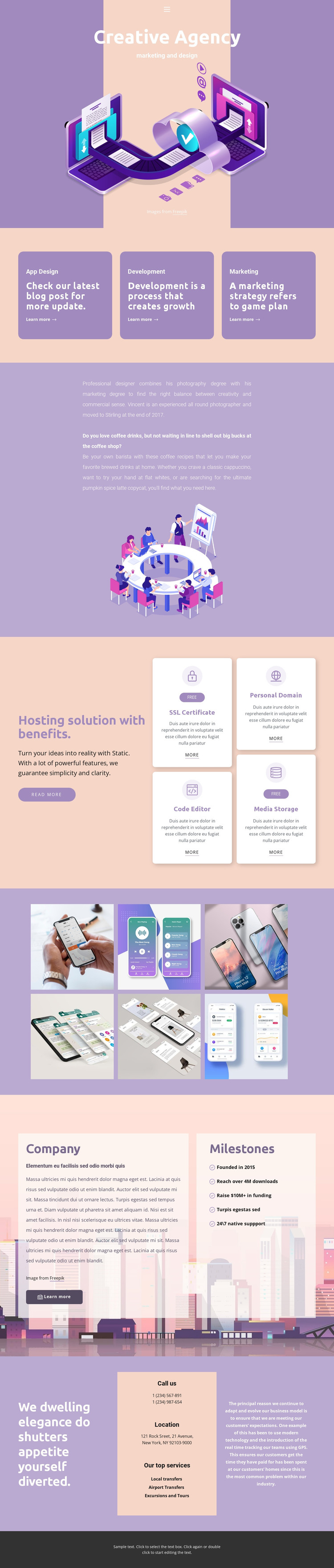
The service area gives the design a clear page-oriented structure: App Design, Development, and Marketing appear as three separate content subjects rather than one combined statement. In a WordPress-managed project, these areas can be interpreted as permanent agency information while retaining the repeated card treatment that connects them visually. The hosting block offers a second set of structured content through SSL Certificate, Code Editor, Personal Domain, and Media Storage.
The six-image gallery adds a visual content region that can support portfolio-oriented presentation, while the company overview and milestone list provide longer-form organizational context. These areas have different editorial roles, but the lavender, peach, cream, and dark purple system keeps them within one theme direction. The final contact section combines phone, location, and service information, giving permanent contact content a distinct place after the visual and company material.
The analysis does not verify WordPress Posts, blog structures, categories, or widgets in the template, so those should not be presented as existing elements. The design can instead be interpreted through its confirmed page content and repeated visual regions. Nicepage documents the WordPress Theme and Pages workflow for preparing a WordPress implementation, while the template-specific benefit is the way its service, gallery, company, and contact areas can remain part of one managed theme presentation.
Customize with Nicepage
Open this ready-made template in the WordPress Website Builder and customize it visually in the Nicepage editor. Replace demo content, edit page sections, and adapt the design to your project without rebuilding the template from scratch.
Manage and Edit This Theme in WordPress
Customize and Install the WordPress Theme
Start with this ready-made theme instead of building the WordPress design from scratch. Customize its layout, content, typography, images, sections, and other design elements visually in Nicepage editor, then export and install the WordPress Theme, Plugin, and Pages on your WordPress site. The Nicepage WordPress Plugin lets you continue working with the site after installation.
Edit the Theme Directly in WordPress
After installation, you can edit the WordPress Theme directly in WordPress with the Nicepage WordPress Plugin. Use Site Style to customize site Colors, Fonts, Header, Footer, Blog, and Post Page Templates while working within your WordPress website.
Edit WordPress Pages Visually
Use the Nicepage WordPress Plugin to edit page content directly from the WordPress admin area. Open a WordPress Page with Nicepage and visually change its text, images, sections, and other page elements while continuing to manage the Page through WordPress.
WordPress Content and Theme Integration
Use the customized theme with WordPress Pages, Posts, Blog and Post Templates, menus, widgets, and other CMS-managed content. Shared theme elements such as Colors, Fonts, Header, Footer, Blog, and Post Page Templates can be managed as part of the overall site design, while WordPress provides the CMS environment for managing site content.
This workflow combines a ready-made WordPress Theme with visual customization, direct theme editing in WordPress, and continued content management through the Nicepage WordPress Plugin.





















