We are crafting emotional experiences aimed at improving results WordPress Theme


Studio values become stable page content through four repeated items
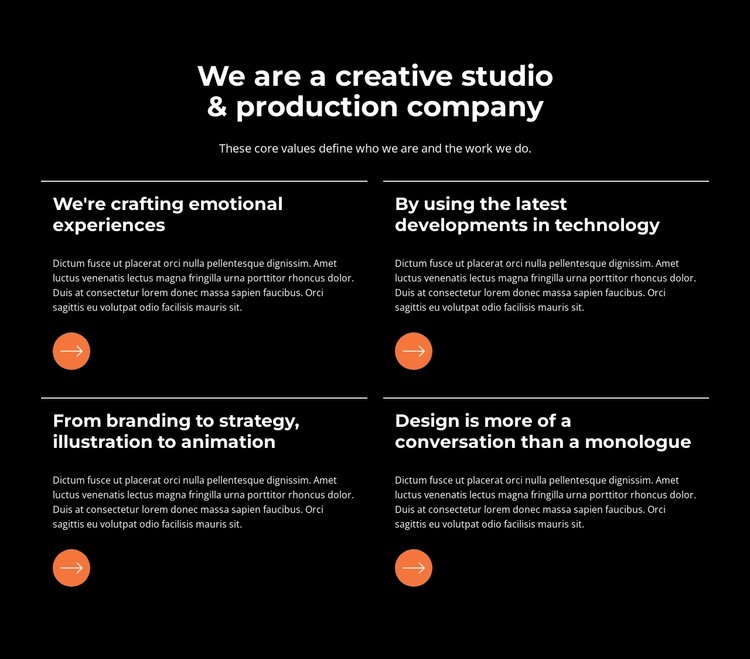
The heading “We are a creative studio & production company” gives the section a clear editorial subject, and the supporting line connects its core values with the work the studio produces. Together, these elements create an introduction that can sit naturally within permanent page content rather than depending on time-sensitive updates or a changing list of posts.
Below the introduction, four value items form a two-column grid with two rows. Their repeated structure is important: every item combines a heading, descriptive paragraph, thin top divider, and circular orange accent. This creates a consistent reading pattern for the capability statements, including the item that names branding, strategy, illustration, and animation. The black field and white typography maintain a strong contrast, while the orange circles help visitors distinguish the four related content units.
For a WordPress-managed page, the block can provide a stable creative-services section within a broader theme and content structure. It can explain the studio’s approach before a separate portfolio, case-study, or contact area, while other CMS-managed pages handle the rest of the project. The section remains one reusable page component: its value lies in the relationship between the centered introduction, the repeated capability content, and the orderly grid, not in representing a complete WordPress Theme.
Customize with Nicepage
Open this ready-made template in the WordPress Website Builder and customize it visually in the Nicepage editor. Replace demo content, edit page sections, and adapt the design to your project without rebuilding the template from scratch.
Edit Template Offline
2. Create a new page or select existing
3. Click Add new block, search for id 5203967 and click enter
Edit Template Online
Create Awesome Websites


Free Nicepage Builder
Keywords
Manage and Edit This Theme in WordPress
Customize and Install the WordPress Theme
Start with this ready-made theme instead of building the WordPress design from scratch. Customize its layout, content, typography, images, sections, and other design elements visually in Nicepage editor, then export and install the WordPress Theme, Plugin, and Pages on your WordPress site. The Nicepage WordPress Plugin lets you continue working with the site after installation.
Edit the Theme Directly in WordPress
After installation, you can edit the WordPress Theme directly in WordPress with the Nicepage WordPress Plugin. Use Site Style to customize site Colors, Fonts, Header, Footer, Blog, and Post Page Templates while working within your WordPress website.
Edit WordPress Pages Visually
Use the Nicepage WordPress Plugin to edit page content directly from the WordPress admin area. Open a WordPress Page with Nicepage and visually change its text, images, sections, and other page elements while continuing to manage the Page through WordPress.
WordPress Content and Theme Integration
Use the customized theme with WordPress Pages, Posts, Blog and Post Templates, menus, widgets, and other CMS-managed content. Shared theme elements such as Colors, Fonts, Header, Footer, Blog, and Post Page Templates can be managed as part of the overall site design, while WordPress provides the CMS environment for managing site content.
This workflow combines a ready-made WordPress Theme with visual customization, direct theme editing in WordPress, and continued content management through the Nicepage WordPress Plugin.