A global architecture, design, and planning firm WordPress Theme


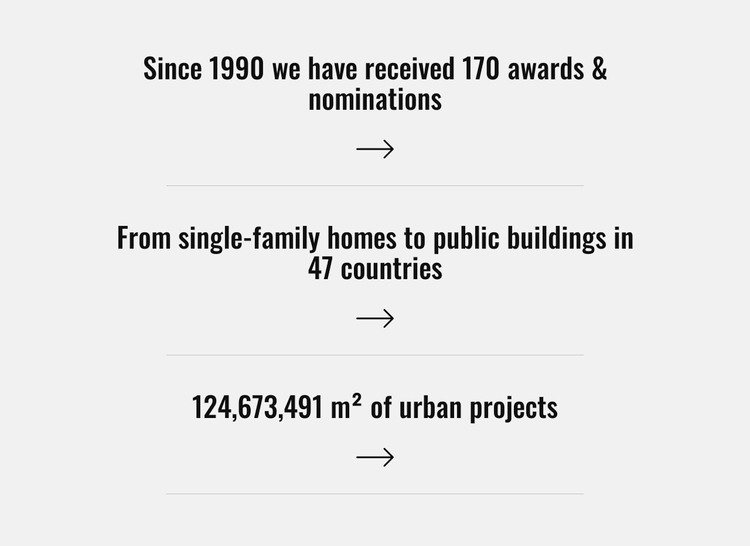
Three centered figures create stable page content
The three statements give this section a clear page-content role: recognition, geographic reach, and project scale are presented as separate highlights rather than merged into one paragraph. The first item refers to 170 awards and nominations since 1990. The second identifies projects in 47 countries and names a range extending from single-family homes to public buildings. The third presents 124,673,491 m² of urban projects. These displayed figures can provide a concise achievements area on a page about an architecture, design, or planning practice.
In a WordPress-managed site, the block can function as stable services-page or company-information content while other sections carry project descriptions, images, or contact details. Its three-item structure is suited to permanent page material because the statements remain recognizable as separate highlights, not as a time-based article stream. The centered column establishes a consistent reading path, while the arrow treatment beneath each statement gives the sequence a repeated visual cue. Thin gray rules preserve separation between the figures, and the light gray field with bold black type makes the content distinct from surrounding page sections. The block contributes a focused content area within the wider WordPress page rather than supplying the site's complete theme structure.
Customize with Nicepage
Open this ready-made template in the WordPress Website Builder and customize it visually in the Nicepage editor. Replace demo content, edit page sections, and adapt the design to your project without rebuilding the template from scratch.
Edit Template Offline
2. Create a new page or select existing
3. Click Add new block, search for id 5094500 and click enter
Edit Template Online
Create Awesome Websites


Free Nicepage Builder
Keywords
Manage and Edit This Theme in WordPress
Customize and Install the WordPress Theme
Start with this ready-made theme instead of building the WordPress design from scratch. Customize its layout, content, typography, images, sections, and other design elements visually in Nicepage editor, then export and install the WordPress Theme, Plugin, and Pages on your WordPress site. The Nicepage WordPress Plugin lets you continue working with the site after installation.
Edit the Theme Directly in WordPress
After installation, you can edit the WordPress Theme directly in WordPress with the Nicepage WordPress Plugin. Use Site Style to customize site Colors, Fonts, Header, Footer, Blog, and Post Page Templates while working within your WordPress website.
Edit WordPress Pages Visually
Use the Nicepage WordPress Plugin to edit page content directly from the WordPress admin area. Open a WordPress Page with Nicepage and visually change its text, images, sections, and other page elements while continuing to manage the Page through WordPress.
WordPress Content and Theme Integration
Use the customized theme with WordPress Pages, Posts, Blog and Post Templates, menus, widgets, and other CMS-managed content. Shared theme elements such as Colors, Fonts, Header, Footer, Blog, and Post Page Templates can be managed as part of the overall site design, while WordPress provides the CMS environment for managing site content.
This workflow combines a ready-made WordPress Theme with visual customization, direct theme editing in WordPress, and continued content management through the Nicepage WordPress Plugin.