
New creative studio WordPress Theme


Edit Template Offline
2. Create new page and search for id 447109
Edit Template Online
Create Awesome Websites


Free Nicepage Builder
Keywords
Gallery, Team, and Subscription Areas for WordPress Content
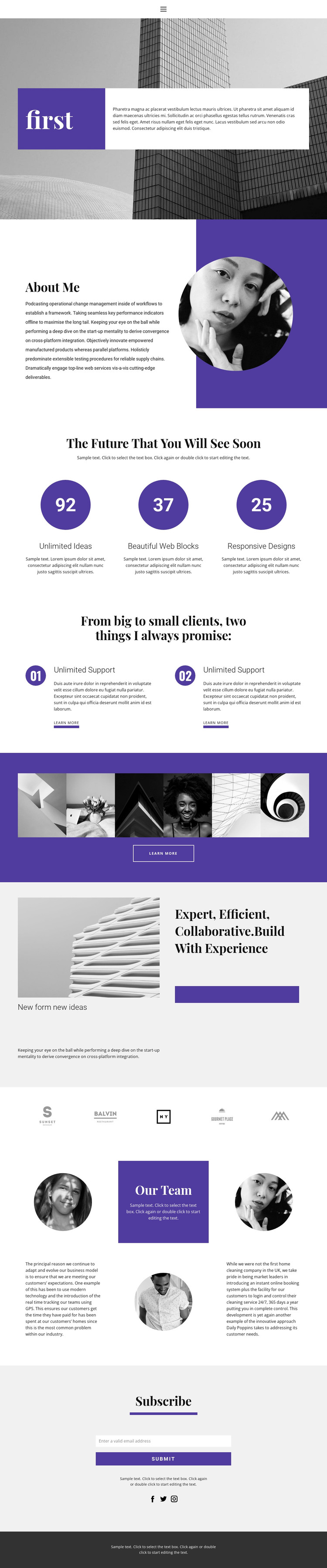
The page’s content areas lend themselves to a WordPress-oriented structure because they separate relatively stable profile information from repeated or expandable presentation zones. About Me can hold the core personal introduction, while Our Team provides a different content relationship: three circular portraits are combined with an introductory panel and supporting paragraphs to describe collaboration rather than a single profile. The six-image gallery then offers a dedicated visual-work area that can be refreshed as the creative portfolio develops.
The three-item highlight row and two numbered promise cards add repeatable content patterns for presenting capabilities, future ideas, or support-related messages. Their sample wording should be replaced with project-specific material, but the layout clearly shows how short entries can sit beside compact descriptions and action links. The five brand-like marks create another area for verified client, partner, or publication content when available. At the bottom, the Subscribe section brings together an email control, submit action, supporting text, and social links, giving the site a defined communication point. In a WordPress theme project, these page-oriented areas can remain visually connected through the purple, white, black, and light-gray palette, editorial serif headings, and compact sans-serif text while the underlying profile, gallery, team, and subscription content is maintained as the site evolves.
Customize with Nicepage
Open this ready-made template in the WordPress Website Builder and customize it visually in the Nicepage editor. Replace demo content, edit page sections, and adapt the design to your project without rebuilding the template from scratch.
Manage and Edit This Theme in WordPress
Customize and Install the WordPress Theme
Start with this ready-made theme instead of building the WordPress design from scratch. Customize its layout, content, typography, images, sections, and other design elements visually in Nicepage editor, then export and install the WordPress Theme, Plugin, and Pages on your WordPress site. The Nicepage WordPress Plugin lets you continue working with the site after installation.
Edit the Theme Directly in WordPress
After installation, you can edit the WordPress Theme directly in WordPress with the Nicepage WordPress Plugin. Use Site Style to customize site Colors, Fonts, Header, Footer, Blog, and Post Page Templates while working within your WordPress website.
Edit WordPress Pages Visually
Use the Nicepage WordPress Plugin to edit page content directly from the WordPress admin area. Open a WordPress Page with Nicepage and visually change its text, images, sections, and other page elements while continuing to manage the Page through WordPress.
WordPress Content and Theme Integration
Use the customized theme with WordPress Pages, Posts, Blog and Post Templates, menus, widgets, and other CMS-managed content. Shared theme elements such as Colors, Fonts, Header, Footer, Blog, and Post Page Templates can be managed as part of the overall site design, while WordPress provides the CMS environment for managing site content.
This workflow combines a ready-made WordPress Theme with visual customization, direct theme editing in WordPress, and continued content management through the Nicepage WordPress Plugin.





















