Discover classic and new menu items WordPress Theme


Stable Menu Content for a WordPress-Managed Restaurant Page
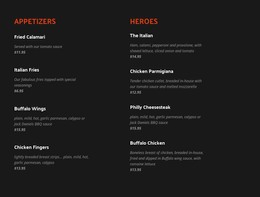
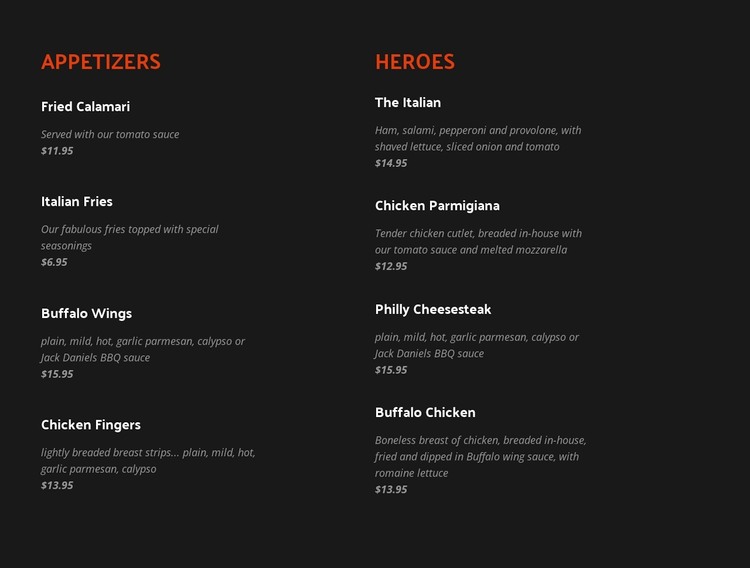
The menu reads as durable page content rather than a time-based stream. Four Appetizers entries sit under the left category heading, and four Heroes entries sit under the right heading. Each item supplies a name, description, and displayed price, making the block appropriate for a stable restaurant information area where visitors can review offerings in one place. The repeated structure also leaves the surrounding project free to manage other content separately.
The visual treatment keeps that content organized when it appears within a broader WordPress-oriented design. Orange-red headings distinguish the two categories, white names provide the primary scan path, and muted gray italic descriptions and prices supply secondary information. The charcoal background connects both columns, while generous vertical spacing prevents eight entries from reading as one crowded text mass. Static presentation keeps the section's purpose centered on browsing the menu.
In a WordPress context, the block can remain a reusable page-content region while other parts of the project handle additional pages or regularly updated material. It is not a standalone WordPress Theme; its role is the menu section itself. Nicepage's WordPress Pages workflow describes the broader environment in which designed content can participate. The section can preserve its two-category arrangement while the surrounding site develops independently.
Customize with Nicepage
Open this ready-made template in the WordPress Website Builder and customize it visually in the Nicepage editor. Replace demo content, edit page sections, and adapt the design to your project without rebuilding the template from scratch.
Edit Template Offline
2. Create a new page or select existing
3. Click Add new block, search for id 4004923 and click enter
Edit Template Online
Create Awesome Websites


Free Nicepage Builder
Keywords
Manage and Edit This Theme in WordPress
Customize and Install the WordPress Theme
Start with this ready-made theme instead of building the WordPress design from scratch. Customize its layout, content, typography, images, sections, and other design elements visually in Nicepage editor, then export and install the WordPress Theme, Plugin, and Pages on your WordPress site. The Nicepage WordPress Plugin lets you continue working with the site after installation.
Edit the Theme Directly in WordPress
After installation, you can edit the WordPress Theme directly in WordPress with the Nicepage WordPress Plugin. Use Site Style to customize site Colors, Fonts, Header, Footer, Blog, and Post Page Templates while working within your WordPress website.
Edit WordPress Pages Visually
Use the Nicepage WordPress Plugin to edit page content directly from the WordPress admin area. Open a WordPress Page with Nicepage and visually change its text, images, sections, and other page elements while continuing to manage the Page through WordPress.
WordPress Content and Theme Integration
Use the customized theme with WordPress Pages, Posts, Blog and Post Templates, menus, widgets, and other CMS-managed content. Shared theme elements such as Colors, Fonts, Header, Footer, Blog, and Post Page Templates can be managed as part of the overall site design, while WordPress provides the CMS environment for managing site content.
This workflow combines a ready-made WordPress Theme with visual customization, direct theme editing in WordPress, and continued content management through the Nicepage WordPress Plugin.