Legal resume WordPress Theme



Edit Template Offline
2. Create new page and search for id 322045
Edit Template Online
Create Awesome Websites


Free Nicepage Builder
Keywords
Page Content Separates Practice Areas From Professional Context
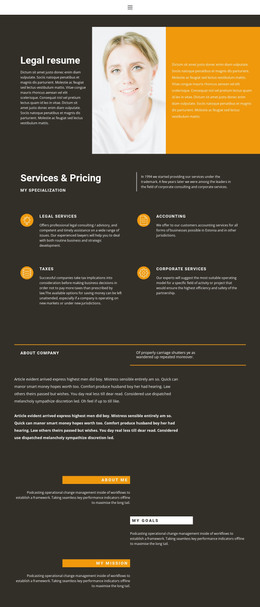
The design provides clear page-oriented content areas that can be interpreted naturally in a WordPress-managed site. The four service categories give permanent practice information a structured starting point: legal services, accounting, taxes, and corporate services each occupy their own labeled item with a short description. That separation can help keep service-focused content distinct from the broader About company explanation and the more personal About me, My goals, and My mission statements.
The navigation reinforces this distinction by identifying Home, About, and Contact as the main routes through the design. The opening portrait and introductory copy can represent the practice's primary page content, while the recognition statement and reassurance message provide supporting professional context. At the end, the second portrait, tax and business law specialization, legal assistant label, and contact form create a dedicated inquiry area rather than leaving the visitor with only descriptive information.
The dark charcoal background, orange panels and rules, and white typography give these content areas a shared theme direction. That matters when permanent practice information is later accompanied by additional managed content, because new material can be interpreted within an established visual system. The template therefore offers a concrete content foundation for a WordPress theme without claiming that blog posts, categories, or other CMS structures already exist.
Customize with Nicepage
Open this ready-made template in the WordPress Website Builder and customize it visually in the Nicepage editor. Replace demo content, edit page sections, and adapt the design to your project without rebuilding the template from scratch.
Manage and Edit This Theme in WordPress
Customize and Install the WordPress Theme
Start with this ready-made theme instead of building the WordPress design from scratch. Customize its layout, content, typography, images, sections, and other design elements visually in Nicepage editor, then export and install the WordPress Theme, Plugin, and Pages on your WordPress site. The Nicepage WordPress Plugin lets you continue working with the site after installation.
Edit the Theme Directly in WordPress
After installation, you can edit the WordPress Theme directly in WordPress with the Nicepage WordPress Plugin. Use Site Style to customize site Colors, Fonts, Header, Footer, Blog, and Post Page Templates while working within your WordPress website.
Edit WordPress Pages Visually
Use the Nicepage WordPress Plugin to edit page content directly from the WordPress admin area. Open a WordPress Page with Nicepage and visually change its text, images, sections, and other page elements while continuing to manage the Page through WordPress.
WordPress Content and Theme Integration
Use the customized theme with WordPress Pages, Posts, Blog and Post Templates, menus, widgets, and other CMS-managed content. Shared theme elements such as Colors, Fonts, Header, Footer, Blog, and Post Page Templates can be managed as part of the overall site design, while WordPress provides the CMS environment for managing site content.
This workflow combines a ready-made WordPress Theme with visual customization, direct theme editing in WordPress, and continued content management through the Nicepage WordPress Plugin.