Revolution of designing art WordPress Theme
Edit Template Offline
2. Create new page and search for id 31866
Edit Template Online
Create Awesome Websites


Free Nicepage Builder
Keywords
Creative Examples and Branding Statements Shape the Theme Content
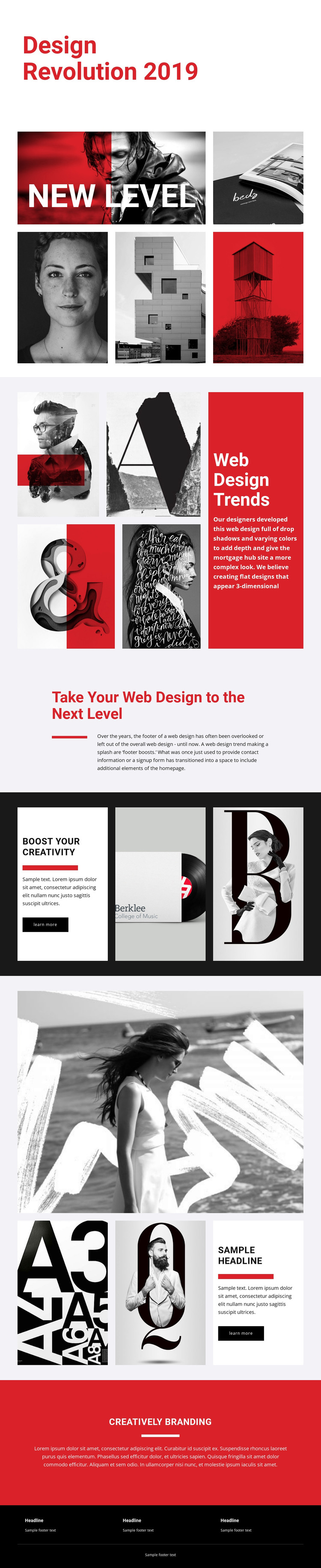
The image collages give this design a strong set of permanent page-oriented content areas. The five-image New Level section can introduce a visual subject, while the four-image Web Design Trends section places examples beside a contrasting text panel. That pairing is useful for a WordPress-oriented content environment because it separates visual presentation from explanatory copy without requiring the design to become a dense article layout. The page’s headings also provide clear editorial subjects, including creative trends, design development, and branding.
The dark Boost Your Creativity section adds a focused text card and learn more link beside two image panels, while the later feature repeats the image-and-text relationship with a large monochrome image and two supporting images. These areas can support distinct page content or curated creative material while retaining the same visual direction. The red Creatively Branding statement and black footer then create shared closing regions that can frame the rest of the presentation. The analysis does not verify blog posts, categories, or other specific WordPress content structures, so those should not be treated as existing template elements. Instead, the theme value comes from its defined page content, repeated visual patterns, and recognizable palette, which can provide a stable design character around WordPress-managed material.
Customize with Nicepage
Open this ready-made template in the WordPress Website Builder and customize it visually in the Nicepage editor. Replace demo content, edit page sections, and adapt the design to your project without rebuilding the template from scratch.
Manage and Edit This Theme in WordPress
Customize and Install the WordPress Theme
Start with this ready-made theme instead of building the WordPress design from scratch. Customize its layout, content, typography, images, sections, and other design elements visually in Nicepage editor, then export and install the WordPress Theme, Plugin, and Pages on your WordPress site. The Nicepage WordPress Plugin lets you continue working with the site after installation.
Edit the Theme Directly in WordPress
After installation, you can edit the WordPress Theme directly in WordPress with the Nicepage WordPress Plugin. Use Site Style to customize site Colors, Fonts, Header, Footer, Blog, and Post Page Templates while working within your WordPress website.
Edit WordPress Pages Visually
Use the Nicepage WordPress Plugin to edit page content directly from the WordPress admin area. Open a WordPress Page with Nicepage and visually change its text, images, sections, and other page elements while continuing to manage the Page through WordPress.
WordPress Content and Theme Integration
Use the customized theme with WordPress Pages, Posts, Blog and Post Templates, menus, widgets, and other CMS-managed content. Shared theme elements such as Colors, Fonts, Header, Footer, Blog, and Post Page Templates can be managed as part of the overall site design, while WordPress provides the CMS environment for managing site content.
This workflow combines a ready-made WordPress Theme with visual customization, direct theme editing in WordPress, and continued content management through the Nicepage WordPress Plugin.