
Exiting agency business WordPress Theme
Edit Template Offline
2. Create new page and search for id 31792
Edit Template Online
Create Awesome Websites


Free Nicepage Builder
Keywords
Agency Content Areas Leave Room for WordPress-Published Material
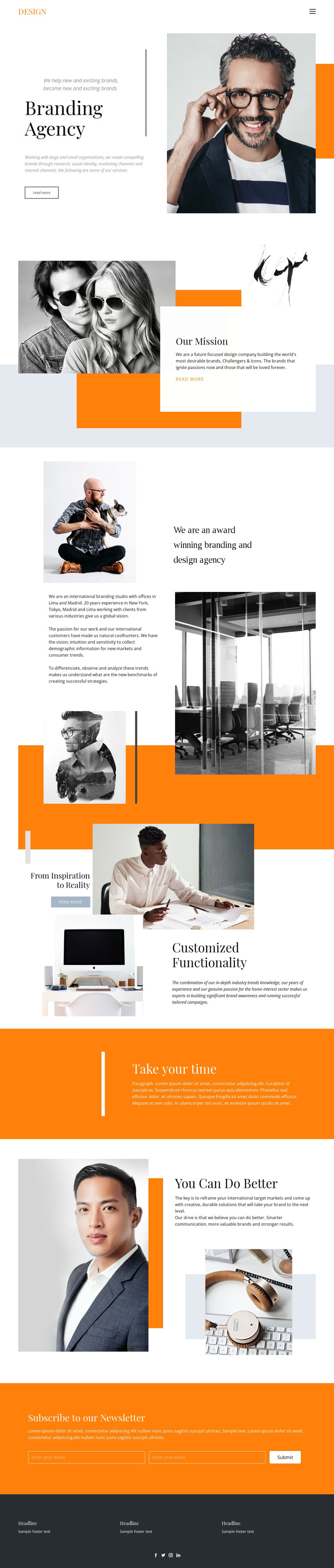
The page separates permanent agency information into recognizable content areas. The hero can carry the primary introduction, while “Our Mission” gives the organization a distinct place for its purpose and point of view. The following award-oriented positioning section adds background and credibility-oriented context, and the capability presentation shifts attention toward the work itself. This arrangement suits a WordPress-managed theme because different kinds of page content can retain their own visual emphasis without losing the shared agency character.
Editorial photography is not used as a single decorative image; it recurs across the hero, mission composition, agency background, and feature sections. That repeated treatment creates a visual system around the content, allowing future copy or image updates to remain connected to the original presentation. The orange geometric accents and contrasting white, blue, and charcoal areas provide additional cues for maintaining that direction across related page content.
The newsletter section has a different role from the descriptive sections. Its name-and-email inputs provide a focused place for audience subscription after the agency story has been presented, while the footer groups recurring information and social links into a shared closing region. In a WordPress project, this combination of page-oriented agency content, repeatable visual patterns, and a distinct subscription area offers a useful theme foundation without assuming that blog posts, categories, or other CMS structures already exist.
Customize with Nicepage
Open this ready-made template in the WordPress Website Builder and customize it visually in the Nicepage editor. Replace demo content, edit page sections, and adapt the design to your project without rebuilding the template from scratch.
Manage and Edit This Theme in WordPress
Customize and Install the WordPress Theme
Start with this ready-made theme instead of building the WordPress design from scratch. Customize its layout, content, typography, images, sections, and other design elements visually in Nicepage editor, then export and install the WordPress Theme, Plugin, and Pages on your WordPress site. The Nicepage WordPress Plugin lets you continue working with the site after installation.
Edit the Theme Directly in WordPress
After installation, you can edit the WordPress Theme directly in WordPress with the Nicepage WordPress Plugin. Use Site Style to customize site Colors, Fonts, Header, Footer, Blog, and Post Page Templates while working within your WordPress website.
Edit WordPress Pages Visually
Use the Nicepage WordPress Plugin to edit page content directly from the WordPress admin area. Open a WordPress Page with Nicepage and visually change its text, images, sections, and other page elements while continuing to manage the Page through WordPress.
WordPress Content and Theme Integration
Use the customized theme with WordPress Pages, Posts, Blog and Post Templates, menus, widgets, and other CMS-managed content. Shared theme elements such as Colors, Fonts, Header, Footer, Blog, and Post Page Templates can be managed as part of the overall site design, while WordPress provides the CMS environment for managing site content.
This workflow combines a ready-made WordPress Theme with visual customization, direct theme editing in WordPress, and continued content management through the Nicepage WordPress Plugin.





















