
Design Agency WordPress Theme


Edit Template Offline
2. Create new page and search for id 24096
Edit Template Online
Create Awesome Websites


Free Nicepage Builder
Keywords
Vevo Black and Client Content Give the Agency Theme Clear Page Roles
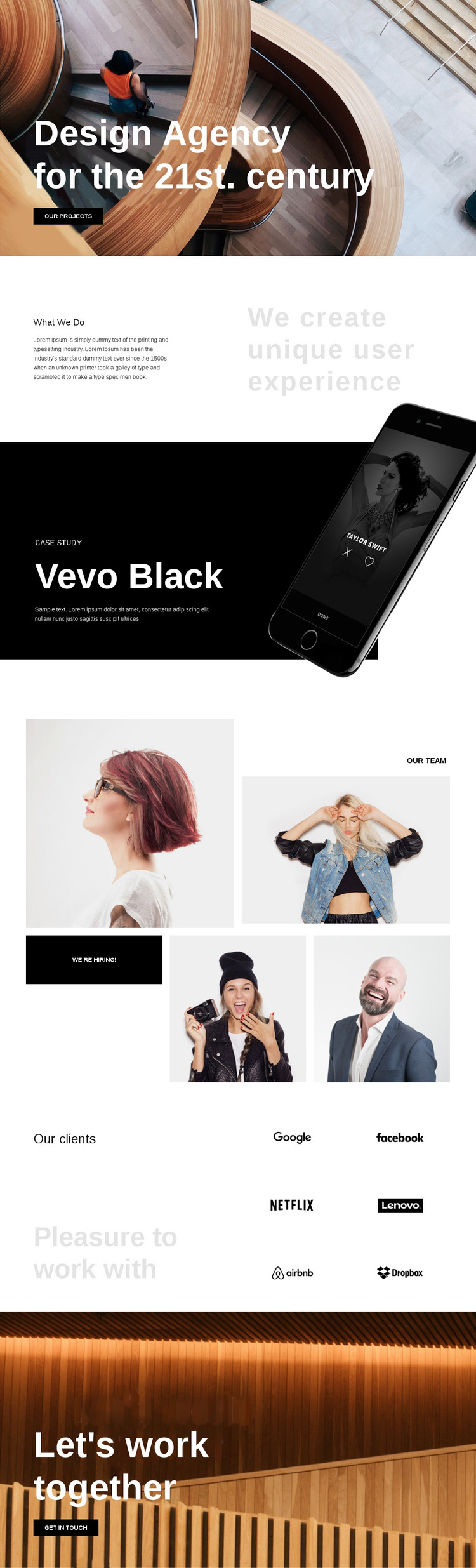
The opening agency statement and “What We Do” section provide distinct permanent page content for a creative-services site. The first establishes the agency’s positioning and points toward “our projects,” while the second explains the focus on creating unique user experiences. In a WordPress-managed project, these areas can serve as the core presentation of the agency without treating the sample wording as fixed business information.
The Vevo Black case study gives the theme a focused project area that can be replaced or expanded with confirmed portfolio material. Its text-and-device arrangement separates project evidence from the general service explanation. The four-image “Our Team” collage adds another content role, and the “we’re hiring!” action shows that recruitment can sit beside the agency story without becoming the main client path. The six client logos form a further relationship section, visually distinct from both the case study and team presentation.
The closing “Let’s work together” block gives the page a clear project-contact destination. These page areas can translate naturally into a WordPress theme structure in which agency information, project presentations, team material, and contact content remain visually connected while the site’s editable content develops over time. The design supports page-oriented content first; it does not require an unsupported claim that blog posts or other WordPress content types already appear in the template.
Customize with Nicepage
Open this ready-made template in the WordPress Website Builder and customize it visually in the Nicepage editor. Replace demo content, edit page sections, and adapt the design to your project without rebuilding the template from scratch.
Manage and Edit This Theme in WordPress
Customize and Install the WordPress Theme
Start with this ready-made theme instead of building the WordPress design from scratch. Customize its layout, content, typography, images, sections, and other design elements visually in Nicepage editor, then export and install the WordPress Theme, Plugin, and Pages on your WordPress site. The Nicepage WordPress Plugin lets you continue working with the site after installation.
Edit the Theme Directly in WordPress
After installation, you can edit the WordPress Theme directly in WordPress with the Nicepage WordPress Plugin. Use Site Style to customize site Colors, Fonts, Header, Footer, Blog, and Post Page Templates while working within your WordPress website.
Edit WordPress Pages Visually
Use the Nicepage WordPress Plugin to edit page content directly from the WordPress admin area. Open a WordPress Page with Nicepage and visually change its text, images, sections, and other page elements while continuing to manage the Page through WordPress.
WordPress Content and Theme Integration
Use the customized theme with WordPress Pages, Posts, Blog and Post Templates, menus, widgets, and other CMS-managed content. Shared theme elements such as Colors, Fonts, Header, Footer, Blog, and Post Page Templates can be managed as part of the overall site design, while WordPress provides the CMS environment for managing site content.
This workflow combines a ready-made WordPress Theme with visual customization, direct theme editing in WordPress, and continued content management through the Nicepage WordPress Plugin.





















