
Travel App WordPress Theme


Edit Template Offline
2. Create new page and search for id 23269
Edit Template Online
Create Awesome Websites


Free Nicepage Builder
Keywords
App Data and Leadership Content Create WordPress Page Areas
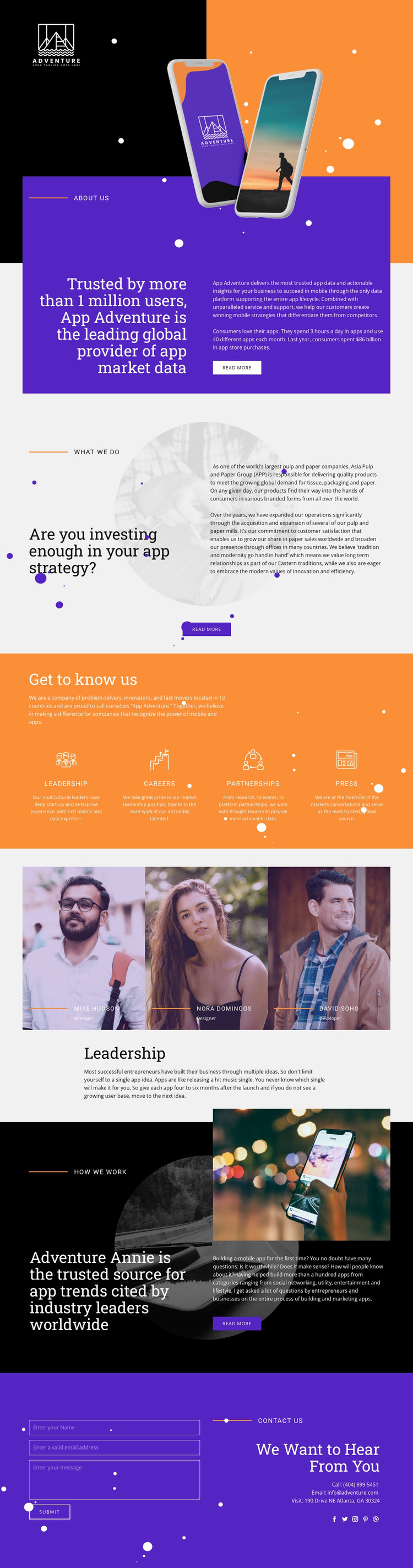
The page contains several kinds of permanent company content that can be organized naturally in a WordPress theme. About Us presents the organization’s app market data positioning, while What We Do gives app strategy and business support a separate explanatory area. Their different questions, statements, images, and Read more actions make them more than interchangeable text blocks: together they establish a page-oriented company narrative that can remain distinct from regularly updated material added later.
The middle content supports additional editorial relationships. Get to know us presents Leadership, Careers, Partnerships, and Press as four organizational areas, while the separate Leadership section focuses on three portrait-based entries and role labels. These areas could support permanent pages or recurring content without claiming that WordPress Posts, categories, or blog structures already exist in the template. How We Work adds another page area for the app-trends statement, mobile app image, and process description.
The closing Contact Us section combines a form with direct contact details and social links, giving the theme a clear shared content endpoint. In a WordPress project, the Nicepage WordPress Plugin can support visual editing of the theme and page content after installation, but the template-specific value comes from its existing division of company, organizational, leadership, process, and contact information. This makes the design suitable for a managed site where permanent profile content and future updates can continue within one visual system.
Customize with Nicepage
Open this ready-made template in the WordPress Website Builder and customize it visually in the Nicepage editor. Replace demo content, edit page sections, and adapt the design to your project without rebuilding the template from scratch.
Manage and Edit This Theme in WordPress
Customize and Install the WordPress Theme
Start with this ready-made theme instead of building the WordPress design from scratch. Customize its layout, content, typography, images, sections, and other design elements visually in Nicepage editor, then export and install the WordPress Theme, Plugin, and Pages on your WordPress site. The Nicepage WordPress Plugin lets you continue working with the site after installation.
Edit the Theme Directly in WordPress
After installation, you can edit the WordPress Theme directly in WordPress with the Nicepage WordPress Plugin. Use Site Style to customize site Colors, Fonts, Header, Footer, Blog, and Post Page Templates while working within your WordPress website.
Edit WordPress Pages Visually
Use the Nicepage WordPress Plugin to edit page content directly from the WordPress admin area. Open a WordPress Page with Nicepage and visually change its text, images, sections, and other page elements while continuing to manage the Page through WordPress.
WordPress Content and Theme Integration
Use the customized theme with WordPress Pages, Posts, Blog and Post Templates, menus, widgets, and other CMS-managed content. Shared theme elements such as Colors, Fonts, Header, Footer, Blog, and Post Page Templates can be managed as part of the overall site design, while WordPress provides the CMS environment for managing site content.
This workflow combines a ready-made WordPress Theme with visual customization, direct theme editing in WordPress, and continued content management through the Nicepage WordPress Plugin.





















