
Your success depends on you WordPress Theme


Edit Template Offline
2. Create new page and search for id 131608
Edit Template Online
Create Awesome Websites


Free Nicepage Builder
Keywords
Service and Editorial Areas Suit WordPress Page Content
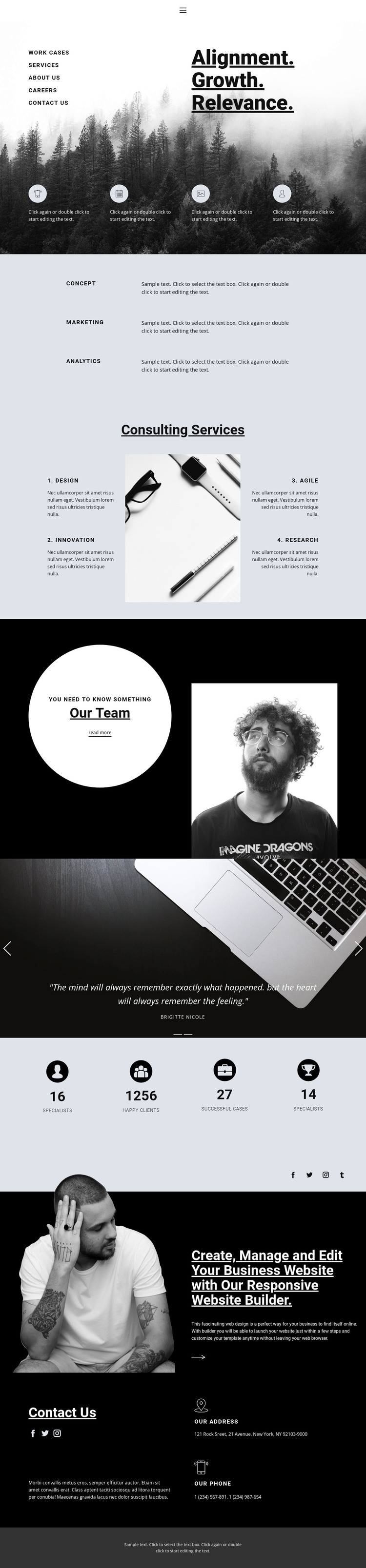
The strategic rows for Concept, Marketing, and Analytics give the page a useful editorial starting point: each area can carry focused explanatory content without disturbing the overall consulting presentation. The four named services—Design, Innovation, Agile, and Research—provide a second, more specific content layer. Their numbered arrangement around a central photograph makes the offering easy to distinguish and gives a WordPress-oriented project clear page content to maintain and expand.
The Our Team section and two-slide testimonial carousel add recurring people and proof content, but the visible names and quotations are demo material and should not be treated as verified business records. The four counters likewise show structural metric units rather than confirmed achievements. These areas can nevertheless help organize permanent page content, while the image-backed testimonial treatment and dark promotional section preserve the design character around that content.
The navigation, social links, and Contact Us area complete the page-oriented structure. Address and phone details are grouped with social channels, giving visitors a defined place for communication information. In a WordPress project, the permanent service, team, testimonial, and contact areas could remain part of the theme’s visual system while the actual copy and publishing needs are managed through the CMS. The design supplies the content arrangement; it does not prove that WordPress posts or blog structures already exist.
Customize with Nicepage
Open this ready-made template in the WordPress Website Builder and customize it visually in the Nicepage editor. Replace demo content, edit page sections, and adapt the design to your project without rebuilding the template from scratch.
Manage and Edit This Theme in WordPress
Customize and Install the WordPress Theme
Start with this ready-made theme instead of building the WordPress design from scratch. Customize its layout, content, typography, images, sections, and other design elements visually in Nicepage editor, then export and install the WordPress Theme, Plugin, and Pages on your WordPress site. The Nicepage WordPress Plugin lets you continue working with the site after installation.
Edit the Theme Directly in WordPress
After installation, you can edit the WordPress Theme directly in WordPress with the Nicepage WordPress Plugin. Use Site Style to customize site Colors, Fonts, Header, Footer, Blog, and Post Page Templates while working within your WordPress website.
Edit WordPress Pages Visually
Use the Nicepage WordPress Plugin to edit page content directly from the WordPress admin area. Open a WordPress Page with Nicepage and visually change its text, images, sections, and other page elements while continuing to manage the Page through WordPress.
WordPress Content and Theme Integration
Use the customized theme with WordPress Pages, Posts, Blog and Post Templates, menus, widgets, and other CMS-managed content. Shared theme elements such as Colors, Fonts, Header, Footer, Blog, and Post Page Templates can be managed as part of the overall site design, while WordPress provides the CMS environment for managing site content.
This workflow combines a ready-made WordPress Theme with visual customization, direct theme editing in WordPress, and continued content management through the Nicepage WordPress Plugin.





















