
Business sphere WordPress Theme


Edit Template Offline
2. Create new page and search for id 1185276
Edit Template Online
Create Awesome Websites


Free Nicepage Builder
Keywords
Service and People Sections Give WordPress Content a Clear Page Structure
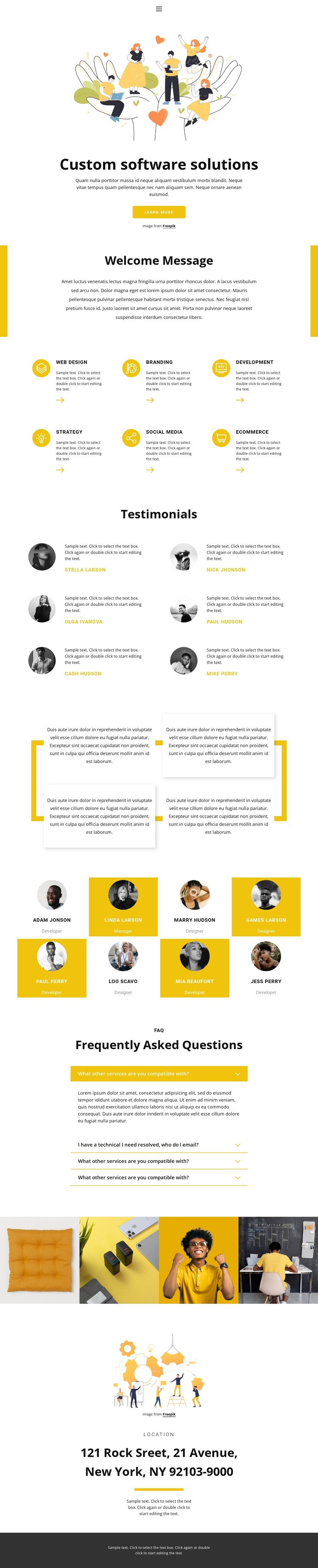
The six service cards create durable page-oriented content around Web Design, Branding, Development, Strategy, Social Media, and Ecommerce. In a WordPress project, these areas can serve as the permanent informational core of the design, while the displayed service descriptions can be replaced with real copy. Their repeated structure makes the visual direction suitable for related content areas without claiming that separate WordPress pages or posts are already present.
The testimonial and team sections provide two different kinds of recurring content. Six testimonial entries can support verified customer or project statements once the demo names and sample text are replaced, while eight profile cards organize people, portraits, and role labels in a consistent format. The four FAQ rows add a compact question-and-answer layer, including questions about service compatibility and a technical issue. This gives the page several content relationships beyond the initial service list.
The four-image gallery supplies a separate visual area, and navigation, the Learn more action, closing location content, and the dark footer establish the shared page frame. Together, these elements can work around WordPress-managed pages and other future content without changing the design’s core character. The main value here is the way permanent service information, repeatable people content, visual material, and explanatory questions already coexist in one coherent theme direction.
Customize with Nicepage
Open this ready-made template in the WordPress Website Builder and customize it visually in the Nicepage editor. Replace demo content, edit page sections, and adapt the design to your project without rebuilding the template from scratch.
Manage and Edit This Theme in WordPress
Customize and Install the WordPress Theme
Start with this ready-made theme instead of building the WordPress design from scratch. Customize its layout, content, typography, images, sections, and other design elements visually in Nicepage editor, then export and install the WordPress Theme, Plugin, and Pages on your WordPress site. The Nicepage WordPress Plugin lets you continue working with the site after installation.
Edit the Theme Directly in WordPress
After installation, you can edit the WordPress Theme directly in WordPress with the Nicepage WordPress Plugin. Use Site Style to customize site Colors, Fonts, Header, Footer, Blog, and Post Page Templates while working within your WordPress website.
Edit WordPress Pages Visually
Use the Nicepage WordPress Plugin to edit page content directly from the WordPress admin area. Open a WordPress Page with Nicepage and visually change its text, images, sections, and other page elements while continuing to manage the Page through WordPress.
WordPress Content and Theme Integration
Use the customized theme with WordPress Pages, Posts, Blog and Post Templates, menus, widgets, and other CMS-managed content. Shared theme elements such as Colors, Fonts, Header, Footer, Blog, and Post Page Templates can be managed as part of the overall site design, while WordPress provides the CMS environment for managing site content.
This workflow combines a ready-made WordPress Theme with visual customization, direct theme editing in WordPress, and continued content management through the Nicepage WordPress Plugin.





















