
Quality is our goal WordPress Theme


Edit Template Offline
2. Create new page and search for id 108070
Edit Template Online
Create Awesome Websites


Free Nicepage Builder
Keywords
The Profile and Repeated Service Content Suit Page-Based Publishing
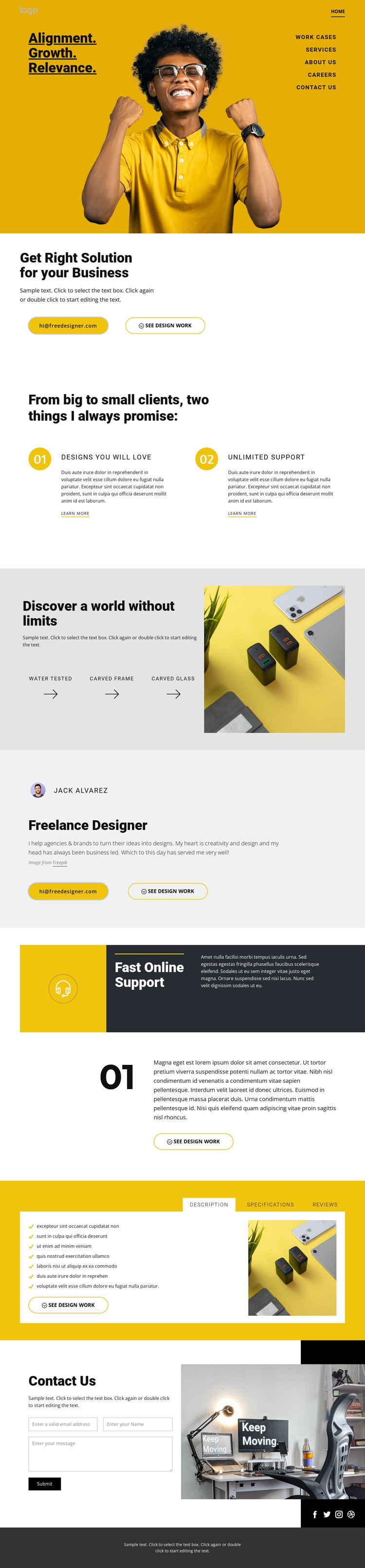
The profile section gives the design a natural page-oriented center: it identifies the freelance designer, places a portrait beside biography content, and repeats contact and design-work actions. Around that core, the business-solution introduction and two promise cards divide the offer into readable content units. “Designs you will love” and “Unlimited Support” can be treated as distinct service or capability messages, while the three labeled features provide another compact layer of information before visitors reach the profile.
The tabs add a separate interpretation for related content. Description, Specifications, and Reviews are visibly grouped, so they can organize supporting information without competing with the main profile narrative. The closing inquiry form then turns the page from presentation toward direct communication, with workshop photography reinforcing the design-services setting. Social links for Facebook, Twitter, Instagram, and Dribbble extend the same identity beyond the main content, and the dark strip gives those links a consistent shared location. In a WordPress-oriented project, these page areas can remain visually coordinated while permanent portfolio and service information is expanded or updated through the site’s content environment. The design’s value comes from its clear relationship between identity, repeated service content, supporting details, and contact response.
Customize with Nicepage
Open this ready-made template in the WordPress Website Builder and customize it visually in the Nicepage editor. Replace demo content, edit page sections, and adapt the design to your project without rebuilding the template from scratch.
Manage and Edit This Theme in WordPress
Customize and Install the WordPress Theme
Start with this ready-made theme instead of building the WordPress design from scratch. Customize its layout, content, typography, images, sections, and other design elements visually in Nicepage editor, then export and install the WordPress Theme, Plugin, and Pages on your WordPress site. The Nicepage WordPress Plugin lets you continue working with the site after installation.
Edit the Theme Directly in WordPress
After installation, you can edit the WordPress Theme directly in WordPress with the Nicepage WordPress Plugin. Use Site Style to customize site Colors, Fonts, Header, Footer, Blog, and Post Page Templates while working within your WordPress website.
Edit WordPress Pages Visually
Use the Nicepage WordPress Plugin to edit page content directly from the WordPress admin area. Open a WordPress Page with Nicepage and visually change its text, images, sections, and other page elements while continuing to manage the Page through WordPress.
WordPress Content and Theme Integration
Use the customized theme with WordPress Pages, Posts, Blog and Post Templates, menus, widgets, and other CMS-managed content. Shared theme elements such as Colors, Fonts, Header, Footer, Blog, and Post Page Templates can be managed as part of the overall site design, while WordPress provides the CMS environment for managing site content.
This workflow combines a ready-made WordPress Theme with visual customization, direct theme editing in WordPress, and continued content management through the Nicepage WordPress Plugin.





















