Women’s Quran Classes Template


Edit Template Offline
2. Create new page and search for id 6659963
Edit Template Online
Create Awesome Websites


Free Nicepage Builder
Keywords
Mosque Imagery and Program Scheduling Make the Design Distinctive
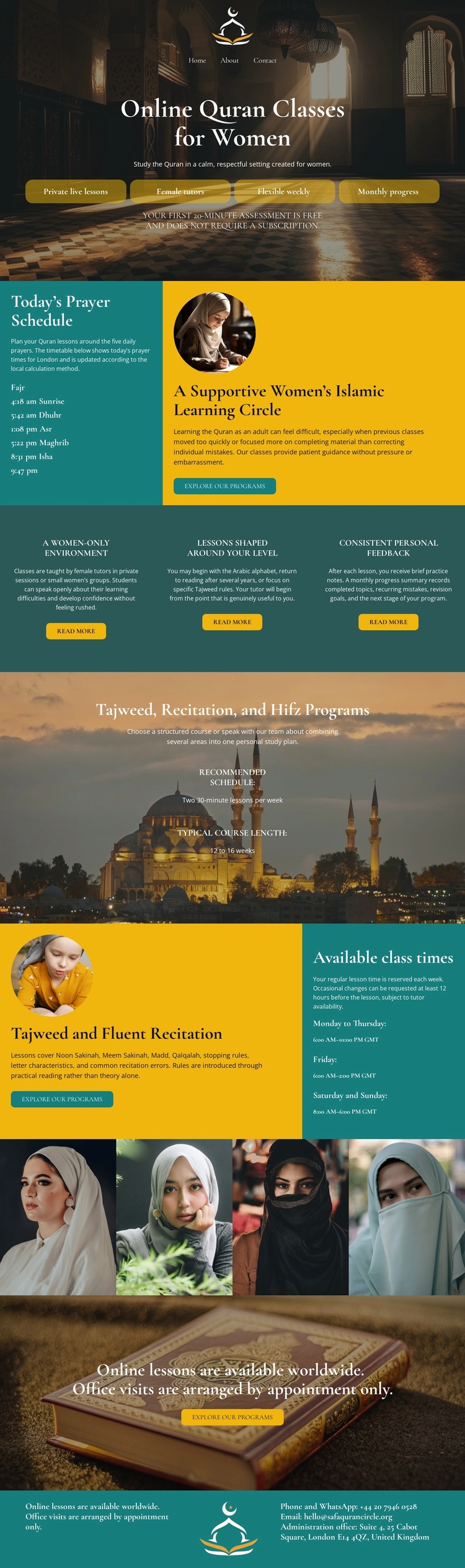
The design combines several facts that are not interchangeable with a generic education layout. Mosque interiors and Quran imagery carry the subject visually from the opening section through the program introduction and final invitation. At the same time, the page does not rely on imagery alone: “Today’s Prayer Schedule” and “Available class times” give the presentation a practical rhythm, showing that the design is prepared to communicate both spiritual context and lesson logistics.
Its content coverage is another reason to consider this option. Tajweed, recitation, and Hifz are named as program areas, while the three benefit statements describe a women-only environment, lessons for different levels, and consistent personal feedback. These details create a focused learning narrative rather than a broad academic homepage. The four-portrait image strip reinforces the women-centered setting without requiring unsupported claims about the identities or achievements of the people shown.
The repeated enrollment and booking actions make the template suitable for projects that need a direct path from program introduction to scheduling and response. It is especially relevant when the page should feel warm, faith-focused, and personal while still giving visitors concrete information about available programs and class times. The balance between full-width imagery, split information panels, and a closing booking invitation is the central design choice to evaluate against another template.
Customize with Nicepage
Open this ready-made template in the Template Builder and customize it visually in the Nicepage editor. Replace demo content, edit page sections, and adapt the design to your project without rebuilding the template from scratch.
Start With a Ready-Made Template
Choose a Design for a New Page
Use a ready-made template as a starting point instead of creating every page from a blank canvas. When adding a new page in Nicepage, browse available designs, compare different layouts, and choose an option that already fits the general purpose and visual direction of your project.
Browse Different Page Designs
Explore Page Designs using search, thematic categories, Design Sets, and full-page previews. The collection includes layouts for different subjects and page purposes, making it easier to compare alternatives before selecting a design to customize.
Customize the Selected Template
After choosing a design, create the page and continue editing it visually in Nicepage. Replace the demo content, adjust images, typography, colors, sections, and other elements, and adapt the ready-made layout to your own content instead of rebuilding the design from the beginning.
Explore More Design Directions
If the first option does not match your project closely enough, return to the design collection and compare other templates before committing to a layout. This makes the template library useful not only for faster page creation, but also for exploring different visual approaches and finding a suitable starting point for a new project.
This workflow gives you access to a broad collection of ready-made designs that can be selected, compared, and customized according to the needs of each new page or project.