Fun of learning in school Template



Edit Template Offline
2. Create new page and search for id 29805
Edit Template Online
Create Awesome Websites


Free Nicepage Builder
Keywords
Learning, Games, and Teaching Features Give the Design Its Character
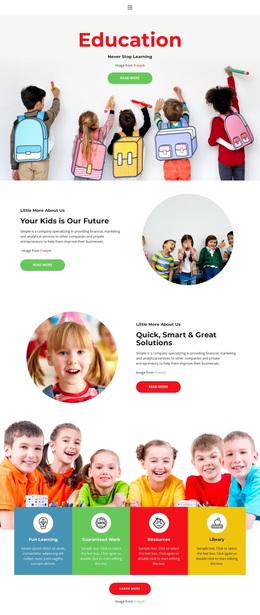
The strongest reason to choose this design is the way it makes preschool education feel active rather than formal. The hero’s “WHO SAID EDUCATION WAS BORING?” message is supported by child-focused imagery, so the page establishes its tone through both language and visual context. Immediately afterward, the four colored tiles for Learning, Philosophy, Practice, and Games give the design a distinctive content signature. They make the educational themes visible at a glance instead of hiding them inside long explanatory paragraphs.
The template also covers more than a general school introduction. Teacher and mission content appears in the About Us area, followed by four service cards for Environment, Active Learning, Creative Lessons, and Qualified Teacher. A later group adds Funny and Happy, Fulfill With Love, Special Education, Professional Teaching, Fully Equiped, and Transportation around a central child image. These relationships make the design suitable for a preschool that wants to communicate both its atmosphere and its practical educational approach.
Enrollment information and the facility section broaden the page from inspiration to useful parent-facing content. The contact panels provide address, telephone, and email channels, while the footer includes Facebook, Twitter, Instagram, and LinkedIn links. Demo values and placeholder copy would need replacement, but the combination of playful visual direction, named learning themes, teaching details, and enrollment context makes this template a strong choice for an education project centered on children’s experience.
Customize with Nicepage
Open this ready-made template in the Template Builder and customize it visually in the Nicepage editor. Replace demo content, edit page sections, and adapt the design to your project without rebuilding the template from scratch.
Start With a Ready-Made Template
Choose a Design for a New Page
Use a ready-made template as a starting point instead of creating every page from a blank canvas. When adding a new page in Nicepage, browse available designs, compare different layouts, and choose an option that already fits the general purpose and visual direction of your project.
Browse Different Page Designs
Explore Page Designs using search, thematic categories, Design Sets, and full-page previews. The collection includes layouts for different subjects and page purposes, making it easier to compare alternatives before selecting a design to customize.
Customize the Selected Template
After choosing a design, create the page and continue editing it visually in Nicepage. Replace the demo content, adjust images, typography, colors, sections, and other elements, and adapt the ready-made layout to your own content instead of rebuilding the design from the beginning.
Explore More Design Directions
If the first option does not match your project closely enough, return to the design collection and compare other templates before committing to a layout. This makes the template library useful not only for faster page creation, but also for exploring different visual approaches and finding a suitable starting point for a new project.
This workflow gives you access to a broad collection of ready-made designs that can be selected, compared, and customized according to the needs of each new page or project.