Premium sports nutrition Template


Edit Template Offline
2. Create new page and search for id 6568594
Edit Template Online
Create Awesome Websites


Free Nicepage Builder
Keywords
A Fitness Hero Leads Into Products, Services, and Proof
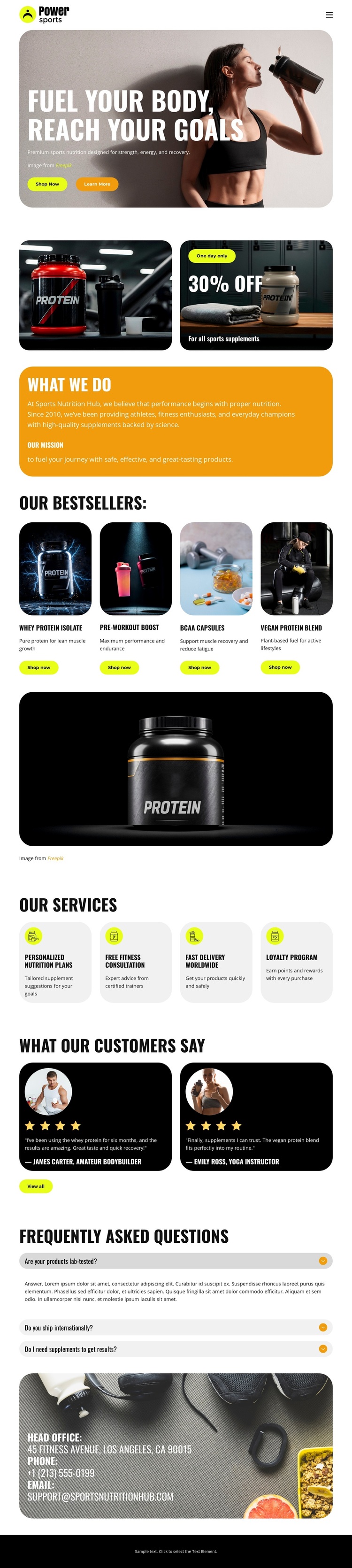
The athlete-led hero gives this design a clear visual starting point: the headline “Fuel Your Body, Reach Your Goals” frames the page around sports nutrition, while Shop Now and Learn More actions make the intended retail direction easy to recognize. Two promotional image cards reinforce that direction directly below the opening banner. The orange “What We Do” panel then adds context, so the page does not depend on product imagery alone to explain what the business offers.
The four-card bestseller section is the template’s most distinctive selection point. It covers whey protein isolate, pre-workout powder, BCAA capsules, and vegan protein blend, giving visitors several recognizable supplement categories within one presentation. The separate service row broadens the concept with personalized nutrition plans, fitness consultation, worldwide delivery, and a loyalty program. This pairing makes the design suitable for a project that needs to present both products and customer support around them.
Testimonials and the FAQ accordion provide a useful change of pace after the catalog and services. The two testimonial cards add customer-oriented context, while three expandable question rows create a compact place for product or service explanations. A closing contact area completes the page without overwhelming the central shopping message. The result is a strong option for projects that want energetic fitness imagery, product coverage, and supporting retail content in one connected design.
Customize with Nicepage
Open this ready-made template in the Template Builder and customize it visually in the Nicepage editor. Replace demo content, edit page sections, and adapt the design to your project without rebuilding the template from scratch.
Start With a Ready-Made Template
Choose a Design for a New Page
Use a ready-made template as a starting point instead of creating every page from a blank canvas. When adding a new page in Nicepage, browse available designs, compare different layouts, and choose an option that already fits the general purpose and visual direction of your project.
Browse Different Page Designs
Explore Page Designs using search, thematic categories, Design Sets, and full-page previews. The collection includes layouts for different subjects and page purposes, making it easier to compare alternatives before selecting a design to customize.
Customize the Selected Template
After choosing a design, create the page and continue editing it visually in Nicepage. Replace the demo content, adjust images, typography, colors, sections, and other elements, and adapt the ready-made layout to your own content instead of rebuilding the design from the beginning.
Explore More Design Directions
If the first option does not match your project closely enough, return to the design collection and compare other templates before committing to a layout. This makes the template library useful not only for faster page creation, but also for exploring different visual approaches and finding a suitable starting point for a new project.
This workflow gives you access to a broad collection of ready-made designs that can be selected, compared, and customized according to the needs of each new page or project.