Weekly Class Timetable Template


Edit Template Offline
2. Create new page and search for id 6678178
Edit Template Online
Create Awesome Websites


Free Nicepage Builder
Keywords
A Timetable-Led Fitness Layout Balances Choice and Context
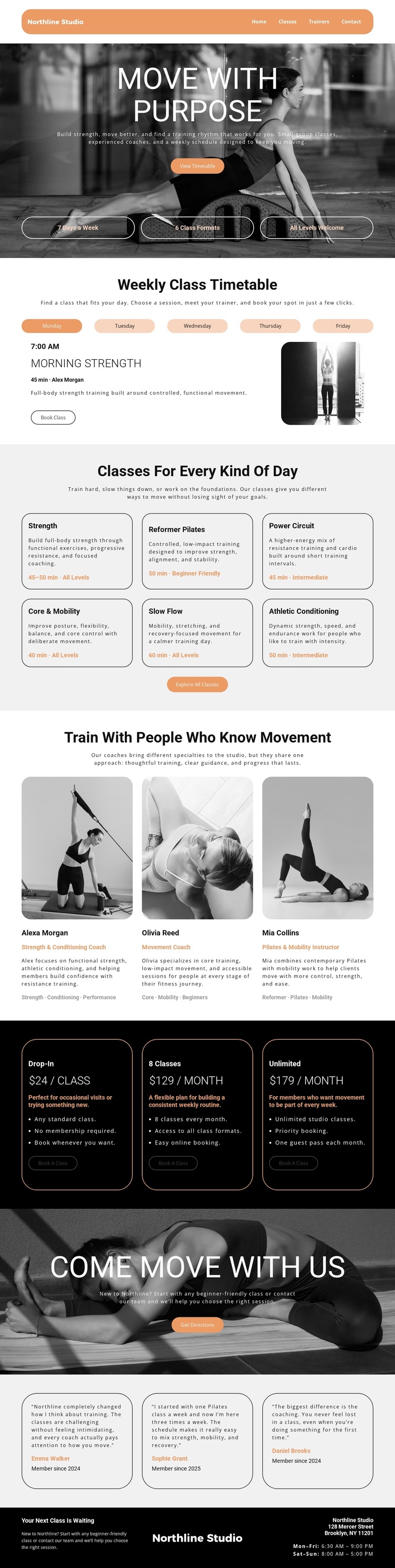
The strongest reason to choose this design is the way it connects a practical schedule with broader studio storytelling. The “Move With Purpose” hero establishes an active tone and points toward the timetable, while the weekday interface gives visitors an immediate way to understand the class offering. That makes the layout more specific than a generic fitness homepage: availability is presented as a central part of the experience rather than an afterthought.
The design also covers several questions a potential member may have next. Six cards distinguish Strength, Reformer Pilates, Power Circuit, Core & Mobility, Slow Flow, and Athletic Conditioning, with descriptions, durations, and level labels. Three trainer profiles add specialist context, and three membership cards make the commercial choices visible through Drop-In, 8 Classes, and Unlimited plans. These sections work together as a compact decision framework for people comparing movement styles, guidance, and attendance options.
Its visual direction further separates the template from layouts built around dense corporate text. Black-and-white fitness photography, warm peach accents, alternating light and dark areas, rounded cards, and thin borders create an energetic but controlled presentation. Testimonials, “Get Directions,” the Brooklyn address, and opening hours complete the practical coverage. The result is a useful design option for a studio that wants class scheduling, instructor credibility, membership information, and a strong photographic identity to share the same page.
Customize with Nicepage
Open this ready-made template in the Template Builder and customize it visually in the Nicepage editor. Replace demo content, edit page sections, and adapt the design to your project without rebuilding the template from scratch.
Start With a Ready-Made Template
Choose a Design for a New Page
Use a ready-made template as a starting point instead of creating every page from a blank canvas. When adding a new page in Nicepage, browse available designs, compare different layouts, and choose an option that already fits the general purpose and visual direction of your project.
Browse Different Page Designs
Explore Page Designs using search, thematic categories, Design Sets, and full-page previews. The collection includes layouts for different subjects and page purposes, making it easier to compare alternatives before selecting a design to customize.
Customize the Selected Template
After choosing a design, create the page and continue editing it visually in Nicepage. Replace the demo content, adjust images, typography, colors, sections, and other elements, and adapt the ready-made layout to your own content instead of rebuilding the design from the beginning.
Explore More Design Directions
If the first option does not match your project closely enough, return to the design collection and compare other templates before committing to a layout. This makes the template library useful not only for faster page creation, but also for exploring different visual approaches and finding a suitable starting point for a new project.
This workflow gives you access to a broad collection of ready-made designs that can be selected, compared, and customized according to the needs of each new page or project.