Bronco Rc Car Template


Edit Template Offline
2. Create new page and search for id 14117
Edit Template Online
Create Awesome Websites


Free Nicepage Builder
Keywords
Off-Road Photography Meets a Detailed RC Feature Story
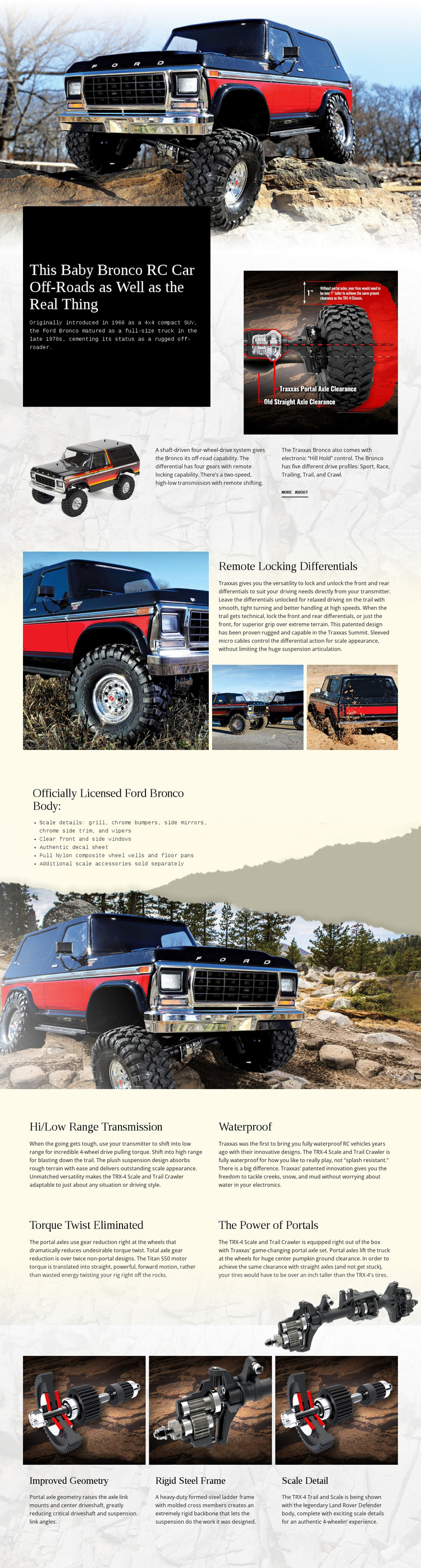
Large off-road vehicle imagery gives this design a clear point of difference among product-oriented page options. The page does not rely on a generic catalog grid; instead, it treats the Ford Bronco RC as a feature story. A full-width opening photograph establishes the subject, then a dark panel and supporting images introduce the vehicle through a bold statement, historical context, drivetrain information, and compact explanatory text.
The content coverage is equally specific. Remote locking differentials receives a dedicated split composition with one large image and two detail photographs, creating a stronger focal point than a standard list item. The licensed body section shifts attention to appearance through chrome bumpers, side mirrors, side trim, wipers, clear windows, and an authentic decal sheet. Four repeated technical blocks then cover hi/low range transmission, waterproof construction, torque twist elimination, and portal power, giving the page enough depth for visitors who want more than a surface-level product impression.
Three closing cards for improved geometry, a rigid steel frame, and scale detail complete the story by connecting mechanical structure with visible authenticity. This combination makes the design worth choosing when a project needs dramatic imagery and organized feature explanation in the same page. It is a focused option for RC vehicle enthusiasts and off-road hobbyists, rather than a broadly generic transportation layout.
Customize with Nicepage
Open this ready-made template in the Template Builder and customize it visually in the Nicepage editor. Replace demo content, edit page sections, and adapt the design to your project without rebuilding the template from scratch.
Start With a Ready-Made Template
Choose a Design for a New Page
Use a ready-made template as a starting point instead of creating every page from a blank canvas. When adding a new page in Nicepage, browse available designs, compare different layouts, and choose an option that already fits the general purpose and visual direction of your project.
Browse Different Page Designs
Explore Page Designs using search, thematic categories, Design Sets, and full-page previews. The collection includes layouts for different subjects and page purposes, making it easier to compare alternatives before selecting a design to customize.
Customize the Selected Template
After choosing a design, create the page and continue editing it visually in Nicepage. Replace the demo content, adjust images, typography, colors, sections, and other elements, and adapt the ready-made layout to your own content instead of rebuilding the design from the beginning.
Explore More Design Directions
If the first option does not match your project closely enough, return to the design collection and compare other templates before committing to a layout. This makes the template library useful not only for faster page creation, but also for exploring different visual approaches and finding a suitable starting point for a new project.
This workflow gives you access to a broad collection of ready-made designs that can be selected, compared, and customized according to the needs of each new page or project.