Wonders of the world quiz Joomla Template


Landmark Questions Form a Structured Joomla Content Region
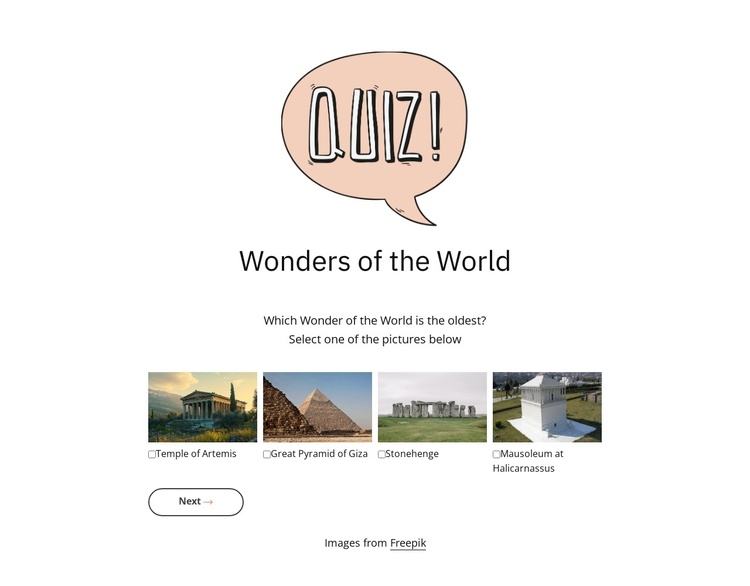
The “Wonders of the World” heading and centered quiz sequence create a clearly bounded information region that can participate in a Joomla-managed page. The block is not a complete Joomla Template; it is a focused content section whose interactive material can sit alongside other editorial or educational content managed in the wider site.
Its content is arranged as four sequential quiz steps. The first step uses a compact horizontal row of four labeled landmark images—Temple of Artemis, Great Pyramid of Giza, Stonehenge, and Mausoleum at Halicarnassus—so the opening question has a visual answer pattern. Later steps change to radio-button choices, giving the remaining questions a more direct response format while preserving the same centered vertical organization.
The carousel-style transition makes each step a separate stage, and the Back, Next, and Submit controls clarify movement through the quiz. This structure suits a Joomla-oriented content area where an interactive geography or learning activity may accompany articles, explanations, or other page sections. The white background, generous surrounding space, illustrated header treatment, and lightly outlined navigation button provide a stable presentation that can remain visually distinct while the broader Joomla-managed page handles its other content regions.
Customize with Nicepage
Open this ready-made template in the Joomla Page Builder and customize it visually in the Nicepage editor. Replace demo content, edit page sections, and adapt the design to your project without rebuilding the template from scratch.
Edit Template Offline
2. Create a new page or select existing
3. Click Add new block, search for id 6533202 and click enter
Edit Template Online
Create Awesome Websites


Free Nicepage Builder
Keywords
Work With This Template in Joomla
Customize and Install the Joomla Template
Start with this ready-made template instead of building the Joomla design from scratch. Customize its layout, content, typography, images, sections, and other design elements visually in the Nicepage application, then export and install the Joomla Template, Nicepage Extension, and supported content on your Joomla website.
Edit the Template Directly in Joomla
After installation, you can edit the Joomla Template directly in Joomla with the Nicepage Joomla Extension. Customize the Header, Footer, Colors, Fonts, typography, and Page Templates from the Joomla workflow while keeping the site design connected with your CMS content.
Edit Joomla Articles Visually
Use the Nicepage Joomla Extension to open and edit Joomla Articles visually from the Joomla Administrator. Change text, images, sections, layouts, and other page content in the Nicepage editor while continuing to manage the Articles through Joomla.
Joomla Content and Template Integration
Use the customized template together with Joomla Articles, module Positions, menus, forms, Blog Pages, and other supported CMS elements. With the Nicepage Extension used as the Site Style Source, shared design settings can be applied across Joomla Articles while Joomla continues to provide the CMS environment for managing site content.
This workflow combines a ready-made Joomla Template with visual customization, direct template editing in Joomla, and continued content management through the Nicepage Joomla Extension.